Un émulateur de PSP écrit en Java. Codé par Mad et Shadow (PCSX2) et rejoint par Wrayal, Fiveofhearts, Hlide et Dreampeppers99. Il émule les jeux commerciaux mais nécessite une puissante configuration.
 
jpcsp
 
Liste de jeux compatibles.
Site de développement du projet.
Builds SVN automatiques (alternative).
 

Télécharger JPcsp (x86) v0.7 rev 0318d15e (26.4 Mo)

Télécharger JPcsp (x64) v0.7 rev 00ac4d6 (29.1 Mo)

Site Officiel

En savoir plus…

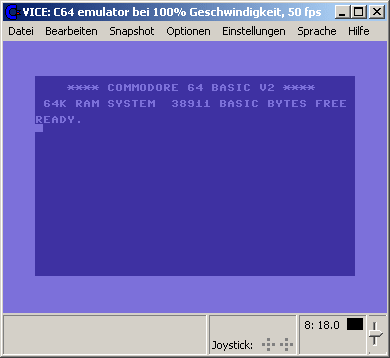
La version Windows de ce superbe émulateur Commodore C64, C128, VIC20, CBM-II, Plus4 et de tous les modèles « PET ».


Les changements:


** General
----------

- New support for double sided 1571 g64 and p64 images.

- SID filter improvements.

** C64(SC)/SCPU64/C64DTV/C128 changes
-------------------------------------

- New joyport script64 dongle emulation.

- New joyport vizawrite64 dongle emulation.

- Fixed joyport paperclip64 dongle emulation.

- Fixed StarDOS emulation.

** XVIC
-------

- Fixed VIA emulation.

** C1541
--------

- Fixed commands and added new commands.

** BeOS/Haiku changes
---------------------

- New drag & drop support: dragging a file from Tracker into the window
  now autostarts it, and dragging text into the window pastes it.


Site Vice Nightly builds (mise à jour automatique quotidienne).


Télécharger VICE (Dos) v3.1 (29.3 Mo)

Télécharger WinVICE (32 bits) v3.8.0 (38.8 Mo)

Télécharger WinVICE (64 bits) v3.10.0 (45.1 Mo)

Télécharger SDLVICE (32 bits) v3.1 (16.9 Mo)

Télécharger SDLVICE (64 bits) v3.1 (10.4 Mo)

Télécharger SDL2VICE (32 bits) v3.8.0 (32.2 Mo)

Télécharger SDL2VICE (64 bits) v3.10.0 (39.2 Mo)

Site Officiel

En savoir plus…

Première version pour cet émulateur Nintendo Switch créé par le célèbre Brassica (travaillant chez Nintendo à présent, on suppose qu’il a leaké l’ému interne), pour l’instant l’émulateur coûte évidemment un bras (99,99 euros vu l’auteur) mais une version démo gratuite est disponible en test. Il ne dépasse pas l’intro des jeux mais c’est un excellent début. Espérons une version gratuite rapidement.


Télécharger Zemu v1.0.0 (2.1 Mo)

Site Officiel

Il s’agit d’un émulateur d’Amstrad / Schneider CPC 464. Une version plus récente existe mais nécessite d’être compilée. Merci à Marc pour l’info.


Site proposant les sources.

Télécharger Roland v0.50b2 (2,2 Mo)

Site Officiel

En savoir plus…

Ce fichier 7z (contenant des fichiers XML/JSON) vous permettra de tricher dans vos jeux préférés. Il s’active via la touche TAB sous MAME (arcade/consoles/ordinateurs).


There is now an alternative LUA cheat engine in MAME (thanks to crazyc) which you will find under the plugins menu. This once again allows you to find cheats via the MAME menus – read about it/post about it in this forum topic.

pugsy


Décompressez l’archive (.zip) de manière à obtenir un fichier cheat.7z (qui en revanche n’est pas à décompresser) et que vous placerez dans le répertoire courant de Mame puis modifier le fichier ini de l’émulateur (fichier qui se créait en lançant la ligne de commande mame.exe -cc) et changer la ligne: « cheat 0 » en « cheat 1 ».


Idem dans plugin.ini mettre les lignes suivantes à « 1 »:

cheat 1
cheatfind 1


Télécharger Pugsy Cheat v0.184 (1,4 Mo)

Site Officiel

En savoir plus…

Il s’agit d’un émulateur de Sega GameGear / Master System, Nintendo GameBoy / GameBoy Color écrit en Java. Le son reste perfectible et l’absence de filtres graphiques se fait sentir. (une version sans Java est également disponible sur le site officiel).


EmuliciousEmulicious2

 
Mais outre une émulation précise, Emulicious dispose de fonctions supplémentaires :
– Mise à jour automatique
– Turbo ajustable
– Moteur ajustable
– Patching d’IPS
– Sauvegardes d’état (Master System/Game Gear uniquement)
 
Outils (Master System/Game Gear uniquement) :
– Debugger
– Visualisateur de palette, cartes, scripts, sprites…
– Traceur mémoire
 

Télécharger Emulicious (2017/04/02) (29,8 Mo)

Site Officiel

En savoir plus…

Ootake est un émulateur PC-Engine en provenance du Japon et basé sur PC2E, tournant sous Windows 2000, XP, Vista, 7, 8 et 10. Il nécessite Direct X v9.0c au minimum.


ootake
 

    - For low-end PC (PC not so fast), the function which can automatically
    optimize the setting was added.
    * Even with Intel Atom(Z8350 for Tablet PC, Stick PC) CPU, Ootake operates
      pretty comfortably at window size up to x2 (full screen 800x600).
    Here is the optimization method.
    ==========================================================================
    Push "Setting" button on the start screen (bottom left on the screen) ->
    Push "Set CD-DA Play Timing" button (top button) -> OK button ->
    Push "High Quality PSG (Defalt)" button (top button).
    Optimization is completed in 60 seconds if your PC has enough speed.
    In the case of a low-end PC, the fact that power is insufficient is
    displayed and the setting is automatically lowered. Then, press the OK
    button and wait 60 seconds again to complete the optimization.
    ==========================================================================
  - When Intel built-in graphics is used, it starts with the setting which is
    lighter(Light PSG. fast) than the default setting.
  - Add "Message Time 100% - 20%" to the setting menu(above the game screen).
    It is possible to adjust the display time of system messages.
  - Supports V-Sync at refresh rate "120 Hz" display output.
    * For 120Hz compatible display for gamers.
  - Add "Full Screen 120Hz" to the Screen menu. When this is selected, it can
    be displayed at 120Hz with full-screen mode.
    * With the Window mode, if the desktop display is 120Hz, V-Sync will be
      performed automatically at 120Hz even if this is not selected.
  - The operation of the PCE built-in sound (wave memory sound) has been
    brought close to the real machine. In "Cyber Night" and
    "Fire Pro-Wrestling" series, the problem of sound has been resolved.
  - Improved Joypad initialization function. If the controller is not
    functioning correctly, please initialize the pad settings once by clicking
    "Input -> Initialize Pad # 1 - # 5 (fourth from bottom)" menu.
  - Fixed a bug that shortcut keys such as Screenshot did not work when
    reproducing the game play with "Capture -> Play Record (F6 key)" menu.
  - Additionally, a detailed part has been improved and corrected.


Télécharger Ootake (2K/XP/Vista/7/8/10) v2.79 (1,2 Mo)

Site Officiel

En savoir plus…

Créé par Alexandr Sizov, il s’agit d’un launcher du nom de DL (pour Decaf Launcher) pour l’émulateur de WiiU appelé Decaf-emu.


Alors oui, Decaf c’est pas aussi bien que Cemu mais il a l’avantage d’être open source et certains titres comme « One Piece: Unlimited World RED » fonctionnent même mieux, tout cela restant assez préliminaire de toute façon.


Decaf supported only LOADLINE games (not .WUD)

--------------READ-MORE---------------
Install:
1) Download and unzip Decaf-emu
2) Download and unzip Launcher and Put him in Decaf folder
-----------
Run:
1) Start DL_07_BETA_G.exe
2) Choose main folder your game
3) Press 'Start GAME' button
Have Fun :)
-----------
Controls:
PC Keyboard --- [WiiU]
Direction Arrow (up-down-left-right) --- [DPad]
Z-X-A-S --- [B-A-X-Y]
Q-W-E-R --- [L-R-ZL-ZR]
Numpad 4-8-6-2 --- [Left Stick]
1 --- [+]
-------------------------
My Spec:
CPU: Intel i5-3570K@3.6 GHz (MB MSI B75A-G43),
GPU: Nvidia GTX 1050ti 4GB (MSI Gaming X),
RAM 8GB DDR3-1600 MHz (Kingston HyperX),
Windows 10 x64 Pro (ForceWare 378.66)
Used Decaf-emu (1.0.1498) March 24.2017 + DL_0.7
-------------------------


Télécharger Decaf Launcher v0.7 Beta (543,6 Ko)

Site Officiel

En savoir plus…

Un émulateur de TRS-80 Model III.


Télécharger Sharp80 v1.1.0.90 (2,5 Mo)

Site Officiel

En savoir plus…

Ecrit par StapleButter (auteur des émulateurs de SuperNES lolSNES/blargSNES pour DS et 3DS et ayant contribué pour DeSmuME), il s’agit d’un émulateur de Nintendo DS dont l’objectif est de faire les choses bien et rapidement, semblable à blargSNES mais en mieux (dixit l’auteur).


Site officiel proposant les sources.

Télécharger melonDS v0.1 (2.2 Mo)

Site Officiel

En savoir plus…

Très performant, PPSSPP est un émulateur de Sony PSP (pour Windows, Android et autres via SDL) gratuit et libre écrit en C + + par Henrik Rydgard (très connu sous le pseudo de Ector, déjà auteur de l’émulateur de PSP Potemkin et surtout connu pour Dolphin, ayant également exercé sur nombre d’émulateurs Dreamcast).
 
ppsspp
 
– Support D3D11 (performs better than OpenGL or D3D9 on most hardware)
– Audio quality improvement (linear interpolation) (#8950)
– Hardware spline/bezier tesselation in OpenGL, D3D11 and Vulkan (…)
– Post-processing shaders in D3D11
– Prescale UV setting removed, now the default (improves perf) (#9176)
– High DPI display fixes
– Various fixes for UMD switching for multi-UMD games (#9245, #9256)
– New audio setting to improve compatibility with Bluetooth headsets
– Various desktop gamepad compatibility fixes
– Workaround for mipmap issue, fixing fonts in Tactics Ogre Japanese
– Assorted minor compatibility fixes, code cleanup and performance improvements


Télécharger PPSSPP v1.4 (19,7 Mo)

Site Officiel

En savoir plus…

Un émulateur multi-système écrit en Java et qui émule les machines suivantes: AC1, BCS3, C-80, HC900, Hübler/Evert-MC, Hübler-Grafik-MC, KC85/1, KC85/2, KC85/3, KC85/4, KC85/5, KC87, Kramer-MC, LC-80, LLC1, LLC2, PC/M, Poly-Computer 880, Schachcomputer SC2, SLC1, VCS80, Z9001, Z1013.


Télécharger JKCemu v0.9.7 (3,9 Mo)

Site Officiel

En savoir plus…


https://getourbonus.com/fr/accueil

https://www.romspedia.com/