Il s’agit d’un plugin audio dédié à PJ64 2.x, 1.6, 1964 et clones, Mupen64, écrit par Shunyuan utilisant principalement le HLE pour un maximum de performance.

Spécificités :

– Plug in Audio spec #1 pour Project 64-2.0, spec #1.1 pour les autres émulateurs

– XAudio2, DirectSound8 & support sans driver Son.

– prebuffer stream audio

– Interface HLE

– Interface LLE

– Thread Audio mise à jour du buffer Son

– Testé avec project64 1.6, project64 2.0, project64 2.1, 1964 svn r146, 1964_ultrafast 3.0, and mupen64 5.1.

– debug OSD

– Auto sync jeu / audio

– Interface de plugin dynamique


Nouveautés:

* Open Lua interface to tweak per game settings
(official pj64 1.6 doesn’t support this feature because it won’t call audio plugin ‘RomOpen’ function, use pj64 1.6 HleAudio fixed version instead)


Télécharger Shunyuan’s HLE audio plugin v1.8 (279.4 Ko)

Site Officiel

En savoir plus…

Un émulateur de Sinclair Zx Spectrum.


Télécharger Xpeccy (20130713) (1.6 Mo)

Site Officiel

En savoir plus…

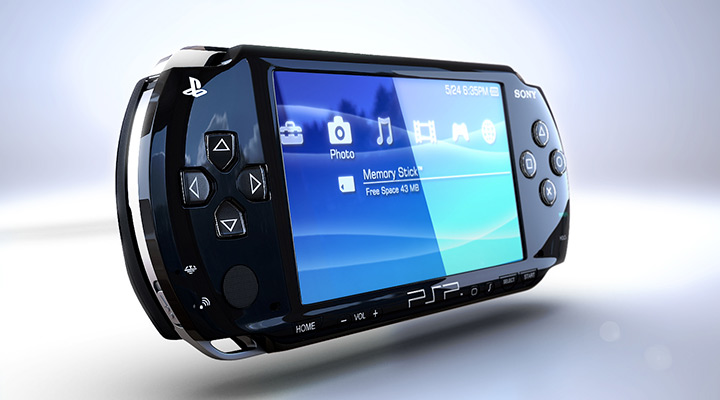
Un émulateur de PSP écrit en Java. Codé par mad et shadow (PCSX2) et rejoint par wrayal, fiveofhearts, hlide et dreampeppers99. Il émule quelques jeux commerciaux (tel que Puzzle Bobble Pocket ou Breath Of Fire III…) mais pas à pleine vitesse. Cet émulateur s’améliore progressivement.

psp

Liste de jeux compatibles
Site de développement du projet.
Builds SVN automatiques.

Télécharger JPcsp (x86) v0.7 rev 3310 (16.6 Mo)

Télécharger JPcsp (x64) v0.7 rev 00ac4d6 (29.1 Mo)

Site Officiel

En savoir plus…

PinballX est un frontend gratuit pour jeux de flippers numériques développé par l’auteur de GameEx. Il est compatible avec les bases de données et les médias disponibles pour HyperPin.


– Now features out of the box high score support thanks to PINemHi by Dna Disturber.

– New Information page on the select menu which shows the high score when available and game statistics.

– Separate instructions control.

– The plugin system has been improved and features a real-time input event.

– Ability to turn off the file searching and matching for exact filename matching only.


Télécharger PinballX v1.46 (64.2 Mo)

Site Officiel

En savoir plus…

Il s’agit d’un plugin audio dédié à PJ64 2.x, 1.6, 1964 et clones, Mupen64, écrit par Shunyuan utilisant principalement le HLE pour un maximum de performance.


v1.7.1u9
– Fix audio slow down for A Bug’s Life.
– Add DirectSound hardware acceleration option UI
(default is off, for Vista and Win7 you need ALchemy, 3D SoundBack or Xear3D EX to take advantage this feature)
 
v1.7.1u8
– Fix Super Smash Bros sound delay for PJ64 2.x
– Fix Super Smash Bros sound crackles for PJ64 1.6
 

Télécharger Shunyuan’s HLE audio plugin v1.7.1u9 (93.2 Ko)

Site Officiel

En savoir plus…

Une version de Mupen64 permettant l’enregistrement de vos parties.


Télécharger Mupen64 Re-recording v8 Reset v2 + SVN r43 (986.2 Ko)

Site Officiel

En savoir plus…

Raine est un émulateur Arcade. Conçu à l’origine pour émuler « Rainbow Islands », il supporte maintenant un paquet de jeux basés sur du hardware « Taito », « Jaleco » et bien d’autres encore. Il émule également la NeoGeo CD depuis que le projet NeoRaine a été intégré dans Raine.


Beaucoup moins gourmand que Mame, Raine s’avère une excellente alternative. Il inclut également un pack de shaders au format glsl compatible avec celui disponible pour Higan.

It’s again about fixes and improvements :
– fixed problems when passing from arcade to neocd and back…
– fixed minor text descriptions
– fixed these cps1 games : sf2dongb, sf2ue, sf2hfj, forgottn and its clones
– gameinfo should now work perfectly even with pang3 (no more bad size reported)
– you can now display also the short names of the games in the game selection dialog, they’ll appear in red and the setting is saved. The default is to hide them.
– the usage of the keyboard is more clever in the dialogs now : if no occurence of what you type is found at the beginning of any entry, then it looks for a substring. It allows to select a game like « Street Fighter II’: Champion Edition (M2, bootleg) » just by typing m2 ! (or sf2m2 if you enable short names). We are close to 1000 games now, and it was time to improve things for the selection of games…
– history.dat isn’t anymore in the debian package to make it smaller, but now if you choose « about this game » in the « about » dialog and there is no history.dat, then you’ll get a message detailling how to install it, and proposing to open their website for you ! It’s done according to their advice, it’s some great work, everybody using raine should also use this file !


Télécharger Raine (Win) v0.62.6 (2.4 Mo)

Site Officiel

En savoir plus…

Il s’agit d’un port amélioré de Genesis Plus créé à l’origine par le grand Charles MacDonald et destiné à la GameCube/Wii, cette version est un backport pour Windows.


Télécharger GenesisPlus GX r812 (786.4 Ko)

Site Officiel

En savoir plus…

Un joli frontend pour mame (ou autres), très configurable et souvent mis à jour. Emu Loader est une interface graphique qui se greffe principalement sur les émulateurs arcade comme MAME, SEGA Model 2, SuperModel, Daphne. L’interface permet de gérer votre collection de roms, de vérifier vos jeux et de lancer vos émulateurs.


version 7.1 change log – July 11, 2013

Fixed
Crash fix for Demul 0.58 (create games list)
Some systems were still using media type index higher than 1. You must re-create games lists for all systems that use CHDs or disc image files (Daphne, Demul… except MAME/HBMAME)

Changed
none

Improved
Optimizations in view audit results feature. Support up to 19 devices per game. I doubt a game will use that much devices… future proof 🙂

Removed
none

Added
New arcade filter: Taito Type-X System
New column « Game Status »: available, missing ROMs/CHDS, missing
Extremely ultra mega preliminary support for 7-Zip files. This is an experimental feature. I recommend to keep your MAME/HBMAME/Demul collections in ZIP format though. With 7-zip you can save around 3GB of HDD space if you have ALL MAME games but c’mon… 500GB external HDDs USB 3.0 are so cheap these days!
– for MAME/HBMAME and Demul only!!!
– file « 7z.dll » must be placed in same folder as EmuLoader.exe (file must be downloaded separately)
– if you do not have ROM sets in 7-Zip format, you don’t need « 7z.dll » as Emu Loader works just fine without it
– very high compression profiles will be slower to handle (compared to zipped sets)
– Zip and 7-Zip formats are supported at the same time. You can have mixed sets in both formats, no need to convert your entire ROMs collection
– newer 7z compression profiles might not be compatible as the only Delphi library I could find compatible with Emu Loader’s internal code was coded in 2011 (not by me…). There is no way to adapt EL’s internal code without breaking the entire project!
– MAME/HBMAME audio samples are also supported… are .7z samples supported in MAME ?
– for information, the library source code is « source\sevenzip.pas » and 7z.dll version supported in v4.65.0.0


Télécharger EmuLoader v7.1 (6.2 Mo)

Site Officiel

En savoir plus…

Raine est un émulateur Arcade. Conçu à l’origine pour émuler « Rainbow Islands », il supporte maintenant un paquet de jeux basés sur du hardware « Taito », « Jaleco » et bien d’autres encore. Il émule également la NeoGeo CD depuis que le projet NeoRaine a été intégré dans Raine.

Beaucoup moins gourmand que Mame, Raine s’avère une excellente alternative. Il inclut également un pack de shaders au format glsl compatible avec celui disponible pour Higan.


Télécharger Raine (Win) v0.62.5 (2.4 Mo)

Site Officiel

En savoir plus…

Un émulateur de PSP écrit en Java. Codé par mad et shadow (PCSX2) et rejoint par wrayal, fiveofhearts, hlide et dreampeppers99. Il émule quelques jeux commerciaux (tel que Puzzle Bobble Pocket ou Breath Of Fire III…) mais pas à pleine vitesse. Cet émulateur s’améliore progressivement.

psp

Liste de jeux compatibles
Site de développement du projet.
Builds SVN automatiques.

Télécharger JPcsp (x86) v0.7 rev 3303 (16.6 Mo)

Télécharger JPcsp (x64) v0.7 rev 00ac4d6 (29.1 Mo)

Site Officiel

En savoir plus…

MedGui Reborn est une interface (Frontend) pour Mednafen sur OS Windows.

Il permet :
– de Comparer les roms avec le dat No-Intro et de retrouver les informations
(vrai nom, version de rom, status & md5)
– Pas besoin de mettre le GUI dans le même répertoire que Mednafen
– vous pouvez faire un backup & retrouver une configuration pour l’utiliser sur un autre PC
– a été inclus toutes les options fournies par Mednafen
– Ajout de n’importe quel utilitaire ISO


Changements :

– Added F key to add selected rom from grid to Favourite folder
– Added « Swap RomTemp/Favourite » Folder button
– Fixed a bug that did not save Mednafen settings properly
– Update all No-Intro Dats to the last version


Télécharger MedGui Reborn v0.031 (6.9 Mo)

Site Officiel

En savoir plus…


https://getourbonus.com/fr/accueil

https://www.romspedia.com/