LaunchBox a été conçu comme une interface attrayante pour DOSBox, mais a depuis été élargi pour supporter à la fois les jeux PC modernes et les consoles émulées. DOSBox continuera d’être une priorité principale pour LaunchBox.
 
Il peut rechercher dans la database TheGamesDB.net (une base de données en ligne communautaire qui permet à quiconque de contribuer) pour les metadatas & box-arts. Il peut exporter les fichiers image, dispose d’une meilleure compatibilité avec dropbox.
 
LaunchBox comprend des processus d’importations automatiques pour Steam, D-Fend Reloaded, et les fichiers ROM pour des gains de vitesse.


LaunchBox-3.6


Télécharger LaunchBox v14.1 (502 Mo)

Site Officiel

En savoir plus…

Le premier émulateur de Sega Model 3 créé par Bart Trzynadlowski, Ville Linde et Stefano Teso dans sa version de développement (voir ici) [source].


Les changements:
r860
– Fix netboard resets and detection of simulated netboard linking to itself


Ajout:
– correction des musiques dans sega rally 2 (mix)
– correction musique 1er niveau 2joueurs (la cave rouge) dans vf3 (pas sûr de la modif, et donc cela peut éventuellement entrainer d’autre problèmes sonore sur d’autre jeux).
(inclut officiellement)

 
Les fichiers sont compilés par Kof2112, merci à lui.


Télécharger SuperModel v0.4 Build 261108 (3.7 Mo)

Télécharger SuperModel WIP (XP) v0.3a r862 (6.3 Mo)

Site Officiel

En savoir plus…

Il s’agit d’un launcher et optimiseur tout-en-un pour nullDC principalement et axé sur le jeu en ligne. Il permet d’assurer une configuration facile pour nullDC (Naomi / Atomiswave / Dreamcast) mais aussi pour Mednafen (NES / SNES / Genesis / MegaDrive / GBA / GBC / Neo-Geo Pocket / PSX / Saturn / Famicom Disk Drive ) et ajoute des paramètres optimisés pour une expérience de jeu fluide.
En résumé: configuration facile, connexion facile, performances maximales et effort minimal.


Les changements:
 

+Added: Record/Playback feature to record opponent inputs. (May require you to open and close nullDC 1 time so it adds the new control configs)
+Added: 2 new buttons in the Controls Panel for Naomi/Dreamcast, « Record » and « Playback »
+Added: « Recording » and « Playback » indicators at the top left of the screen that’ll show you wtf is going on, since it wasn’t too clear sometimes.

+Changed: The « Control Debug » options won’t spam the console as much anymore and will not show empty frames.

+Fixed: The profile configs crashing if the profile file was deleted manually, it will now use the default « Controls.bear » if it cannot find the profile file.
 

Télécharger NullDC BEAR v1.96c (69.2 Mo)

Site Officiel

En savoir plus…

Créé par CaptainYS, il s’agit d’un émulateur pour Windows, MacOs et Linux de Fujitsu FM-Towns et sa déclinaison console Marty. C’est un émulateur du légendaire ordinateur Fujitsu FM TOWNS. Le but est d’imiter le modèle II MX qui était le dernier ordinateur sur lequel l’auteur a (dixit) « prêté allégeance ». L’auteur essaie également de trouver et de documenter autant que possible les fonctionnalités non documentées du système FM TOWNS pendant l’écriture de l’émulateur.


Les changements:
 

– Added State Save and Restore. To save or restore, the virtual machine must be running. Tsugaru will look for the disc/disk images saved in the image file in the following order:
(1) saved file name as is
(2) relative path from the state file
(3) image search path if available
(4) state path + name part of the saved file name.
Tsugaru will not reload the hard-disk image from the file name saved in the image file at this time.
If the application requires a hard-disk image, it must be loaded before restoring from the saved state file.


Pack de bios ici.


Télécharger Tsugaru (2026/05/22) (2.1 Mo)

Site Officiel

En savoir plus…

m64p (ou Mupen64Plus-GUI) est une interface graphique écrite en Qt5. Elle supporte tout ce que vous attendez d’une interface mupen64plus (sélection de plugins, édition de la configuration, gestion des sauvegardes, capture d’écran, pause, etc.).
 
Cette archive inclut Mupen64Plus + GlideN64 + une interface utilisateur.


– Fix for #122 and #148
– Accuracy improvements in GLideN64: gonetz/GLideN64#2470
– Misc Fixes

 
Code source. Builds ici.

Télécharger Simple64 (x86) (2020/06/02) (20.6 Mo)

Télécharger Simple64 (x64) v2024.12.1 (46.5 Mo)

Site Officiel

En savoir plus…

Les packs de screenshots pour MAME d’Antopisa sont disponibles.
 
Antopisa
 

• It’s available this folder on Mega.nz that allows individually download files to update from version to version. The folder will be temporarily available until the next update. • It’s available this folder on Mega.nz that allows individually download files to update from version to version. The folder will be temporarily available until the next update.
• I’m back, after almost a year, to update the important category of « Cabinets »; for arcade machine images the most important part of the research was done by MetalGod.
• Also for images related to software lists I release many updates, some that complete lists, such as « ti99_cart », « vsmile_cart », « vsmilem_cart », « psx », « gamegear », « fmtown_cd », « megacd » and « hp_ipc » and here I have to thank JoeMame for the massive contribution.
• I warn all users that from these updates I have removed the direct link from the pages to download the package with the dat (and the ini file); these two files are contained within the image packages. If you still want to download them individually, you can find them all on the page: https://www.progettosnaps.net/dats/.
• Another small but, in my opinion, very useful news can be seen on my home-page: now the « News » come directly from the RSS file; at the top, under the title, you will see the latest news highlighted. The others follow the new table which summarizes the latest updates made for each file/category of resources. Furthermore, the columns can be reordered simply by clicking on the column header. This table is now automatically generated thanks to yet another motoschifo job, for which a thousand thanks are not enough!
• The next update is scheduled for Sunday, June 20, 2021, presumably with version 0.232 of MAME
.


Site Officiel

Miroir Officiel 1

Miroir Officiel 2

En savoir plus…

Il s’agit d’une mise à jour du pack d’icônes de Mamu_ par Antopisa. Antopisa a repris la gestion des icônes de MAMu_, se basant sur son dernier set connu, Antopisa renomme ou copie les icônes pour être le plus à jour possible en conformité avec les derniers sets de MAME. En attendant que MAMu_ se décide à reprendre son set, il remercie Antopisa d’ici la…
 

Télécharger MAMU Icons Pack Update (non officielle) v0.289 (14.9 Mo)

Site Officiel

En savoir plus…

Un émulateur de GB/GBC/GameBoy Advance écrit en langage C par Jeffrey Pfau (endrift) et basé (sensiblement) sur GBA.js et qui a comme objectif d’être un émulateur de haute qualité. Disponible pour Windows (Vista et +), Linux, Mac OSX et bien d’autres systèmes.
 
mgba
 
Les changements sont visibles ici.


Télécharger mGBA (32 bits) v0.10.5 (13.8 Mo)

Télécharger mGBA (64 bits) v0.10.5 (13.5 Mo)

Site Officiel

En savoir plus…

Applewin est un excellent émulateur Apple IIe pour Windows et développé par Tom Charlesworth. Applewin est basé sur la version originale 1.10.4 d’Oliver Schmidt.
 
Note: This version only works under Windows XP and later.
 

– [Change #693] AppleWin built with VS2019 using v141_xp platform toolset
– [Change #939] Improved support for SSI263 speech chip.
– Fix for ‘Classic Adventure’ (#929) not detecting speech chip.
– Support the 2-bit Duration b7:6 of phoneme register for SSI263 (not SC01).
– Support 2nd SSI263 at $Cn20 connected to 6522-A (at $Cn00).
– SC01: only support it mapped to 6522 at $Cn00.
– [Change #936] Swap Joystick Buttons not working
– Command line (-swap-buttons) or GUI « Swap 0/1 » now swaps buttons 0/1 for all devices.
– [Change #930] WOZ support: add some random jitter in the bit stream
– A better alternative fix for WOZ images: ‘Wasteland’ and ‘Legacy of the Ancients’.
– Fix for WOZ images: ‘Gruds in Space’ (bug #921) and ‘Buzzard Bait’ (bug #930).
– [Change #912] For ‘Base 64A’ add support for its F2 key via the Windows DEL key.
– [Change #876] Starting up windowed mode & fullscreen mode
– New command line switch -no-full-screen to start in windowed mode.
– Added command line switch -full-screen as an alias for -f.
– [Change #864] Anti-M 1.8 doesn’t work
– Improved Disk II card’s data latch value when: (a) drive disconnected or (b) connected, but empty.
– New command line switches -d1-disconnected and -d2-disconnected to disconnect drives from slot-6 card.
– [Bug #934] Characters doubled in BASIC.SYSTEM when using -speech switch.
– Trap calls to COUT1 and BASICOUT (instead of COUT).
– [Bug #827] Fix bug where NSC is recognised on Apple II/II+ when slot-3 is empty.
– Support NSC on 6502-based Apple II’s via F8-ROM for ProDOS 2.5 compatibility.
– [Bug #770] Fix so that no AY changes get dropped.
– Support reading the AY-3-8913 registers (not Phasor though).
– [Bug #652, #833] Fixes for Mockingboard’s 6522 VIA.
– Cycle-accurate TIMER1/2 r/w for all addressing modes.
– Support TIMER1 latch in one-shot mode.
– Improve 6522 reset support – only ACR,IFR,IER affected.
– [PR #891] Fix for « Unable to capture PrintScreen key » warning on startup.
– Adds a « Don’t show this message again » checkbox to the message.
– Debugger: add red ‘IRQ’ after the v/h-pos when IRQ is being asserted to the 6502.
– Debugger: improve mini-memory views for 6522 & AY8913 chip registers.
– Much refactoring to the code by Andrea Odetti / @audetto.


Télécharger AppleWin v1.32.1 (4.3 Mo)

Site Officiel

En savoir plus…

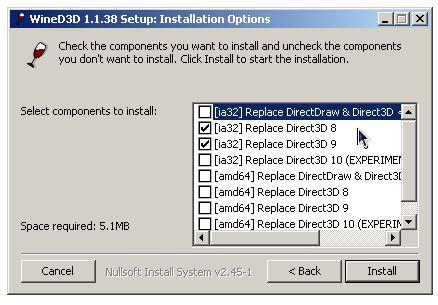
WineD3D For Windows est un wrapper DirectX 1-11 vers OpenGL basé sur WineD3D, qui est une implémentation presque complète de DirectX utilisée dans Wine.


Même si Windows prend en charge DirectX de manière native, l’utilisation de WineD3D peut améliorer la compatibilité avec les jeux plus anciens, en particulier sur Windows 8 et supérieurs qui ne prennent pas en charge les modes d’écran 16 bits. Une autre utilisation possible est d’imiter les versions non prises en charge de DirectX ou de transférer des applications DirectX vers OpenGL sans avoir à réécrire le code de rendu.
Notez que WineD3D est loin d’être parfait, et de nombreux jeux ne fonctionneront pas.
 
Des instructions sur l’utilisation des DLL sont également incluses.
 
Version 1.7.x fonctionne à partir de Windows 2000.
Version 6.x fonctionne à partir de Windows Vista.


Télécharger Wine D3D For Windows (Win 2K et +) v1.7.52 (1.7 Mo)

Télécharger Wine D3D For Windows (32 Bits | Win8 et +) v11.20 (1.9 Mo)

Télécharger Wine D3D For Windows (64 Bits | Win8 et +) v11.20 (1.9 Mo)

Site Officiel

En savoir plus…

IV/Play (prononcé «Four Play») est une interface graphique pour MAME. Il a été conçu par un codeur rémunéré par John IV comme une alternative à MAMEUI (que Robbbert maintient). IV/Play mise sur une séparation réelle entre frontend et code MAME afin que les changements sur MAME n’affectent plus le frontend. Disponible pour windows 32 et 64 bits, il vous faudra .NET 4.0 pour le lancer.


– Added support for the new format of HISTORY.XML.
 

Télécharger IV/Play v2.16 (11.9 Mo)

Site Officiel

En savoir plus…

Un émulateur ultra précis de Gameboy N&B/Color pour Windows et MacOs proposant également un débogueur.


Les changements ici
 

Télécharger SameBoy v1.0.5 (1.6 Mo)

Site Officiel

En savoir plus…


https://getourbonus.com/fr/accueil

https://www.romspedia.com/