Il s’agit du meilleur émulateur de PlayStation One, devant ePSXe et pSX.
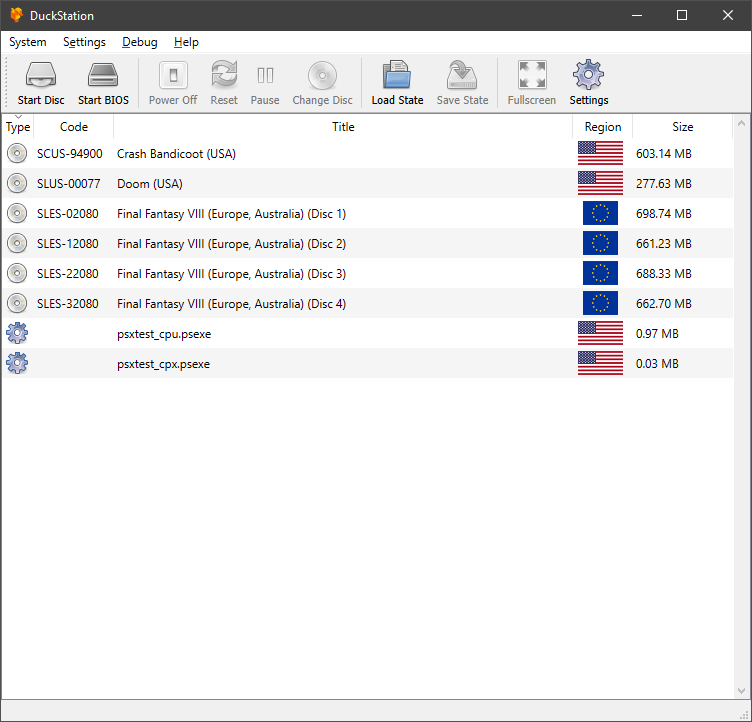


Caractéristiques:
– CPU Recompiler/JIT (x86-64, armv7/AArch32 and AArch64)
– Hardware (D3D11, OpenGL, Vulkan) and software rendering
– Upscaling, texture filtering, and true colour (24-bit) in hardware renderers
– PGXP for geometry precision, texture correction, and depth buffer emulation
– Adaptive downsampling filter
– Post processing shader chains
– « Fast boot » for skipping BIOS splash/intro
– Save state support
– Windows, Linux, highly experimental macOS support
– Supports bin/cue images, raw bin/img files, and MAME CHD formats.
– Direct booting of homebrew executables
– Direct loading of Portable Sound Format (psf) files
– Digital and analog controllers for input (rumble is forwarded to host)
– Namco GunCon lightgun support (simulated with mouse)
– NeGcon support
– Qt and NoGUI frontends for desktop
– Automatic updates for Windows builds
– Automatic content scanning – game titles/regions are provided by redump.org
– Optional automatic switching of memory cards for each game
– Supports loading cheats from libretro or PCSXR format lists
– Memory card editor and save importer
– Emulated CPU overclocking
– Integrated and remote debugging
– Multitap controllers (up to 8 devices)
– RetroAchievements

 
Configuration requise:
– A CPU faster than a potato. But it needs to be x86_64, AArch32/armv7, or AArch64/ARMv8, otherwise you won’t get a recompiler and it’ll be slow.
– For the hardware renderers, a GPU capable of OpenGL 3.1/OpenGL ES 3.0/Direct3D 11 Feature Level 10.0 (or Vulkan 1.0) and above. So, basically anything made in the last 10 years or so.
– SDL, XInput or DInput compatible game controller (e.g. XB360/XBOne). DualShock 3 users on Windows will need to install the official DualShock 3 drivers included as part of PlayStation Now.
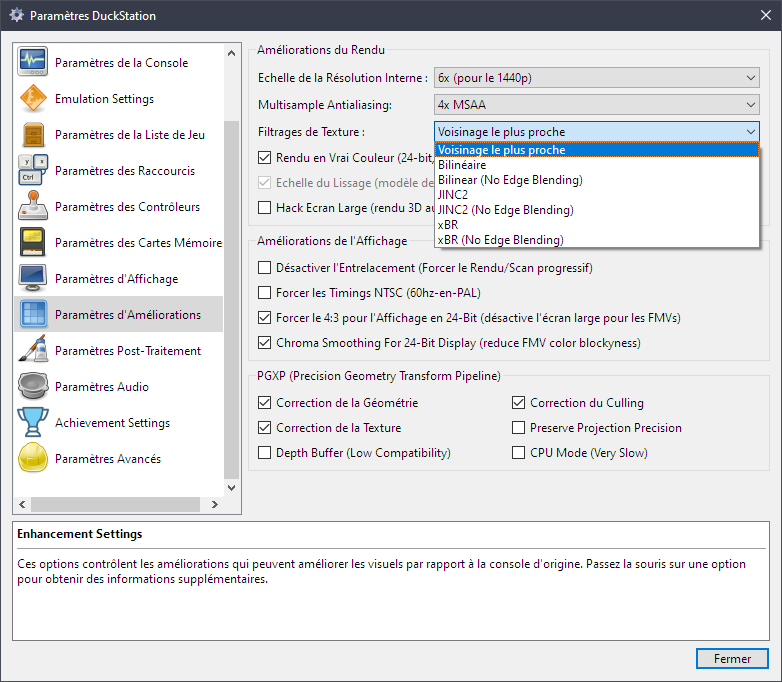


Les améliorations sont:
 
Preview Build:
[46daa57]: Atualização Português do Brasil (Anderson_Cardoso) #1732
[a0a1781]: Update Simple-Chinese language file to latest (zkdpower) #1735
[8f1cfb7]: Update gamesettings.ini (6lackmag3) #1737
Fix build path for Qt on Mac (#1740) #1740 (Connor McLaughlin)
[0cbba59]: GPU/ShaderGen: Add readonly/restrict qualifier to VRAM write SSBO (Connor McLaughlin)
[7f77e8e]: Atualização Português do Brasil (Anderson_Cardoso) #1742
[645ce66]: Qt/MemoryCardEditor: Don’t show blocks label when no card is selected (Albert Liu) #1743
[47e2cd3]: Qt/MemoryCardEditor: Increase default filename column size (Albert Liu) #1743
[f112222]: Qt/MemoryCardEditor: Prevent duplicate filenames when copying saves (Albert Liu) #1743
[3088138]: Qt/MemoryCardEditor: Remove duplicate browse functionality (Albert Liu) #1743
[0218006]: Qt/MemoryCardEditor: Remove unused context help button (Albert Liu) #1743
[e939507]: Qt/MemoryCardEditor: Handle switching to empty path at combobox index 0 (Albert Liu) #1743
Implement save file importing and exporting #1743 (Albert Liu)
 
Development Build:
– Update latest news (Connor McLaughlin)
– Fix master enable not having any effect (Connor McLaughlin)
– Fix crash when loading input profile and multitap disabled (Connor McLaughlin)
– Make hardware renderer init failure an OSD message (Connor McLaughlin)
– Prevent quick menu opening over other windows (Connor McLaughlin)
– Don’t pass key input to controllers/hotkeys when ImGui has focus (Connor McLaughlin)
 

Stable Build:
– 2021/03/03: RetroAchievements are now available. You can now log in to your retroacheivements.org account in DuckStation and gain points in supported games. Currently only for Windows/Linux/Mac, Android will be added in the future.
– 2021/03/03: Multitap is now supported for up to 8 controllers. You can choose which of the two main controller ports have taps connected in Console Settings and bind controllers in Controller Settings.
– 2021/03/03: Ability to add/remove touchscreen controller buttons and change opacity added for the Android app.
– 2021/01/31: « Fullscreen UI » added, aka « Big Duck/TV Mode ». This interface is fully navigatible with a controller. Currently it’s limited to the NoGUI frontend, but it will be available directly in the Qt frontend in the near future, with more features being added (e.g. game grid) as well.
– 2021/01/24: Runahead added – work around input lag in some games by running frames ahead of time and backtracking on input. DuckStation’s implementation works with upscaling and the hardware renderers, but you still require a powerful computer for higher frame counts.
– 2021/01/24: Rewind added – you can now « smooth rewind » (but not for long), or « skip rewind » (for much long) while playing.
– 2021/01/10: Option to sync to host refresh rate added (enabled by default). This will give the smoothest animation possible with zero duped frames, at the cost of running the game <1% faster. Users with variable refresh rate (GSync/FreeSync) displays will want to disable the option. - 2021/01/10: Audio resampling added when fast forwarding to fixed speeds. Instead of crackling audio, you'll now get pitch altered audio. - 2021/01/03: Per game settings and game properties added to Android version. - 2020/12/30: Box and Adaptive downsampling modes added. Adaptive downsampling will smooth 2D backgrounds but attempt to preserve 3D geometry via pixel similarity (only supported in D3D11/Vulkan). Box is a simple average filter which will downsample to native resolution. - 2020/12/30: Hotkey binding added to Android version. You can now bind hotkeys such as fast forward, save state, etc to controller buttons. The ability to bind multi-button combinations will be added in the future. - 2020/12/29: Controller mapping/binding added for Android version. By default mappings will be clear and you will have to set them, you can do this from Settings -> Controllers -> Controller Mapping. Profiles can be saved and loaded as well.
– 2020/12/29: Dark theme added for Android. By default it will follow your system theme (Android 10+), but can be overridden in settings.
– 2020/12/29: DirectInput/DInput controller interface added for Windows. You can use this if you are having difficulties with SDL. Vibration is not supported yet.
– 2020/12/25: Partial texture replacement support added. For now, this is only applicable to a small number of games which upload backgrounds to video RAM every frame. Dumping and replacement options are available in Advanced Settings.
– 2020/12/22: PGXP Depth Buffer enhancement added. This enhancement can eliminate « polygon fighting » in games, by giving the PS1 the depth buffer it never had. Compatibility is rather low at the moment, but for the games it does work in, it works very well. The depth buffer will be made available to postprocessing shaders in the future, enabling effects such as SSAO.
– 2020/12/21: DuckStation now has two releases – Development and Preview. New features will appear in Preview first, and make their way to the Development release a few days later. To switch to preview, update to the latest development build (older builds will update to development), change the channel from latest to preview in general settings, and click Check for Updates.
– 2020/12/16: Integrated CPU debugger added in Qt frontend.
– 2020/12/13: Button layout for the touchscreen controller in the Android version can now be customized.
– 2020/12/10: Translation support added for Android version. Currently Brazillian Portuguese, Italian, and Dutch are available.
– 2020/11/27: Cover support added for game list in Android version. Procedure is the same as the desktop version, except you should place cover images in /duckstation/covers (see Adding Game Covers).
– 2020/11/27: Disc database is shipped with desktop and Android versions courtesy of redump.org. This will provide titles for games on Android, where it was not possible previously.
– 2020/11/27: Compatibility databases added to libretro core – broken enhancements will be automatically disabled. You can turn this off by disabling « Apply Compatibility Settings » in the core options.
– 2020/11/27: SDL game controller database is included with desktop versions courtesy of https://github.com/gabomdq/SDL_GameControllerDB.
– 2020/11/21: OpenGL ES 2.0 host display support added. You cannot use the hardware renderer with GLES2, it still requires GLES3, but GLES2 GPUs can now use the software renderer.
– 2020/11/21: Threaded renderer for software renderer added. Can result in a significant speed boost depending on the game.
– 2020/11/21: AArch32/armv7 recompiler added. Android and Linux builds will follow after further testing, but for now you can build it yourself.
– 2020/11/18: Window size (resize window to Nx content resolution) added to Qt and SDL frontends.
– 2020/11/10: Widescreen hack now renders in the display aspect ratio instead of always 16:9.
– 2020/11/01: Exclusive fullscreen option added for Windows D3D11 users. Enjoy buttery smooth PAL games.
– 2020/10/31: Multisample antialiasing added as an enhancement.
– 2020/10/30: Option to use analog stick as d-pad for analog controller added.
– 2020/10/20: New cheat manager with memory scanning added. More features will be added over time.
– 2020/10/05: CD-ROM read speedup enhancement added.
– 2020/09/30: CPU overclocking is now supported. Use with caution as it will break games and increase system requirements. It can be set globally or per-game.
– 2020/09/25: Cheat support added for libretro core.
– 2020/09/23: Game covers added to Qt frontend (see Adding Game Covers).
– 2020/09/19: Memory card importer/editor added to Qt frontend.
– 2020/09/13: Support for chaining post processing shaders added.
– 2020/09/12: Additional texture filtering options added.
– 2020/09/09: Basic cheat support added. Not all instructions/commands are supported yet.
– 2020/09/01: Many additional user settings available, including memory cards and enhancements. Now you can set these per-game.
– 2020/08/25: Automated builds for macOS now available.
– 2020/08/22: XInput controller backend added.
– 2020/08/20: Per-game setting overrides added. Mostly for compatibility, but some options are customizable.
– 2020/08/19: CPU PGXP mode added. It is very slow and incompatible with the recompiler, only use for games which need it.
– 2020/08/15: Playlist support/single memcard for multi-disc games in Qt frontend added.
– 2020/08/07: Automatic updater for standalone Windows builds.
– 2020/08/01: Initial PGXP (geometry/perspective correction) support.
– 2020/07/28: Qt frontend supports displaying interface in multiple languages.
– 2020/07/23: m3u multi-disc support for libretro core.
– 2020/07/22: Support multiple bindings for each controller button/axis.
– 2020/07/18: Widescreen hack enhancement added.
– 2020/07/04: Vulkan renderer now available in libretro core.
– 2020/07/02: Now available as a libretro core.
– 2020/07/01: Lightgun support with custom crosshairs.
– 2020/06/19: Vulkan hardware renderer added.


Télécharger DuckStation v0.1 build 12XXX (71.6 Mo)

Site Officiel

En savoir plus…

Xemu est une application multiplateforme et open source qui émule le matériel de la console de jeu Xbox d’origine, permettant aux utilisateurs de jouer à leurs jeux Xbox sur les systèmes Windows, macOS et Linux.


Ce projet est une branche active du projet XQEMU, qui est lui même basé sur le projet QEMU qui est populaire et très activement maintenu.


A noter que la version 32 bits n’est pas officielle (réalisée par Lo v2).
 

Télécharger Xemu (x86) (2020/06/12) (6.2 Mo)

Télécharger Xemu v0.8.139 (10.9 Mo)

Télécharger Xemu (Debug) v0.8.139 (11.3 Mo)

Site Officiel

En savoir plus…

SSE pour « Steven Seagal Edition » est un émulateur d’Atari ST basé sur le STeem original v3.2 de 2004. Il emprunte également des améliorations en provenance de Hatari.


R0
– Initial release, full of bugs


Télécharger Steem SSE (D3D) [32 bits] v4.2.1 R2 (6.1 Mo)

Télécharger Steem SSE (D3D) [64 Bits] v4.2.1 R2 (6.9 Mo)

Télécharger Steem SSE (All builds) v4.2.1 R2 (4.5 Mo)

Site Officiel

En savoir plus…

NSFPlay est un lecteur de musiques NSF c’est à dire pour les jeux Nintendo NES (disquettes et cartouches) pour Windows. Il est également distribué sous forme de plugin destiné à Winamp. Il s’agit d’une version en cours de développement.
 
– Merge pull request #59 from jprjr/fix-linux-build
– Makefile: put iconv flags in variable
– nsf2wav: strerror is defined in string.h on linux


Télécharger NSFPlay/NSFPlug WIP v2.6 (2025/02/04) (2.1 Mo)

Site Officiel

En savoir plus…

Fuse (Free Unix Spectrum Emulator) est un émulateur tournant à l’origine sous Unix. Plusieurs portages ont été fait dont celui pour Windows. Les systèmes 16K, 48K, 128K, +2, +2A, +3, +3e, SE, TC2048, TC2068, TS2068, TTX2000S, Pentagon 128 et Scorpion ZS 256 sont émulés.


– Add TTX2000S emulation
– Experimental PulseAudio sound driver
– Fix activation of joystick and IF2 peripherals when loading a snapshot
– GTK/Win32: New higher resolution keyboard picture on GTK and win32 UIs
– GTK: Add Fuse icon to the about dialog and the main window
– GTK: Load/save binary dialog remembers last values
– GTK 3: Improve moving and sizing Fuse’s window under Wayland
– GTK 3: Fix kempston mouse values on Wayland
– GTK 3: Fix bug when resizing from 2x to 3x
– SDL: Fix crash when using dispmanx backend on the Raspberry Pi
– SDL: Allow forcing fullscreen mode when SDL doesn’t report available screen modes
– WidgetUI: New dialog to load/save binary data
– WidgetUI: Enable HOME and END keys in menus
– WidgetUI: Use monospaced characters on memory browser
– WidgetUI: Fix crash when trying to overwrite read-only files
– Xlib: Try to keep graphic filter when the user resize the window
– Fix display corruption with HQ 3x scaler
– Fix antialiasing effect of AdvMAME3x scaler
– Add 4x, TV 4x, Pal TV 4x and HQ 4x scalers on GTK, SDL, win32 and Xlib UIs
– Allow screenshots with TV 3x, PAL TV and Timex 1.5x scalers
– Various minor bugfixes


Télécharger Fuse v1.10.1 (3.6 Mo)

Site Officiel

En savoir plus…

Il s’agit d’un fork de DOSBox des plus intéressant, destiné à Windows Linux et MacOS et créé par Jon Campbell. Il possède une compatibilité excellente et met l’accent sur la précision d’émulation notamment en ce qui concerne l’émulation de Windows 3.x à ME. En outre il ajoute des améliorations en provenance d’autres builds comme DOSBox ECE avec l’émulation de la 3DFX en interne.


Les améliorations sont à consulter sur le site officiel.
 

Télécharger DOSBox-X (Hx DOS) v2026.10.01 (9.7 Mo)

Télécharger DOSBox-X (LowEnd) v2026.10.01 (19.6 Mo)

Télécharger DOSBox-X (MinGW) v2026.10.01 (24.1 Mo)

Télécharger DOSBox-X (Visual Studio) v2026.10.01 (28.9 Mo)

Site Officiel

En savoir plus…

Créé par DH & Hykem (et rejoint par un ensemble de développeurs), RPCS3 est un émulateur de Playstation 3 multi-plateformes qui a pour objectif de devenir le plus complet possible. Il faisait principalement office de désassembleur mais pousse à présent la performance jusqu’à exécuter un certains nombres de jeux commerciaux devenant ainsi le premier émulateur de PS3 émulant des jeux du commerce, toutefois il nécessite un PC extrêmement performant.
 
En effet il vous faudra rien de moins qu’un CPU type core i7 @ 4Ghz (voir config minimale requise sur le site officiel), une carte graphique récente type nVidia GTX, de la mémoire haute performance type DDR4 ou encore un système d’exploitation récent pour espérer lancer des jeux dans un mode relativement fluide (mais attention cela dépend énormément des builds et des jeux).
 
Plusieurs rendus s’offre à vous: Aucun, OpenGL, DirectX12 (Windows 10 uniquement) et Vulkan (qui a pour but de remplacer à terme OpenGL et ses dérivés en exploitant plus efficacement les architectures informatiques modernes).
 
Au sujet du nom de l’émulateur, il s’agit d’une abréviation et d’une combinaison de Personal Computer (PC) et PlayStation 3 (PS3). PC + PS3 = PCS3.
Que signifie le R? DH et BlackDemon se souviennent qu’il représentait Real car en 2011, il n’y avait que de faux émulateurs de Ps3. Puis, à un moment donné, DH (originaire d’Ukraine) a commencé à dire que le R représentait le mot Russe. De plus, Nekotekina, qui a rejoint l’équipe fin 2013 et qui est rapidement devenu l’un des plus grands développeurs de cet émulateur, est originaire de Russie. Du coup RPCS3 signifie à présent Russian Personal Computer Station 3.


Cette version (qui n’est pas à considérer comme stable) qu’on nommera « point de repère » (landmarks) dans le sens ou elle est officiellement publiée sur le site officiel (ce qui change des builds régulier dit « WIP » ou « GIT »), n’est disponible que pour les processeurs 64 bits. Pas de changelog malheureusement.


Version changes serve as landmarks and are by no means stable builds
This changelog lists the main (but not all) changes made since 0.0.X


Site officiel des sources et versions compilées (builds).
 

Télécharger RPCS3 v0.0.43 Alpha (36.7 Mo)

Site Officiel

En savoir plus…

Ce fichier permet de sauvegarder vos meilleurs scores sous MAME(Arcade), ils apparaissent ensuite dans les crédits de chaque jeux, comme dans la réalité. Cette version non officielle est souvent mise a jour, elle supporte les tout derniers jeux ajoutés dans MAME(Arcade).
 
Ce fichier était devenu inutile depuis Mame v0.107u2, il fallait donc l’utiliser qu’avec des builds non officiels. Mais depuis MAME v0.172, ce fichier a été intégré officiellement avec l’émulateur dans un répertoire plugins/hiscore (c’est dans ce répertoire qu’il faudra placer le fichier).


Ce fichier sert à être téléchargé que si sa version est plus récente que celui que propose MAME en interne, mais dans le cas contraire c’est que MAME propose déjà la dernière version (qui sera donc la même). A noter qu’il ne fonctionne qu’avec MAME v0.174 ou supérieur.
 

Télécharger Hiscore.dat (Non Officiel) (2023/12/05) (87 Ko)

Site Officiel

En savoir plus…

Conçu pour gérer les roms MAME, ClearMAMEPro supporte également tous les dats au format CM, mais aussi XML, permettant de gérer efficacement vos collections de roms & isos. Le manager le plus complet.
 
clrmamepro
 
Changement :
– added: Select Sets variables %R %G to filter by for Region / Language
– added: Batcher, rebuilder setting to avoid message prompts
– misc: support dat date attribute format YYYY-MM-DD without specifying timestamp
– misc: rar/7z/uncompressed files timestamps are handled as UTC based, zip as non UTC based
– fixed: some unpack/pack zip operation fail on very long file/path names
– fixed: interative folder creation for UNC paths is broken
– fixed: systems auto assign fails for software lists
– fixed: fail to load dats from www when www profiler definition file doesn’t use http/https in the links

 
clrmamepro


Télécharger ClrMAME Pro (XP) v4.035 (3.1 Mo)

Télécharger ClrMAME Pro (x86) v4.050 (3.9 Mo)

Télécharger ClrMAME Pro (x64) v4.050 (4.5 Mo)

Site Officiel

En savoir plus…

WineD3D For Windows est un wrapper DirectX 1-11 vers OpenGL basé sur WineD3D, qui est une implémentation presque complète de DirectX utilisée dans Wine.


Même si Windows prend en charge DirectX de manière native, l’utilisation de WineD3D peut améliorer la compatibilité avec les jeux plus anciens, en particulier sur Windows 8 et supérieurs qui ne prennent pas en charge les modes d’écran 16 bits. Une autre utilisation possible est d’imiter les versions non prises en charge de DirectX ou de transférer des applications DirectX vers OpenGL sans avoir à réécrire le code de rendu.
Notez que WineD3D est loin d’être parfait, et de nombreux jeux ne fonctionneront pas.
 
Des instructions sur l’utilisation des DLL sont également incluses.
 
Version 1.7.x fonctionne à partir de Windows 2000.
Version 6.x fonctionne à partir de Windows Vista.


Télécharger Wine D3D For Windows (Win 2K et +) v1.7.52 (1.7 Mo)

Télécharger Wine D3D For Windows (32 Bits | Win8 et +) v11.20 (1.9 Mo)

Télécharger Wine D3D For Windows (64 Bits | Win8 et +) v11.20 (1.9 Mo)

Site Officiel

En savoir plus…

Il s’agit d’une version améliorée de l’émulateur M88 utilisant le moteur de son fmgen, l’interface est en anglais mais le reste des informations en japonais. (source)


Télécharger M88 fmgen v2.21a (2026/01/01) (199 Ko)

Site Officiel

En savoir plus…

Cet émulateur est également le plus complet des outils de développements X68000 existant aujourd’hui. Il s’agit d’un fork de l’émulateur XM6 v2.05 de PI avec une pléthore de nouvelles fonctionnalités. Les changements sont pour la plupart liés à l’interface utilisateur et un accent a été mis sur le développement et les fonctions de débogage plutôt que sur l’exactitude de l’émulation, cependant il y a suffisamment d’améliorations pour qu’il soit recommandé d’utiliser cette version plutôt que XM6 v2.06 finale.


Les changements:
 
– The informational display shown in the title/caption bar is now configurable
through the View > Caption submenu. There are distinct options for windowed
and full-screen mode; the defaults now show less information in an attempt
to make things less distracting, particularly when in full-screen mode.
– In addition, the caption is now capable of displaying indicators, such as the
state of the keyboard LEDs. This is enabled by default but can be turned off.
– Be aware that the setting to turn off the informational display entirely will
be saved in state files, which is useful for games that abuse the keyboard LEDs.
– Added an option to omit updating the MRUs (history) when the program exits.
It can be found under the File menu. If you use it in conjunction with the
Clear History command, the program will start with blank MRUs every time.
You could also exploit this setting to make a set of MRU lists persistent,
so that commonly used disk images or state files are always present initially.
– The Clear History command now commits the history erasure to the configuration
file immediately; otherwise the erasure could end up being undone if the new
Save History setting is disabled.
– The no-wait VM/MPU options are now reset when the program is started unless
the new Resume Speed setting is enabled on the Resume page in the options.
– Shortcuts that access the menu bar now also work for most pop-up subwindows.
– Keyboard input is now (mostly) blocked after accelerator commands so one can
type accelerators as fast and sloppy as desired without sending extraneous
input to the VM.
– Implemented a better keyboard translation for the Plus key.
– Shift is now respected when selecting items from the media menu.
– Automatic MRU population will no longer take the top slot if a disk is in the
corresponding drive, unless said disk is believed to be in the wrong drive.
– Several items were moved from the Tools menu to more appropriate locations.
The most notable was the High Priority command, which is now in the File menu.
(You really should be using Alt-P for that one instead of the menu anyway.)
– All relevant SRAM settings are now respected in the Software Keyboard. WYSIWYG!
 

Bug fixes:
– Certain six-trigger Megadrive/Genesis scanning patterns were not working.
– The Unicode edition Software Keyboard displayed wrong on Japanese installations.
– Disconnecting the keyboard was not extinguishing its LEDs.
– The « default directory » (basically the program’s current directory) was not
always being set as one might expect on startup when using Resume settings.
– Disk reinsertion commands (e.g. Alt-I) were behaving unexpectedly in certain
circumstances due to automatic MRU population (see the change listed above).
– Shift-single-left-clicking a drive pane to move a multi-disk file to another
drive will no longer eject the source drive.
– Key translations were mistakenly active during Code Nyuuryoku mode.
– The setting to disable the informational display lacked an interface.
– Fixed a few bugs related to subwindows that were minimized / hidden.


Télécharger XM6 Pro-68k Release 81 (261031) (4.5 Mo)

Site Officiel

En savoir plus…


https://getourbonus.com/fr/accueil

https://www.romspedia.com/