Il s’agit d’une branche de l’émulateur de Microsoft X-Box CXBX, apportant certains modifications et améliorations diverses.

Branche Darkrush3760
Branche LukeUsher
0 commentaire



Il s’agit d’une branche de l’émulateur de Microsoft X-Box CXBX, apportant certains modifications et améliorations diverses.
Branche Darkrush3760
Branche LukeUsher
Un émulateur de Rolant MT-32.

Nous recommandons d’utiliser VirtualMIDISynth pour faire office de switch midi / midi mapper (choisir le output midi en VirtualMIDISynth lui même ou MT-32 Synth Emulator).
Fonctionne également à merveille avec la Version spéciale Daum Dos box qui supporte Munt. Fonctionne très bien avec Hoot! Media player classic notamment avec le playback des fichiers .mid!
Les résultats sont à des années lumière de tout ce que VirtualMIDISynth peut accomplir avec une banque soundfont MT-32.
Bonus! ROM nécessaire au bon fonctionnement de Munt: ici ou là.
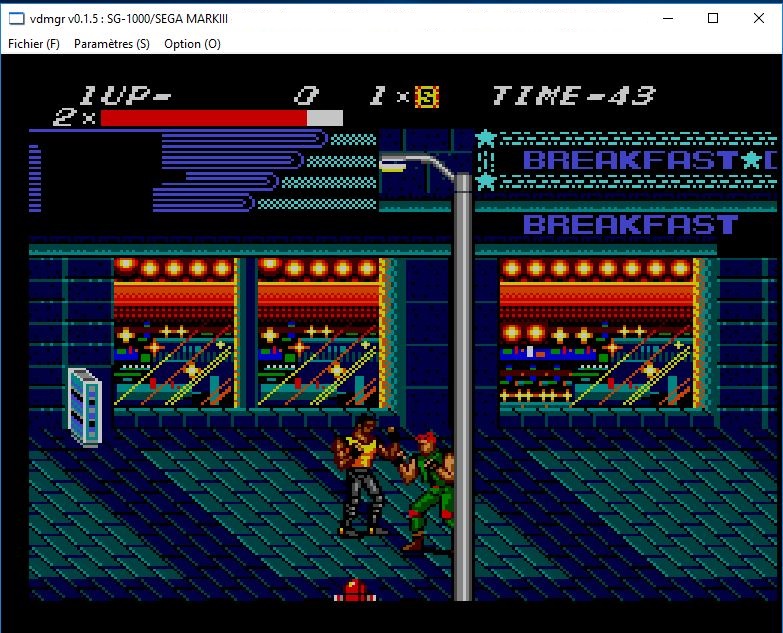
Il s’agit d’un émulateur multi-systèmes dont l’interface est multi-langues (la version française est assurée par Tradu-France). Il propose également un très bon débogueur. Les systèmes émulés sont les suivants: ColecoVision, le 8502, le GMC-4, le HVC-001, le MCS Basic-52, la MSX, le SC-3000+SF-7000, la NeoGeo Pocket, la Neo Geo Pocket Color, le SG1000, le TD4 et le Z80.
Voici les améliorations:
Z80 video game
– Since I got permission to use the farm, I attached a farm.
Libvdmgr / vdmgr
– Added pause.
– When loading error in debugger, change log window so that it is active.
– Fixed vdmgr falling when ending with the data recorder playing.
– At the first startup, changed to look at the user’s locale and set the language. .
HVC-001
– Corresponding to Mapper 190
– Fixed not referring ROM database.
– Fixed incorrect x position of screen division of MMC 5.
– Fixed the scroll of fractional position in y direction of screen division of MMC 5.
– Fixed wrong valid bit of extended sound source of MMC 5.
– It corresponds to the PCM reading mode of MMC 5 (interrupt not supported).
– MMC 5 NES 2.0 compatible.
– Fixed that the first bank at the time of VRC 7 reset was wrong.
– It corresponds to NES file output from assembler.
– Corrected address abnormality at bank switching of assembler.
– Fixed that bracket could not be processed correctly by assembler.
– Add assembler macros and functions, pseudo instructions such as reading bit map files.
– Added « Darius mock » to the assembler and MMC 5 samples.
Sg-1000 / SEGA MARK III
– Fixed that sprite drawing priority was reversed.
– Supports double display of sprite.
– Fixed to update the VRAM address after register writing of VDP 315-5124 (same as TMS9918).
– Fix that the sprite of the NAME / SPR / PTN / COL window is not displayed correctly when the sprite is 8 × 16.
– ROM database added.
– Corresponds to the CODEMASTERS mapper (resolution of 256 × 224 is not supported).
Flash writer
– Added a reload button.
– If the size of the write data is the same as that of the last read data, change the setting so that it does not initialize
Créé par Exzap, il s’agit du second émulateur de Wii U à être disponible au public mais le premier à pousser jusqu’à l’émulation de jeux commerciaux. Il peut décrypter les images Wii U qui utilisent le format Wud mais également les fichiers RPS ou RPL. La résolution interne peu aller jusqu’à 1920×1080 selon les jeux. A noter que pour le moment, un seul contrôleur est accepté, il s’agit du DRC (GamePad) de la Nintendo Wii U. Cette version n’est compatible que pour les Windows x64 avec une carte graphique gérant OpenGL 4.0 ou supérieur.
(Correspondance ID-Titre).

Les changements:
En résumé:
– Graphic improvements
– Minor optimizations
– Shader cache compilation is now multi-threaded
– Graphic packs can modify texture formats
– Bugfixes & minor new features
En détails:
# New in 1.7.4d:
– GX2: Added a workaround for unsupported alignment in glVertexAttribIPointer for AMD GPUs
# New in 1.7.4b/c:
– general: Fixed titleId calculation if DLC was installed incorrectly
– GX2: Fixed crash if CPU extensions SSSE3 and SSE4.1 were not supported
# New in 1.7.4:
– general: Added command line option -ud to enable upside-down render mode
– general: Added game profile option ‘GPUBufferCacheAccuracy’
– general: Added game profile option ‘disableGPUFence’
– general: Updated some game profiles
– CPU/JIT: Overhauled FPR register management, reducing the number of load/store operations
– CPU/JIT: Fixed an unsafe optimization that could lead to floating-point stores being optimized away
– CPU/JIT: Implemented instructions CREQV, LWBRX
– CPU/JIT: Recompiler will now inline small functions
– GX2: Improved occlusion query support
– GX2: Added API GX2SetVertexSamplerBorderColor()
– GX2: Fixed a bug in GX2SetPixelSamplerBorderColor()
– GX2: Experimental support for texture readback
– GX2: Added support for mip-mapped 3D textures
– GX2: Shader dump debug option will now also dump shaders from the transferable shader cache
– GX2: Added support for vertex attribute format=0x07, nfa=2, signed=0, endian=0
– GX2: Fixed a bug that caused graphic pack shaders always being loaded as pixel shaders instead of their respective type
– GX2: Slightly optimized OpenGL backend by reducing the number of GL function calls
– GX2: Optimized decoding and handling of index data (utilizing SSE2)
– GX2: Fixed data corruption occuring under rare circumstances in vertex/uniform data cache
– GX2: Extended shader archive format to support cache files larger than 4GB
– GX2: Compiling shaders from the transferable shader cache is now done multi-threaded (if ARB_parallel_shader_compile is supported)
– GX2: Graphic packs now support overwriting the format of textures
A noter que des packs graphiques haute définition sont disponibles ici. Ils permettent, entre autre, d’augmenter la résolution native des jeux car contrairement à Dolphin et parce que la machine est techniquement différente il n’est pas possible à Cemu d’augmenter la définition autrement que par cette méthode.
A l’inverse, des packs SD (définitions standards et/ou basses) sont disponibles sur ce lien et permettent à certains PC manquant de performance de lancer des jeux en 60 FPS.
Une liste de compatibilité est disponible ici.
DS4Windows est un programme portable qui vous permet d’obtenir la meilleure expérience lors de l’utilisation d’un DualShock 4 sur votre PC. En émulant un contrôleur Xbox 360, beaucoup de jeux deviennent alors accessibles.

Bochs est un émulateur PC tournant sous Windows, son développement s’effectue en Open Source. Ecrit en C + +, il fonctionne sur la plupart des plates-formes populaires. Il inclut l’émulation des CPU x86 d’Intel, les périphériques E / S courants et un BIOS personnalisé. Actuellement, Bochs peut être compilé pour émuler un processeur 386, 486, Pentium/PentiumII/PentiumIII/Pentium4 ou x86-64, y compris MMX option, SSEX et 3DNow! instructions.Bochs est capable d’exécuter la plupart des systèmes d’exploitation à l’intérieur de l’émulation, y compris Linux, DOS, Windows ® 95/98 et Windows ® NT/2000/XP ou Windows Vista/7/8/10.
L’utilisation «typique» de Bochs est de fournir émulation PC x86 complète, y compris le processeur x86, des périphériques et la mémoire. Cela vous permet d’exécuter OS et des logiciels au sein de l’émulateur sur votre poste de travail, un peu comme si vous aviez une machine à l’intérieur d’une machine. Par exemple, disons que votre poste est un poste de travail Unix/X11, mais que vous souhaitez exécuter des applications Win’95. Bochs va vous permettre d’exécuter Win 95 et le logiciel associé sur votre poste de travail Unix/X11, affichant une fenêtre sur votre poste de travail, simulant un moniteur sur un PC.
Les changements sont:
Brief summary :
– CPU: implemented new instructions and x86 architecture extensions.
– Bugfixes for CPU emulation correctness.
– Added Android host platform support.
– Added USB EHCI device emulation support.
– Added USB floppy (UFI/CBI) support.
– Added ethernet module ‘socket’, designed to interconnect Bochs instances.
– Show textconfig at runtime in the Bochs VGA window (gui console).
Detailed change log :
– General
– Added new log action « warn », designed to show a message box on error events.
– Show message box before exit if log action is set to « fatal ».
– Added macro BX_FATAL for all cases when continuing is not recommended, since
it can cause an application crash or incorrect simulation behaviour.
– Configure and compile
– Added Android host platform support.
– Configure script now prints warnings for features not maintained yet.
– GUI and display libraries
– Show the runtime configuration in the Bochs VGA window (gui console) instead
of console / xterm (rfb, sdl, sdl2, vncsrv and X11 guis).
– SDL2: Added get/set clipboard text support.
– CPU / CPUDB
– Bugfixes for CPU emulation correctness (critical bugfix for x86-64 and AVX opcodes emulation,
fixed assertion failures in proc_ctrl.cc)
! VMX: Implemented Page Modification Logging (PML)
! VMX: Implemented TSC Scaling Extension
! Paging: Implemented Protection Keys
! Implemented UMIP: User Mode Instruction Prevention (don’t allow execution of SLDT/SIDT/SGDT/STR/SMSW with CPL>0)
! Implemented RDPID instruction
! Implemented VPOPCNTD/VPOPCNTQ AVX512 instructions
! Implemented XSAVES/XRSTORS instructions and IA32_XSS MSR
! Implemented Translation Cache Extensions (TCE) for AMD CPUID and EFER.TCE control
! Implemented CLZERO instruction (AMD), enabled in Ryzen CPU model
! Implemented MONITORX/MWAITX instructions (AMD), enabled in Ryzen CPU model
! CPUDB: Added AMD Ryzen configuration to CPUDB
– I/O Devices
– Busmouse
– Added standard bus mouse support in addition to the existing InPort
emulation code. (patch by Ben Lunt).
– Hard drive
– Implemented lock mechanism for hard disk images. An image that is opened
in r/w mode cannot be used multiple times (e.g. by another Bochs session).
– Several fixes in some disk image modes.
– Serial / Parallel ports
– Added support for changing output file at runtime.
– Networking
– Added ethernet module ‘socket’, designed to interconnect Bochs instances
with external program ‘bxhub’ (simulating a multi-port ethernet hub).
– Now creating separate plugins for each network driver implementation
(slirp, win32, etc.).
– Sound
– Added PCM output data resampling in a separate thread. The resampler
requires either libsamplerate or the SoX resampler library installed.
– SDL: Added audio capture support (requires library version >= 2.0.5).
– Now creating separate plugins for each sound driver (alsa, win, etc.).
– USB
– Added USB EHCI device emulation support (EHCI core ported from Qemu).
– Added USB floppy (UFI/CBI) support (patch by Ben Lunt).
– Added asynchronus USB packet completion support (needed by disk/cdrom
seek and read/write latency emulation).
– Implemented USB remote wakeup mechanism.
– Fixed NAK response handling in all USB HCs.
– USB printer: added support for changing output file at runtime.
– Added common USB device option « debug » to turn on BX_DEBUG reporting at
connection time.
– ROM BIOS
– Implemented Bochs BIOS option « fastboot » for skipping the boot menu delay.
Télécharger Bochs (32 bits) v2.6.9 (4,9 Mo)
Télécharger Bochs (64 bits) v3.1 (7.7 Mo)
Un émulateur de PSP écrit en Java. Codé par Mad et Shadow (PCSX2) et rejoint par Wrayal, Fiveofhearts, Hlide et Dreampeppers99. Il émule les jeux commerciaux mais nécessite une puissante configuration.

Liste de jeux compatibles.
Site de développement du projet.
Builds SVN automatiques (alternative).
Télécharger JPcsp (x86) v0.7 rev 0318d15e (26.4 Mo)
AmiArcadia est le port amélioré de Tunix2001 ex ‘Win Arcadia 2001’ (par Gavin Turner) pour Amiga. Ecrit par James Jacobs et Gavin Turner, cette version est en fait le port Windows du port Amiga (un backport) !
Il émule les consoles basé sur la famille des Arcadia2001 : Bandai, Emerson, Grandstand, Hanimex, Intervision, Leisure-Vision, Leonardo, MPT-03, Ormatu, Palladium, Poppy, Robdajet, Rowtron, Tele-Fever, Tempest, Tryom, Tunix, etc.
Il supporte aussi l’Interton VC 4000 et l’Elektor TV Games Computer. Il nécessite Windows 9x/ME/NT/2000/XP et tourne aussi sous Vista/8/10.
Il s’agit d’un nouvel émulateur multi-plateformes de GameBoy N&B/Color, GameBoy Advance et Nintendo DS créé par Jeffrey Pfau, l’auteur de mGBA dont il tire une bonne partie des améliorations (mais il en reste encore pas mal à implémenter), la nouveauté étant la partie Nintendo DS. Les 2 branches (mGBA et Medusa) vont évoluer parallèlement jusqu’à ce que, à terme, mGBA fusionne avec Medusa pour ne former qu’un seul émulateur qui se nommera donc définitivement Medusa (à partir de la version 2.0 probablement en 2018), le nom mGBA ne sera pas maintenu pour des raisons évidentes.

Plus d’infos ici.
Il s’agit d’un émulateur de consoles Nintendo 8/16-bit. Le site étant entièrement en japonais, il est difficile d’en connaitre les réelles améliorations.
CoolSoft VirtualMIDISynth est un fantastique synthétiseur SoundFont logiciel, similaire à BASSMIDI Driver : il s’installe également en tant que nouveau périphérique de sortie MIDI sous Windows, et, par conséquent, peut également être utilisé depuis n’importe quelle application ou jeu vidéo. Une fois votre soundfont MIDI assignée, vous pouvez par exemple la choisir sous ScummVM en tant que synthétiseur MIDI, et une nouvelle expérience sonore des oldies PC s’offrira à vous !

Tout comme BASSMIDI Driver, VirtualMIDISynth utilise le moteur de rendu SoundFont BASS, de chez Un4Seen Developments, pour reproduire les sonorités. Par conséquent, vous percevrez peu de différence entre ces deux synthétiseurs logiciels lorsque vous jouerez des fichiers MIDI ; en revanche, chacun d’entre eux propose des options et des choix de conception spécifiques, qui pourront vous amener à choisir l’un plutôt que l’autre.
Excellent Tutorial en images (par Arachnosoft)
Télécharger MIDI Synth. Driver-CoolSoft VirtualMIDISynth v2.0 (1.2 Mo)
pfeMame (écrit par Gareth Finch) est un frontend pour MAME, écrit en Python. Il est multiplateforme (testé sur Linux – Ubuntu et Windows). Il comprend également une interface graphique destinée aux MameCab qui permet le contrôle à l’aide de joystick / manette.

Télécharger pfeMame (32 bits) v3.9.2 (119 Mo)

