DS4Windows (site original) est un programme portable qui vous permet d’obtenir la meilleure expérience lors de l’utilisation d’un DualShock 4 sur votre PC, en émulant un contrôleur Xbox 360, beaucoup de jeux deviennent alors accessibles.
– Re-compiled program and tools. Signed binaries
– Almost identical to version 3.0.5
Bizhawk utilise des fonctions d’enregistrement vidéo et est relié au projet TasVideo.
La version 2 n’est utilisable qu’avec Windows 7 ou supérieur et en version 64 bits uniquement. L’autre version est valable pour les systèmes 32 bits à partir de XP. La liste des pré-requis est disponible ici.
bsnes-mt est une version améliorée de bsnes – un émulateur précis de la console de jeu 16 bits SNES (Super Nintendo). Il permet d’améliorer un ensemble de choses: Pixel-perfect integer-ratio scaling, captures d’écran PNG, rapport hauteur / largeur précis, convivialité améliorée, corrections de bogues, etc.
Added French translation (fr) by KarLKoX-FR.
(The executable is the same as 1.3.3.)
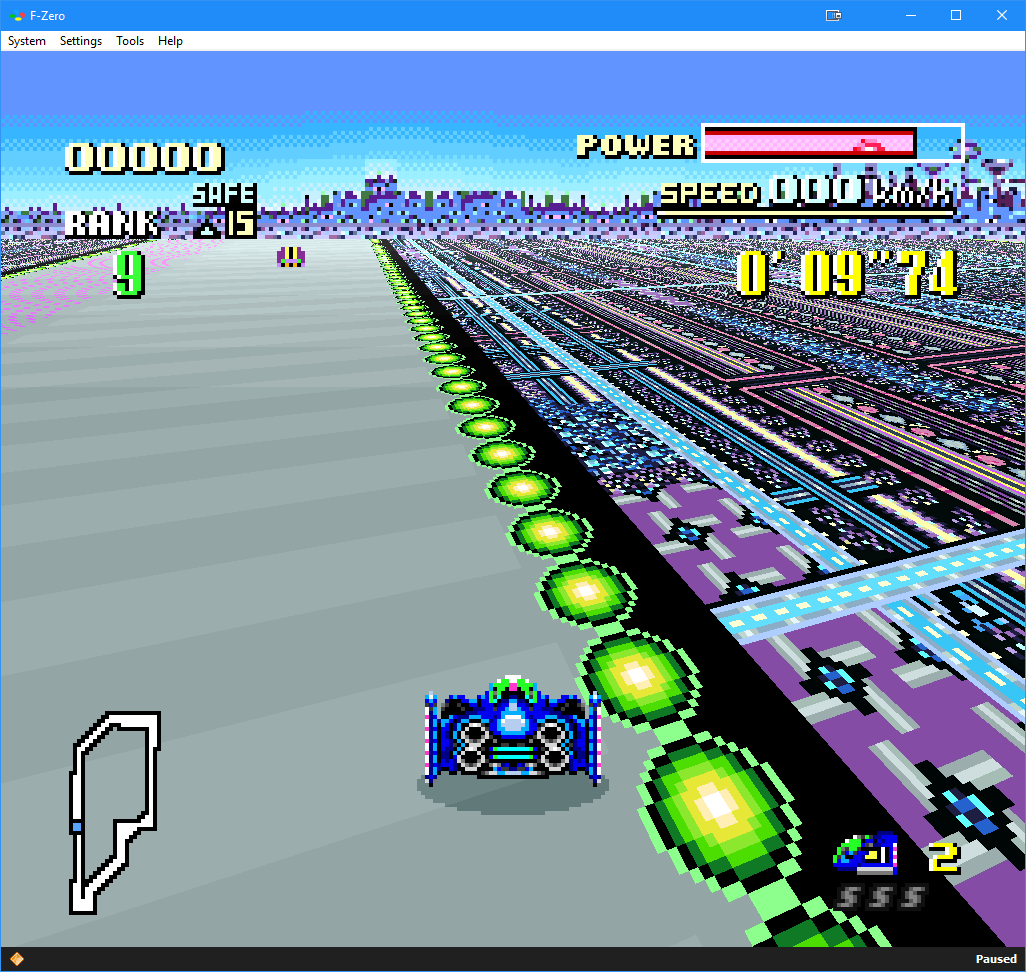
Il s’agit d’une version béta de bsnes ajoutant un mode haute résolution au mode 7 et qui gère à présent l’affichage en mode écrans larges, le résultat est absolument magnifique !! Espérons que Near pourra l’intégrer dans le projet officiel prochainement !
– Patches and setting overrides in the same folder and named the same as the ROM are now also found and applied by the libretro core
– The libretro core is now available for iOS, tvOS and arm Macs, thanks to contributions of the libretro team
– The setting override S2 enables widescreen hacks to extend windowing effects into the widescreen areas
– The packaged WIP widescreen hack for Super Metroid by ocesse has been updated, including the aforementioned widescreen windowing among other improvements
– The packaged game fixes are now available as a separate ZIP for Mac and RetroArch users
– Fixed bug #39, eliminating a superfluous columns of background colored pixels on right side of pillarboxed scenes, thanks to JimPancakes’ research
– Implemented the fix for bsnes bug 173, which is mostly hypothetical for bsnes-hd as, for unknown reasons, it does not crash
All provided as-is!
« bsnes-hd beta » core for RetroArch available in the internal updater on Windows, Linux, Mac (Intel and arm), Android, iOS, tvOS and Switch
If you experience crashes on Android please try the Android core provided below.
CPCEC est un émulateur d’Amstrad CPC (modèles 464, 664 et 6128). ZXSEC est un émulateur de Sinclair ZX Spectrum (modèles 48k, 128k, +2/Plus2 et +3/Plus3) pour Windows.
Il s’agit d’un émulateur Commodore 64 & 128 Scala.
General
– Rollback of VIC’s pipeline function: unfortunately it’s not yet full functional; more VICE’s testbench tests passed but more demos broken.
– Debugger: registers are now shown in a table
– REU: changed floatingBus emulation, still something to fix.
– Fixed –warp option: now disables audio output
– Added –custom-glue-logic option
– Fixed handling of undocumented opcodes when operate in decimal mode.
– Fixed state saving: included PAL/NTSC VIC’state
– Fixed handling of CPU port’s fading bits (6,7 for C64, 7 for C128)
– Added external -Dkernal64.config property to specify the configuration directory.
– Added new –viciinew option.
– Added 1024,2048,4096 sizes to –reu-type option.
– Fixed handling of warp mode: now when switching back to normal speed ther’s no freeze time to wait for.
– CIA: fixed light-pen handling
– new SID (resid) implementation
– REU: when REU asserts DMA, AEC is high, and every pending writes are lost.
– Datassette: fixed counter on recording
– GMOD3 cartridge implementation
– New KCS cart
C128
– VDC: fixed cursor handling introduced with graphic line buffer. Now the cursor is checked on every line.
– Fixed REU handling: when REU is performing DMA bit 6,7 of D506 set which bank is involved.
– Removed MMU registers from c64 mode: they are not visible.
BeamRacer
– Fixed deactivation, when writing to register 0x2E
Flycast Dojo est un fork de Flycast , un émulateur multi-plateforme Sega Dreamcast, Naomi et Atomiswave dérivé de Reicast , avec un accent sur les fonctionnalités de netplay et la relecture.
Flycast Dojo peut être récupéré à partir de GitHub ou dans le cadre du service de matchmaking Fightcade . Quelle que soit la manière dont vous l’obtenez, vous aurez toujours la possibilité de l’utiliser de manière autonome pour les jeux P2P utilisant des codes de correspondance sur un serveur de matchmaking Internet, via une connexion IP directe ou un LAN virtuel comme ZeroTier ou Radmin.
Il s’agit d’une interface très simplifiée destinée au projet Libretro (les cores qui composent Retroarch) et qui a été écrite en langage de programmation GO. Plus simple et rapide que l’interface de Retroarch (mais proposant moins d’options), elle sera satisfaire la plupart des utilisateurs.
– Update dependencies
– Update cores
– Improve analog support
– Add N64 icon
pfeMame (écrit par Gareth Finch) est un frontend pour MAME, écrit en Python. Il est multiplateforme (testé sur Linux – Ubuntu et Windows). Il comprend également une interface graphique destinée aux MameCab qui permet le contrôle à l’aide de joystick / manette.
AmiArcadia est le port amélioré de Tunix2001 ex ‘Win Arcadia 2001’ (par Gavin Turner) pour Amiga. Ecrit par James Jacobs et Gavin Turner, cette version est en fait le port Windows du port Amiga (un backport) !
Il émule les consoles basé sur la famille des Arcadia2001 : Bandai, Emerson, Grandstand, Hanimex, Intervision, Leisure-Vision, Leonardo, MPT-03, Ormatu, Palladium, Poppy, Robdajet, Rowtron, Tele-Fever, Tempest, Tryom, Tunix, etc.
Il supporte aussi l’Interton VC 4000 et l’Elektor TV Games Computer. Il nécessite Windows 9x/ME/NT/2000/XP et tourne aussi sous Vista/8/10.