Débuté en 1996 sur diverses plateformes car hautement portable, MasterGear est gratuit depuis le 11/03/2015 dans ses versions Windows.


MasterGear (MG) est un émulateur des systèmes Sega 8 bits. Il supporte la Sega MasterSystem (Mark3 au Japon) et GameGear, ainsi que leurs prédécesseurs : SG1000, SC3000, SF7000, et Mark2. MasterGear dispose aussi d’un débogueur.


– Made replay save states approximately every 170ms.
– Added ability to browse through paused replay.
– During replay, the [UP] button to pause.
– Press [LEFT] and [RIGHT] to browse through paused replay.
– Press [UP] to resume replay, any other key to continue.
– Made WaitJoystick() exit when window closed.


Télécharger MasterGear (Windows) v4.9 (161 Ko)

Site Officiel

En savoir plus…

Highly-Experimental Playstation Simulator x64 est un émulateur PSone et PS2 en développement (au stade préliminaire), codé par TheGangster dont certains éléments proviennent de Mame/Mess ou PCSX.

 
– fixed pad set mode command
– faster graphics
– multi-threading capability
– async disk reads, program window fixes
hps1x64 v0232 – removed OpenCL references and non-standard windows dlls
hps1x64 v0231 – fixed GetOverlappedResultEx Windows 7 issue reported by Hector


Télécharger Hpsx64 v0500 (8.7 Mo)

Site Officiel

En savoir plus…

Sorte d’équivalent de MAME32 pour PinMAME. Cette version est un vrai portage de PinMAMEW sous Windows.


Visual PinMame:
– Switch to VS2015 for the release builds (tested in the wild and seemingly faster, thanks to CarnyPriest)
– RawDmdPixels and RawDmdColoredPixels will now work correctly for Strikes N’ Spares
 
PinMame:
*** CORE/CPU ***
Fix wrong gain/volume of voices/sound effects in Sound Mode 1 (i.e. builtin alternate sound file support)
Further improve M114 sound core (Mr. Game)
Add save credits support for Bow & Arrow
Fix neverending sounds on LTD system 4 games, added sound support for Cowboy Eight Ball and Zephy
Fix S.A.M. PulseSolState (needed for mech) and bug in Family Guy mini-playfield lights and move the (non-modulated) LED outputs in Tron LE that occupied columns 8 and 9 so far (i.e. disabling the start button lamps) to cols 11 and 12
Implement ‘fast flips’ support for some S.A.M. games: Recommended table implementation is to use direct/fast flipper flips when solenoid 33 is on, but to respond to the standard flipper solenoids when 33 is off
(acd_168h, acd_170, acd_170h, avr_200, avs_170, bbh_170, bdk_294, csi_240, fg_1200, ij4_210, im_183ve, mt_145h, mtl_170h, nba_802, potc_600, rsn_110h, shr_141, smanve_101, st_161h, tf_180, tf_180h, trn_174h, twd_160, twd_160h, twenty4_150, wof_500, wpt_140a, xmn_151h)
Implement proper ‘fast flips’ support for some WPC-S games: Still uses solenoid 31
(WHO Dunnit)
Implement ‘fast flips’ support for most WPC-95 games: Takes over solenoid 31, so is compatible with the existing VP core scribts UseSolenoids=2 implementation
(Attack from Mars, Cactus Canyon, Champion Pub, Cirqus Voltaire, Congo, Fish Tales, Junk Yard, Medieval Madness, Monster Bash, NBA Fastbreak, No Good Go(l)fers, Safe Cracker, Scared Stiff, Tales of the Arabian Nights)
Implement ‘fast flips’ support for most Whitestar games: Uses solenoid 15
(apollo13, austin, Dale Jr., Elvis, godzilla, Grand Prix, harl_a30, hirolcas, id4, jplstw22, Lord of the Rings, lostspc, monopoly, NASCAR, nfl, playboys, rctycn, Ripley’s Believe It or Not!, shrkysht, simpprty, Sopranos, spacejam, sprk_103, startrp2, strikext, strxt_uk, swtril43, term3, twst_405, vipr_102, xfiles)
Implement ‘fast flips’ support for most Capcom games: Uses solenoid 51
(abv106, bbb109, bsv103, ffv104, Kingpin, Pinball Magic)
Fix some (unfortunately not all) AT91 JIT crashes (i.e. S.A.M. and Whitestar II)
Fix GameOn solenoid instability when ModSol is in use
This should remove the need for tweaks in tables that use the VPMModSol=1 flag (a multi-threading problem – the code temporarily was juggling solenoids 28-32 (as they get moved to 37+ in some cases), but VPM can be used to read the values while the calculation was still updating solenoids)
Cleanup, unify and clarify some of the game names/variants
Fixed Cheap Squeak sound ROM loading for 8K sized ROMs, Space Hawks’s and Dark Shadow’s original sound ROMs are working now
Un-cloned some Bell games (different gameplay, different solenoid assignment, missing aux lamps etc.)
 
*** ROM SUPPORT ***
New:
Inder: Topaz
Mirco: Lucky Draw
Sonic: Night Fever (uses same ROMs as Playmatic Big Town)
Third World (uses same ROMs as Playmatic Big Town)
Williams: Bigfoot R0.1 & R0.1b & R0.1c & R0.1d (FreeWPC based rewrite of White Water)
 
Kinda new:
Baywatch 4.01 (unofficial MOD)
Hook 5.01 (unofficial MOD)
 
Correct Dumps:
Bally: Game Show LU-4 (Europe) (simple rename of gs_l4 to gs_lu4), LA-3 (simple rename of gs_l3 to gs_la3)
Capcom: Kingpin 1.05 Beta (simple rename of kpv106 to kpb105)
Nuova Bell: Dark Shadow
Space Hawks
Super Bowl
Williams: Mousin’ Around! LA-4 (now uses the ‘real’ L2 sound roms. As this matches the LX-1 set then, LX-1 was removed from PinMAME)
 
Clones:
AC/DC 1.70.0,1.70.0LE
Baby Pac-Man (Vidiot U9 ROM Update 891-16 per Service-Bulletin dated July 11 1983)
Batman 1.03 (French)
Beach Bums (unofficial MOD of Hollywood Heat)
Black Jack (Saucer points modification)
Bow & Arrow (Prototype rev. 22)
Earthshaker PA-4
Embryon v92 (7-digit conversion and more)
Frontier (Gate Fix)
Galaxy (Planet Skillshot)
Game Show LU-3 (Europe),LG-6 (German)
High Speed L-4C (competition MOD)
Jokerz! G-4 (German)
Meteor (No Background Sound)
Pool Sharks LA-7C (competition MOD)
Safe Cracker 1.0,1.8 with Sound 1.1,1.8 No Percentaging with Sound 1.1,1.8 No Percentaging with German Sound 2.4
Space Hawks (Free Play, Dips 25 & 26 must be on)
Spider-Man 2.62 (bootleg with replaced music)
Star Trek (Stern) 1.62,1.62LE
Super Bowl (Free Play)
Vector (modified rules) rev.4,rev.10


Télécharger Visual PinMAME v3.7 build 477 (151 Mo)

Site Officiel

En savoir plus…

DS4Windows est un programme portable qui vous permet d’obtenir la meilleure expérience lors de l’utilisation d’un DualShock 4 sur votre PC, en émulant un contrôleur Xbox 360, beaucoup de jeux deviennent alors accessibles.

 
– Reduced overhead of message tips for Settings check boxes
– Added unchecked blocks to help speed up state conversion


Télécharger DS4Windows (original) (x86) v3.3.3 (2.6 Mo)

Télécharger DS4Windows (original) (x64) v3.3.3 (2.6 Mo)

Site Officiel

En savoir plus…

ANESE est un émulateur de Nintendo NES écrit en C++11 par Daniel.


Télécharger ANESE v0.9.1 (Build 200901) (570 Ko)

Site Officiel

En savoir plus…

Un joli frontend pour Mame (ou autres), très configurable. Emu Loader est une interface graphique qui se greffe principalement sur les émulateurs Arcade comme MAME, SEGA Model 2, SuperModel ou Daphne. Emuloader permet de gérer votre collection de roms, de vérifier vos jeux et de lancer vos émulateurs.
 
el


Télécharger Emuloader v8.9.4 (32.8 Mo)

Site Officiel

En savoir plus…

Mesa3D peut être utilisé pour fournir un rendu OpenGL aux applications Software.
Il est particulièrement utile pour exécuter d’anciennes applications et des jeux qui utilisent une ancienne version d’OpenGL et qui ne fonctionnent pas correctement sur du matériel moderne.
Notez que ce dispositif de rendu est loin d’être parfait, et de nombreux jeux ne fonctionneront pas encore.
 
Des instructions sur l’utilisation de la DLL sont incluses.


NB: Parce que certaines applications et jeux vont refuser de charger opengl32.dll à partir de leur répertoire, vous pouvez utiliser MesaInjector.
 

Télécharger Mesa3D (x86) v20.1.8 (6.7 Mo)

Télécharger MesaInjector v20.1.8 (8.5 Mo)

Site Officiel

En savoir plus…

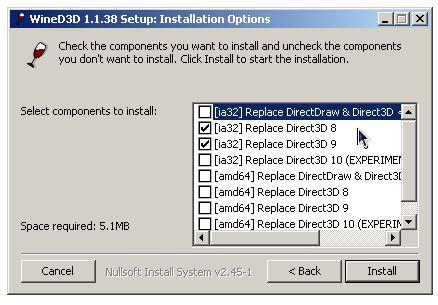
WineD3D For Windows est un wrapper DirectX 1-11 vers OpenGL basé sur WineD3D, qui est une implémentation presque complète de DirectX utilisée dans Wine.


Même si Windows prend en charge DirectX de manière native, l’utilisation de WineD3D peut améliorer la compatibilité avec les jeux plus anciens, en particulier sur Windows 8 et supérieurs qui ne prennent pas en charge les modes d’écran 16 bits. Une autre utilisation possible est d’imiter les versions non prises en charge de DirectX ou de transférer des applications DirectX vers OpenGL sans avoir à réécrire le code de rendu.
Notez que WineD3D est loin d’être parfait, et de nombreux jeux ne fonctionneront pas.
 
Des instructions sur l’utilisation des DLL sont également incluses.
 
Version 1.7.x fonctionne à partir de Windows 2000.
Version 2.x fonctionne à partir de Windows Vista.


Télécharger Wine D3D For Windows (Win 2K et +) v1.7.52 (1.7 Mo)

Télécharger Wine D3D For Windows (32 Bits | Win8 et +) v11.20 (1.9 Mo)

Télécharger Wine D3D For Windows (64 Bits | Win8 et +) v11.20 (1.9 Mo)

Site Officiel

En savoir plus…

Il s’agit d’un très bon émulateur de NES, ce fut le second à être releasé au public (en 1996 !) après Pasofami mais le premier à être le plus facilement utilisable. L’idée originale de iNES appartient à Alex Krasivsky, qui a trouvé les premières informations sur le matériel et NDA a écrit le code initial, il ne reste rien de ce code aujourd’hui.
 

iNES lance une immense quantité de jeux NES, supporte le Gamegenie, le Family BASIC Keyboard, le FDS et le système arcade VS-System. iNES propose plusieurs filtres graphiques et supporte le jeu en ligne.
 
Il a été porté sur Unix, MacOS, MSDos, Windows, Symbian, PocketPC, etc…
 
inesines2
 
– Added vertical scroll bug emulation (Tower Of Druaga works).
– Added left-side sprite masking emulation.
– Fixed background/sprites rendering order.
– Disabled sprite #0 hit detection at X=255.
– Disabled drawing sprites at scanline #0.
– Further optimized sprite drawing.


Télécharger iNES v6.1 (218 Ko)

Site Officiel

En savoir plus…

Un complément pour le cheat.7z (XML) de Pugsy (et qui ne sert que pour la partie arcade de MAME), à utiliser en plus du fichier original.


Wayder cheat

 
– Décompressez l’archive de manière à obtenir un fichier cheat_wayder.7z (qui lui n’est pas à décompresser) et wayder_omake.zip.
– Placez-les dans le répertoire courant de Mame.
– Enfin, ajouter une référence dans le fichier de configuration de MAME :
 
Remplacez la ligne : ‘cheatpath cheat’ par ‘cheatpath cheat;cheat_wayder;wayder_omake’
 
Lire le changelog ici.
 

Télécharger Wayder Cheat v0.266 (310 Ko)

Site Officiel

En savoir plus…

A l’instar de MAMEinfo pour MAME(Arcade), le fichier MESSinfo vous permet de suivre les changements entre les versions concernant les différents systèmes émulés par MAME (partie consoles et ordinateurs).


Télécharger MESSinfo.dat v0.289 (7.1 Mo)

Site Officiel

En savoir plus…

RYMCast est un lecteur VGM pour les fichiers musicaux Sega Genesis / Megadrive.


Télécharger RymCast (x86) v1.0.6 (2.6 Mo)

Télécharger RymCast (x64) v1.0.6 (2.8 Mo)

Site Officiel

En savoir plus…


https://getourbonus.com/fr/accueil

https://www.romspedia.com/