
pa update

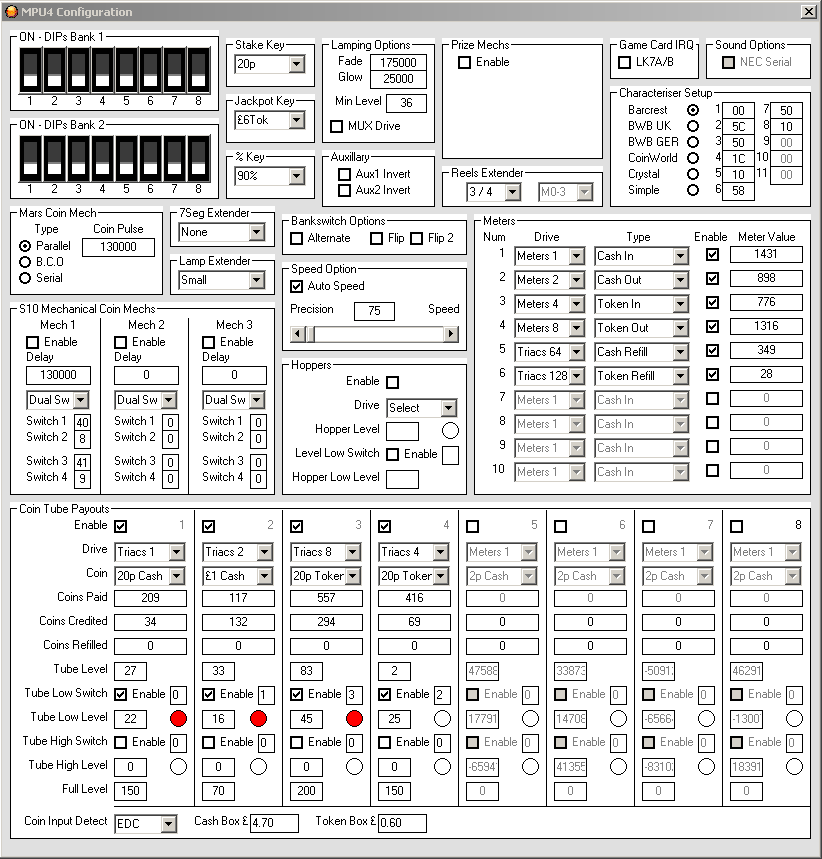
Un grand projet actif mené par Guitar. Project Amber peut émuler une grande majorité de jeux MPU4.

Supporte les Barcrest, BWB, Cristal, Coinworld, Empire, MDM, Il propose davantage d’options et de compatibilités que MFME. Un bon complément à celui-ci, Déjà une référence en matière de Fruit machine !

Une release se profile à l’horizon grâce au travail acharné de Guitar, aidé par une communauté soudée de passionnés de machines à sous, proche de l’auteur.


15/06/2014
Progress has been steady, but slower than I had hoped.
The synthesized sound is in, AY8910 needs a bit of work to sort the speed out on some machines.
For sampled sound the OKI chip is in and working, although it needs a few tweaks to sort out the dynamic frequency settings.
The NEC chip is written, and will be debugged later today to ensure its working.
The Crystal games decoding has been massively simplified and is now complete.
BWB, Coinworld & Simple Characterisers need doing.
Hoppers need doing.
1 Lamp Extender, 1 Reel Extender, and all the 7 seg extenders need completing.
That should see MPU4 complete and working.
Almost everything has been upgraded or tweaked to work more accurately, and to be easily re-used on later techs.

Getting FAME to initialize is step 1 of about 20, I am cautiously optimistic it can be made to work. IMPACT will be the next tech as I can use it as a test bed for the FAME dll. Getting a game going using just FAME will be much easier than running it as a second cpu.
MPU4 Plasma will either be a piece of cake or a nightmare, not likely any middle ground. MAME has a preliminary driver with it in but it looks very incomplete. If the memory map is pretty much right, it should be a doddle as there isn’t much to the Plasma board. If the memory map is wrong, or Barcrest are doing something funky with the board then it could be a bit of a mare to do. MPU4 video just seems like its going to be a massive pain in the backside to emulate we’ll see nearer the time.


9/06/2014

I’m toying with several ideas for server features. I haven’t decided yet what will make the final cut. One of the ideas was you could win a « Hot Tip » whereby the server would tell you which machines have high drift (i.e. are likely to pay out).
Other idea’s include a « Halves In » mode where you can go 50/50 with another player on a machine.
There will be 3 admin modes, master admin (me), minor admin (as assigned) and arcade admin (arcade owner)
admins will be able to change various settings and watch machines in real time, so if a machine needs a refill it will be able to be fixed without the original player leaving the machine.
Arcade owners will not be allowed to play in their own arcades. As an admin for an arcade you will be able to see various stats that would allow you to shark your own machines, so you wont be allowed to play in your own arcades.
There are other ideas too, but we’ll see what makes the final release. Be aware the when the new emu is released it will probably take a while to sort the bugs on the server.


Well, as per usual, things have been slower than I had hoped for.
But the coin handling is now in and working. Coin tubes are now emulated so token and cash low lights will go on and off as the real machine would. This also allows for different sounds to be played depending on whether a coin drops to tube, rejects, drops to cash box, or drops from tube A to tube B when tube A is full.
Small Lamp Extender is working, 7 Segs and Small extender is working.
The sampled sound framework is in and the OKI chip is 90% complete.
Thanks to a nudge in the right direction from DialTone, the FAME dll for the 68k core will now initialize without crashing the emulator.
This will (eventually) allow for MPU4 Plasma, MPU4 Video, M1 Video, JPM System 5, & JPM System 6 (IMPACT) to be emulated in future.
Sound, Extenders, Characteriser should see the regular MPU4 emulation complete.


01/06/2014

Todays 28 bugs later:
Lots of stuff has been fixed and most machines will boot now.
OKI and NEC sound is next on the agenda to allow sampled sound machines to boot without locking up waiting for the sound card.
Lamp, Reel & 7 Seg extenders can then be added as I need various machines working to test the various extenders.
I’m hoping tonight will see MPU4 (not Video or Plasma) near as dammit complete.
Some extra features have been added along the way, some extra bugs found in the original VB code too which have been fixed in the C++ version.
Once MPU4 is done I will post some screen shots or a video of the new stuff.
IMPACT will be next up on the to do list.


Vous trouverez tous les détails concernant Project Amber dans une section dédiée sur le forum de Fruit-Emu, où s’active une sympathique communauté.

 

Télécharger Project Amber v0.10910 RC1 (47,1 Mo)

Site Officiel

En savoir plus…

Une interface graphique pour Mame dédiée aux MameCabs.


Les changements:


06/14/2014

– Fixed second building crack sound effect not firing during the shutdown sequence
– Always center the selected category/game in the lists
– Asynchronously load game lists so that there’s no stutter when you select one
– Big Blue configuration utility can now read MAME’s list XML output
– New interface for adding games from MAME
– Added migration feature that lets you move Big Blue entries from one location to another


06/11/2014

– Fixed snapshot not resetting after a 2 player game
– Improved config UI scroll behavior


06/10/2014

– Added new shutdown/restart sequence to give people time to decide whether they really want to shut down or restart their machine
– Added support for game lists; you can now have multiple lists, but you can still configure Big Blue to work with only a single list if you want to keep it simple
– Big Blue now allows you to configure programs to run both before the main game is launched and after the main game is launched
– Dropped support for Windows XP; GroovyMAME works in Windows 7 now; I wanted to do some asynchronous coding for Big Blue’s game lists, and there’s no reason to cripple the program for a busted, out-of-date OS
– Added GUI configuration utility to maintain Big Blue


Télécharger Big Blue Frontend (2014/06/15) (24,4 Mo)

Télécharger Big Blue Frontend (XP) (2014/05/31) (9.2 Mo)

Site Officiel

En savoir plus…

MameUI est un émulateur multi-arcade émulant plus de 28000 jeux (à partir de 1975) et incluant une interface (frontend).


Télécharger MAMEUI64 v0.153.1 r30979 (17,8 Mo)

Télécharger MAMEUI Icons Pack v0.289 (43.5 Mo)

Télécharger MAMEUI Screenshots Pack (Update) up to v0.258 (5.6 Mo)

Site Officiel

En savoir plus…

Bochs est un émulateur PC tournant sous Windows, son développement s’effectue en Open Source. Ecrit en C + +, il fonctionne sur la plupart des plates-formes populaires. Il inclut l’émulation des CPU x86 d’Intel, les périphériques E / S courants et un BIOS personnalisé. Actuellement, Bochs peut être compilé pour émuler un processeur 386, 486, Pentium/PentiumII/PentiumIII/Pentium4 ou x86-64, y compris MMX option, SSEX et 3DNow! instructions.Bochs est capable d’exécuter la plupart des systèmes d’exploitation à l’intérieur de l’émulation, y compris Linux, DOS, Windows ® 95/98 et Windows ® NT/2000/XP ou Windows Vista/7/8.


L’utilisation «typique» de Bochs est de fournir émulation PC x86 complète, y compris le processeur x86, des périphériques et la mémoire. Cela vous permet d’exécuter OS et des logiciels au sein de l’émulateur sur votre poste de travail, un peu comme si vous aviez une machine à l’intérieur d’une machine. Par exemple, disons que votre poste est un poste de travail Unix/X11, mais que vous souhaitez exécuter des applications Win’95. Bochs va vous permettre d’exécuter Win 95 et le logiciel associé sur votre poste de travail Unix/X11, affichant une fenêtre sur votre poste de travail, simulant un moniteur sur un PC.
 
Les changements sont:
 
CPU / CPUDB
– allow sandy bridge configuration even when AVX is not compiled in
 
Configure and compile
– fixed compilation error when 3dnow support is enabled
– speedup Visual Studio build by almost 20% by adding /Gr compiler option
 
Misc
– fixed minimizing win32 gui window and resolution change while minimized
– added compiled SeaBIOS 1.7.5 image into Bochs tree along with Bochs BIOS images
– documentation fixes and updates


Télécharger Bochs (32 bits) v2.6.6 (4,9 Mo)

Télécharger Bochs (P4 + SMP) v2.6.11 (2.3 Mo)

Site Officiel

En savoir plus…

Les derniers builds en développements sont à présent disponibles.


Citra: Emulateur de Nintendo 3DS.
3Dmoo: Emulateur de Nintendo 3DS.
RPCS3: Emulateur de Playstation 3.
Jpcsp: Emulateur de Sony PSP.
CxBx: Emulateur de Microsoft X-Box.
Xenia: Emulateur de Microsoft X-Box 360.


Télécharger Citra (32 bits) (2015/04/01) (12.5 Mo)

Télécharger 3dmoo (x86) (2017/08/21) (454 Ko)

Télécharger RPCS3 (32 bits) v0.0.0.4 (2014/06/02) (3.1 Mo)

Télécharger RPCS3 (WIP) v0.0.43 Alpha (2026/11/25) (35.6 Mo)

Télécharger JPcsp (x86) v0.7 rev 0318d15e (26.4 Mo)

Télécharger JPcsp (x64) v0.7 rev 00ac4d6 (29.1 Mo)

Télécharger CXBX Shogun v0.8.1-Pre3 (2015/10/30) (398 Ko)

Télécharger Xenia v1.0.2844 (2026/11/25) (3.9 Mo)

Il s’agit de l’intégralité des traductions Gameboy et Megadrive du site TRAF. Les nouveautés concernent 3 jeux tous traduits par Terminus: Kwirk, Ninja Jajamaru (série), El Viento.


Télécharger Nintendo Gameboy (2014/06/15) (1.2 Mo)

Télécharger Sega Megadrive (2026/11/14) (12.4 Mo)

Site Officiel

En savoir plus…

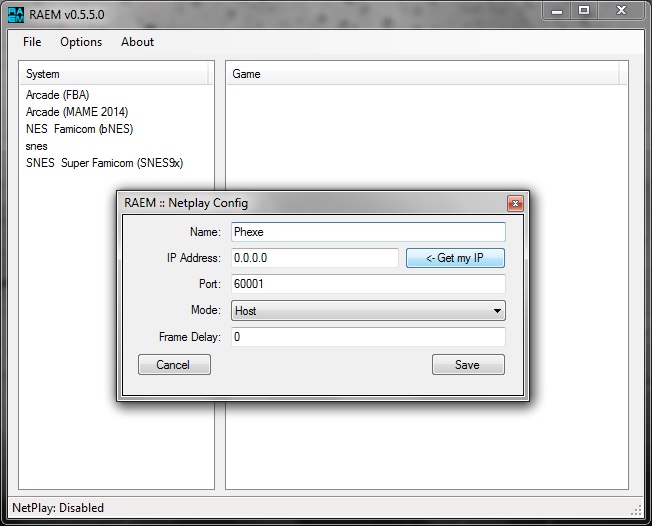
RAEM (ex-RA player -afin de ne pas être confondu avec Real Player- est une interface graphique dédiée à RetroArch. RAEM vous permet de configurer séparemment les différents cores des différents systèmes (NES/SNES/PSX/etc). Vous pouvez même gérer plusieurs cores de systèmes (comme Snes9X / bSNES etc).


raem


RAEM permet :
– de configurer les cores des systèmes (mode avancé préliminaire)
– la configuration des contrôles par core (requiert “retroarch-joyconfig.exe”)
– Ajoute une extension d’archive automatique dans le système « types de fichiers »


Cette version ajoute le jeu en réseau.


Télécharger RAEM v0.5.5.0 (166,6 Ko)

Site Officiel

En savoir plus…

Il s’agit du plugin audio en provenance de PCSXR r55425 mais modifié pour être compatible avec la version 64 bits de l’émulateur.


Télécharger dfsound 64bit for PCSXR (2014/05/29) (178.3 Ko)

Site Officiel

En savoir plus…

SSE pour « Steven Seagal Edition » est un émulateur d’Atari ST basé sur le STeem original v3.2 de 2004. Il emprunte également des améliorations en provenance de Hatari.


Les améliorations sont les suivantes:


– Better handling of CTR disk images: Vroom, Outrun and other games using weak bits. Last version of CAPSImg 5.1 necessary (may 2014)
– Timings: correct frame cycles for 508 cycle scanlines
– Timings: sync 68000 on E-clock for ACIA R/W, HBL, VBL interrupts if option 6301/ACIA checked
– various bugfixes


Télécharger Steem SSE v3.6.4 (789,8 Ko)

Site Officiel

En savoir plus…

Il s’agit d’une version spéciale de DeSmuME (Meilleur emulateur Nintendo DS). DeSmuME  X432R reprend la SVN officielle r5038. Cette version propose un rendu en haute résolution à titre expérimental.


La résolution d’origine peut se retrouver quadruplée MAIS il vous faudra un ordinateur TRES puissant (CPU & carte graphique) pour en bénéficier dans de bonnes conditions. Selon l’auteur, le déboggage est insuffisant donc un crash est possible. Les versions 32 & 64bits sont incluses dans l’archive.


Télécharger DeSmuME X432R (2014/06/14) (2,2 Mo)

Site Officiel

En savoir plus…

MEWUI est une simple extension de l’interface interne de MAME, dont la caractéristique principale réside dans la visualisation de la liste complète des jeux. Les améliorations sont les mêmes que pour Mewui-UME.


Télécharger MEWUI-MAME (x86) v1.54 RC1 (21.7 Mo)

Site Officiel

En savoir plus…

MEWUI-MESS est une simple extension de l’interface interne de MESS, dont la caractéristique principale réside dans la visualisation de la liste complète des jeux. Les améliorations sont les mêmes que pour Mewui-UME.


Télécharger MEWUI-MESS (x86) v1.54 RC1 (14.2 Mo)

Site Officiel

En savoir plus…


https://getourbonus.com/fr/accueil

https://www.romspedia.com/
