Un émulateur Jupiter Ace dont voici les nouveautés:


v0.317
– ADDED: Check the Edit ROM menu item to be able to edit the ROM.
– ADDED: Onscreen keyboard.
– ADDED: Added extra suffixes for Spool file loading ( .ja4,  .fs)
– FIXED: The Copy, Fill and Find function didn’t actually work properly!!
– FIXED: If you cancelled load WAV file in WAV browser SpudACE crashed.
– REMOVED: OpenGL buttons in Options.


v0.315
– ADDED: You can now load a custom ROM via the Options dialog.
– FIXED: The folders path in the Options dialog were including the last file loaded.


Télécharger SpudAce v0.317 (297,6 Ko)

Site Officiel

En savoir plus…

Il s’agit d’une interface graphique pour l’émulateur OpenMSX proposant une multitude de fonctions.


Enhancements:
   – Added ability to filter databases by company, year, country, medium, size, MSX generation, sound chip and genre
   – Added game properties in the right-click contect menu
   – Added ability to update game extra data in all databases. Useful when there’s a new version of the accompanying extra-data.dat file
   – Added slight display improvements to the Mac version
   – Added ability to select a game in the list by typing the first few letters of its name


Bug fixes:

   – Some fields set internally in the game profile (and only now displayable in the new properties screen) were not correct. The new ‘Update all databases’ feature fixes that automatically


Télécharger OpenMSX Launcher v1.2 (1.7 Mo)

Site Officiel

En savoir plus…

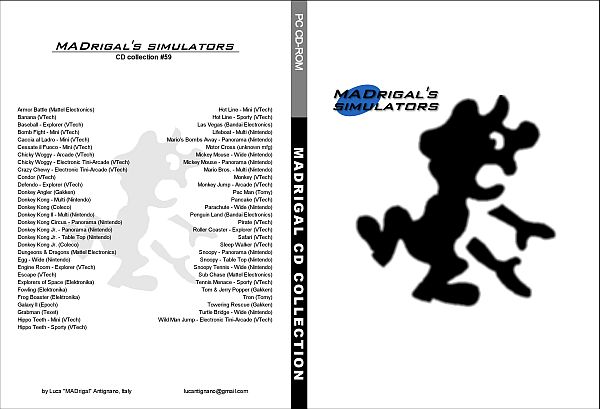
Madrigal CD Collection regroupe spécifiquement la totalité des simulateurs de Madrigal. Ce set est en complément au « Handheld Remakes (Simulators) » afin de respecter le nom d’origine des simulateurs de Madrigal.


dvd_cover_full


Télécharger MADrigal CD Collection v59.2 (81.3 Mo)

Site Officiel

En savoir plus…

MAME Plus! Plus Kaillera permet le jeu Online avec ou contre d’autres joueurs. Cette version permet notamment de jouer à plusieurs sur des titres exclusivement supportés par Mame.


Site source n°1. Site source n°2. Site source n°3.


Télécharger MAME Plus! Plus Kaillera (x86) v0.153 r213 (20.7 Mo)

Site Officiel

En savoir plus…

Il s’agit d’un simulateur de Speak And Spell pour Windows 98/98SE/Me/NT4/2000/XP/Vista/7/8.

L’auteur ne veut pas que son simulateur soit diffusé ailleurs que via son site, vous devrez donc aller sur le site officiel pour télécharger l’archive.


Site Officiel

En savoir plus…

fs-uae est un emulateur multi-plateformes (sur Linux , mac osX et windows) reprenant les travaux de WinUAE/E-UAE/PUAE en mettant l’accent sur l’émulation des jeux sur lecteur de disquette et CD-Rom. A noter que cette version propose un launcher dédié. Il s’agit de la version en cours de développement.


Télécharger FS-UAE (Instable) v2.5.2 DEV (30,2 Mo)

Site Officiel

En savoir plus…

Appelé également Gens Movie, il s’agit d’une version de Gens (basé sur la version 2.12a) permettant d’enregistrer vos parties sous l’émulateur.


r348
– Video mode transitions fix


Télécharger Gens Rerecording v2.12 Movie 11c SVN 348+742 (1,8 Mo)

Site Officiel

En savoir plus…

Il s’agit d’un émulateur spécialisé dans l’enregistrement vidéo et basé sur le noyau de bsnes. Destiné avant tout aux vidéos dans le but d’obtenir des enregistrements parfaits en vu de référencements sur des sites comme TAS.


– Delete the now-unused emulator_status stuff
– Numeric range class, obsolete clip_range.
– Lua: gui.solidrectangle
– Lua: (D)BITMAP:draw_clip, (D)BITMAP:draw_outside, TILEMAP:draw_outside
– c-interface: Add some translation templates
– src/lua/gui-bitmap.cpp Initialize spal to avoid compiler warning
– Don’t use -Werror
– Use open/read/write/close for binary saves instead of iostreams
– Select slot hotkeys
-Fix macros getting frame duplicated after loadstate
– Advance macros after frame is complete, not before frame starts
– SA1 tracing support + memorywatch/search SA1 IRAM
– Recognize SA1IRAM for purposes of breakpoints
– ZMBV full search mode
– SNES: SA1 registers for memory.getregister/setregister
– SNES: Pseudo-registers hcounter and vcounter
-Memory search: Resolve memory area if possible
– Merge multiple versions of get_read_address() into one
 -Lua: Deprecate global addresses
– moviefile::get_movie_length: Use milliseconds, not nanoseconds
– Use curl-config instead of -lcurl
– Wipe all sorts of potentially sensitive stuff after use
– Memory peek/poke: Accept and show relative addresses
– Autodetect followed by undefined with multiple choices: Ask user
– Lua: Fix some includes
– Fix SA1 open bus
– Trace logger (Window): Show start of frame
– Trace logger: Allow deleting lines / clearing
– Fix potential crash on exit
– lsnes-dumpavi: Support downloading movies
– Trace logger: Don’t double free trace hooks
– Support configurable URI shorthands
– Movie editor: Draw clear / fix current column
– Movie editor: Insert multiple lines at once
– Fix loading states with movie-ahead without ROM
– If loading ROM with multiple candidates, prompt before adding to recentrom
– Tweak the RNG a bit
– Some Win32 build fixes
– TAS input keyboard support
– Use urandom / rtlgenrandom


Télécharger Lsnes (Beta) rr2 beta 21 (10,3 Mo)

Site Officiel

En savoir plus…

layout_header


2014-05-05_egg2014-05-05_mickeymw


I have always wanted to upgrade my simulators of games belonging to the
Nintendo Game & Watch series, but unfortunately I don’t own the original
handhelds anymore and I have no chance to scan them at high resolution by
myself.

Luckily, I recently got a huge help from two Austrian men, authors of the
gorgeous Der Inoffizielle Game & Watch Sammlerkatalog book, who provided me
with great pictures and scans from a few games I simulated long ago: Egg,
Mickey Mouse, Snoopy Tennis and Turtle Bridge.

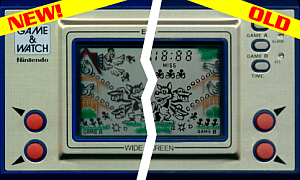
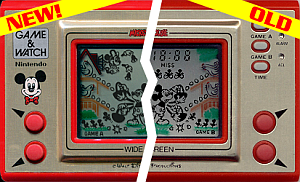
I decided to upgrade the former two games first, as well as their Russian
clones (minor fixes). This is the new look of the Game & Watch simulators:

I will release the upgraded Snoopy Tennis and Turtle Bridge sometimes soon.
Here’s the list of the games I’m releasing today:

– Egg (Nintendo, Wide Screen) S4/1.03 (Standard 4, complete rewrite)
– Mickey Mouse (Nintendo, Wide Screen) S4/1.02 (Standard 4, complete
rewrite)

– Explorers of Space (Elektronika) S4/1.03 (Standard 4, various
optimizations)
– Fowling (Elektronika) S4/1.02 (Standard 4, various optimizations)
– Frog Boaster (Elektronika) S4/1.02 (Standard 4, various optimizations)

– MADrigal CD Collection ver. 59.2

Grab all the new files from the usual page.


Site Officiel

Créé par BUT, Emuman, K&K, Sword et Xvi. Mame Plus! est sans problème la meilleure version de Mame pour Windows, avec ou sans frontend. Support multi-langage, tirs automatiques, option anti-sortie, interface interne améliorée, interface de gestion des roms améliorée, effets vidéos supplémentaires (2xSai, RGB, hq3x, 2xPM…), meilleure gestion des contrôles, support de la NeoGeo en mode console, il regroupe également plein de correctifs et de drivers additionnels…


r5139
– fixed access violation(-listgames)
– update tp text


Site source n°1. Site source n°2. Site source n°3.

Télécharger Mame/MameUI Plus! (x86) v0.153 r5144 (38.1 Mo)

Télécharger Mame/MameUI Plus! (x64) v0.168 r5272 (32.8 Mo)

Site Officiel

En savoir plus…

PinballX est un frontend gratuit pour jeux de flippers numériques développé par l’auteur de GameEx. Il est compatible avec les bases de données et les médias disponibles pour HyperPin.

 
Les changements sont:
– GameEx Online has been upgraded to a 2048 secure encrypted SSL server to provide security for your data.
– This version of PinballX connects to GameEx Online over the new encrypted connection and previous versions of PinballX no longer work with GameEx Online.


Télécharger PinballX v1.80 (53,5 Mo)

Site Officiel

En savoir plus…

Un émulateur NEC PC-6001 Japonais.
 
Changements (google):
– It corresponds to SR at last. However FM sound source is not yet.
– Fixed color snapshot from was funny.
– Improved there be freeze at reset.
– Fixed a problem when you build NOMONITOR (no monitor mode).
– I was returned to the 8bit color mode of the internal. (Final output 32bit)
– Review the OSD path name processing relationship. UnDelimiter () abolition), Delimiter (.ini file, change the path to a relative path notation SAVE file anywhere. (Only sub-directory of the executable file below)
– Bug fixes thread class. (Mistake Returns initial cThread :: IsCancel of ())
– Fixed DISK routine. Added error handling. (Akigawa Mr. Thanks)
– Bug fixes SAVE anywhere. (Eighttails Mr. Thanks)


Télécharger PC6001V (x86) v1.21 (629.3 Ko)

Télécharger PC6001V (x64) v2.04 (4.2 Mo)

Site Officiel

En savoir plus…


https://getourbonus.com/fr/accueil

https://www.romspedia.com/