Il s’agit d’un frontend pour Mednafen avec une interface originale et très complète, en voici quelques caractéristiques:


(BugFix) – Fixed UI transparency issue
(BugFix) – Fixed issues with games library sidebar text ‘jumping’ when changing the selected game
(Enhancement) – Some non-system related mednafen key bindings can now be set within MedLaunch
(Enhancement) – Added detection of system for discs (discs will be added to the correct system on import, even if they are in the wrong folder)
(Enhancement) – Megadrive .smd interleaved format games can now be imported. On game launch, if interleaving is detected, the ROM will be converted into the cache folder and launched from there (this is still experimental – its easier to ditch your old .smd roms and get something newer)
(BugFix) – MegaDrive 6-button pad was missing the ‘mode’ button in control configuration


Télécharger MedLaunch v0.5.25.3 (40.6 Mo)

Site Officiel

En savoir plus…

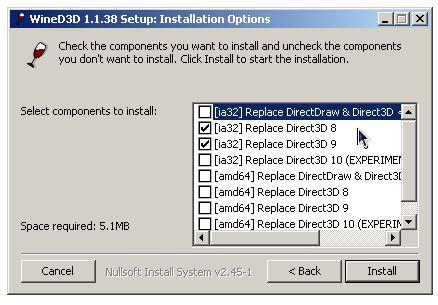
WineD3D For Windows est un wrapper DirectX 1-11 vers OpenGL basé sur WineD3D, qui est une implémentation presque complète de DirectX utilisée dans Wine.


Même si Windows prend en charge DirectX de manière native, l’utilisation de WineD3D peut améliorer la compatibilité avec les jeux plus anciens, en particulier sur Windows 8 et supérieurs qui ne prennent pas en charge les modes d’écran 16 bits. Une autre utilisation possible est d’imiter les versions non prises en charge de DirectX ou de transférer des applications DirectX vers OpenGL sans avoir à réécrire le code de rendu.
Notez que WineD3D est loin d’être parfait, et de nombreux jeux ne fonctionneront pas.
 
Des instructions sur l’utilisation des DLL sont également incluses.
 
Version 1.7.x fonctionne à partir de Windows 2000.
Version 2.x fonctionne à partir de Windows Vista.


Important: Les versions 64 bits sont destinées aux applications 64 bits sur Windows 64 bits. Pour les anciens jeux, utilisez la version standard que ce soit sur Windows 32 ou 64 bits.
 

Télécharger Wine D3D For Windows (Win 2K et +) v1.7.52 (1.7 Mo)

Télécharger Wine D3D For Windows (32 Bits | Win8 et +) v11.20 (1.9 Mo)

Télécharger Wine D3D For Windows (64 Bits | Win8 et +) v11.20 (1.9 Mo)

Site Officiel

En savoir plus…

Mesa3D peut être utilisé pour fournir un rendu OpenGL aux applications Software.
Il est particulièrement utile pour exécuter d’anciennes applications et des jeux qui utilisent une ancienne version d’OpenGL et qui ne fonctionnent pas correctement sur du matériel moderne.
Notez que ce dispositif de rendu est loin d’être parfait, et de nombreux jeux ne fonctionneront pas encore.
 
Des instructions sur l’utilisation de la DLL sont incluses.


NB: Parce que certaines applications et jeux vont refuser de charger opengl32.dll à partir de leur répertoire, vous pouvez utiliser MesaInjector.
 

Télécharger Mesa3D (x86) v20.1.8 (6.7 Mo)

Télécharger MesaInjector v20.1.8 (8.5 Mo)

Site Officiel

En savoir plus…

MedGui Reborn est une interface (Frontend) pour Mednafen sur OS Windows. Cette archive inclut MetroMed.


– Added RomHack/Translations download by link tab
– Added mirror on ModLand Scraper
– Fixed any bugs


Télécharger MedGui Reborn v0.127 (24.5 Mo)

Site Officiel

En savoir plus…

Il s’agit d’un fork de DOSBox des plus intéressant, destiné à Windows Linux et MacOS et créé par Jon Campbell. Il possède une compatibilité excellente et met l’accent sur la précision d’émulation notamment en ce qui concerne l’émulation de Windows 3.x à ME. En outre il ajoute des améliorations en provenance d’autres builds comme DOSBox ECE avec l’émulation de la 3DFX en interne.


dosbox-x
 

Les améliorations sont les suivantes:

– The Windows maximize button no longer triggers fullscreen mode.
– Direct3D, OpenGL, and Surface outputs updated to fill the window in Windows builds when the window is maximized. If aspect correction is enabled, the Direct3D and OpenGL outputs will scale the DOS screen (with pillarbox/letterbox padding) to the correct aspect ratio and center within the maximized window.
– Fixed minor memory leak in MT32 (MUNT) synthesizer usage.
– Fixed uninitialized state issues with DMA channel 4 (cascade).
– IMGMOUNT now allows mounting the El Torito bootable floppy image of a CD-ROM drive as a drive letter and accessible (read only) filesystem. The FAT filesystem driver was fixed to support working from sources other than a direct file.
– PC-98 mode fixed not to register certain built-in commands and binaries to drive Z:\ that are not compatible with PC-98 mode.
MEM.EXE in particular uses IBM PC-specific techniques to gather it’s information, and is therefore incompatible with PC-98 mode.
This can be verified from the source code as MEM.EXE was evidently borrowed from the FreeDOS project.


Télécharger DOSBox-X (Visual Studio) v2026.10.01 (28.9 Mo)

Site Officiel

En savoir plus…

Il s’agit de WinUAE, la référence de l’émulation Commodore Amiga, traduit en français.


Télécharger WinUAE (Français | 32 bits) v6.0.3 (8.6 Mo)

Télécharger WinUAE (Français | 64 bits) v6.0.3 (11.0 Mo)

Site Officiel

En savoir plus…

Anciennement appelé UoYabause, YabaSanshiro est une version basée sur Yabause (émulateur Saturn) maintenue par Devmiyax (développeur japonais).
Devmiyax avait proposé plusieurs patchs pour la branche officielle puis plus rien pendant de longs mois jusqu’à l’arrivée de YabaSanshiro sur la scène de l’émulation Saturn pour le système Android et sur laquelle cette version Windows est basée. L’émulateur fait presque jeu égal avec SSF (d’ailleurs certains passent mieux sur Yabause) rendant les deux émulateurs complémentaires.
Cette version inclut à la fois les dernières améliorations de la version officielle de développement de Yabause et celles de Devmiyax, probablement le build le plus abouti.

 
uoyabause
 
Les améliorations:
 

– Graphics Emulation Improvement


Ce build est basé sur les dernières sources disponibles et a été compilé par Tradu-France.
 
Vous pouvez consulter la liste de compatibilité avec les jeux UoYabause sur le Wiki Uoyabause Tradu-France. L’avantage du Wiki, c’est que tout le monde peut participer à la liste.

 
Builds officiels de Devmiyax.

Télécharger YabaSanshiro v3.4.0 (20.1 Mo)

Site Officiel

En savoir plus…

MAME Content Manager Plus est un programme simple qui permet de trier et selectionner les roms que vous voulez garder sur votre PC. Il permet de facilement renommer ou effacer les roms MAME en utilisant les catégories : Adult, Quiz, Mahjong, Puzzle, etc.


Les changements sont visibles ici.


Télécharger MAME Content Manager Plus v1.2 (946,2 Ko)

Site Officiel

En savoir plus…

Également disponible sous Linux, Xpeccy est un excellent et complet émulateur de:


– ZX Spectrum 48K
– Spectrum +2
– Spectrum +3
– Pentagon (128-512K)
– ZS Scorpion (256,1024) + ProfROM
– Pentagon 1024SL
– ATM Turbo 2
– ZXEvo BaseConf
– ZXEvo TSConf
– MSX1 (beta)
– MSX2 (alpha)
– Gameboy color

 
Forum alternatif
 
xpeccy


Télécharger Xpeccy v0.6 (2026/08/20) (9.8 Mo)

Télécharger Xpeccy (Win QT Libraries) (9.4 Mo)

Site Officiel

En savoir plus…

Nouvelle version de cet émulateur d’Amiga dont voici les améliorations:


Core emulation updates:

  • 68030, 68040 and 68060 full instruction and data cache emulation, with or without MMU emulation.
  • 68030, 68040 and 68060 EC model partial MMU (transparent translation registers only) emulation.
  • 68030, 68040 and 68060 MMU emulation performance improved (added extra translation caches).
  • STOP-instruction CPU model specific undocumented behavior emulated when parameter does not have S-bit set.
  • 68020+ DIVS/DIVU CPU model specific undefined overflow condition N and Z flags emulated.
  • Undocumented 68881/68882 FMOVECR values emulated.
  • 68020/030 BCD instructions undocumented V flag behavior fixed (68000 was already correct)
  • Optional Toshiba Gary slow (chip ram like) Z2 IO and/or ROM space access speed.

 
Emulated hardware expansion updates:

  • Added Cubo CD32 later revision hardware support, PIC copy protection, touch screen, NVRAM and RTC emulation. (TODO: Coin and ticket dispenser support, no hardware information available)
  • Cubo CD32 is now an expansion device, added DIPs, PIC game ID/language and expansion device enable options.
  • A2090 Combitec and MacroSystem 3rd party ROM update/adapter supported.
  • DKB 1230/1240/Cobra and Rapidfire flash rom write support added.

 
New emulated hardware expansions:

  • Ashcom Addhard (SCSI)
  • Evesham Micros Reference (SCSI)
  • FastATA 4000 MK I/II (IDE)
  • Gigatron Arriba (IDE)
  • Kupke Golem HD3000 (OMTI)
  • Profex HD3300 (OMTI)
  • Reiter Software Wedge (OMTI)
  • Sprit Technology InMate (SCSI)
  • Music Master dongle

 
Direct3D 11 support implemented:

  • Requires Windows 7SP1 and later. Windows 7 requires KB2670838 (Available via Windows update as an optional update), Windows 8 and later does not need any extra packages like D3D9 support required (Ancient DX9 redistributable).
  • Requires hardware level 9.1 or higher, which means most Windows 7 capable GPUs are supported.
  • All Direct3D9 mode features supported (overlays, masks, custom shaders)
  • Variable sync (G-Sync, possibly also FreeSync) supported in windowed mode.
  • Many D3D9 custom shaders are supported automatically, some require manual modifications to work in Direct3D 11 mode.

 
Other new features and updates:

  • Simple box art/screenshot config file support.
  • If Wait for Blitter is enabled and blit size makes no sense, don’t wait. Fixes long delay in Vital / Mystic.
  • Added “CIA 391078-01” advanced chipset checkbox. This CIA revision has a bug in IO port output mode, reading output mode port will always read output mode data state. Other models, including original DIP 8520, 391078-02 and Akiko internal CIAs read IO pin external voltage level as documented. This can affect “bad” mouse left button/joystick fire button reading code (not working or stuck button). Used in A600. A1200/A4000 can have -01 or -02 revision.
  • Added ATAPI Tape drive emulation.
  • CD SCSI emulator READ CD-DA and READ CD-DA MSF commands emulated.
  • Expansion device GUI changes are now always activated after hard reset.
  • uaehf.device hardfiles/harddrives unit number is now user configurable.
  • “Include CD and FMV Audio” and/or sound mode change on the fly when CD or FMV audio is playing is now supported.
  • Debugger assembler support (a) and some other misc debugger updates.
  • Optional non-rawinput mouse and keyboard mode is back (-norawinput_all)
  • Added Misc panel option to show WinUAE in Windows shutdown/logoff screen (Vista or newer) if emulation session is active.
  • JIT Direct is allowed in CyberStorm PPC configuration but it also disables CSPPC MAP ROM hardware feature.
  • Ability to image CHS-only IDE drives using USB adapters that don’t support CHS-only drives. (Common side effect is drive being detected but it appears as zero size drive in Windows Disk Management)

 
Bugs fixed:

  • It was not possible to override Z2 RAM board autoconfig data if board had built-in manufacturer/product ID defaults.
  • It was not possible to change existing path with Select Directory/Select Archive or Plain File buttons.
  • Fixed 64-bit version random crashes that usually happened with some shell extensions.
  • Z3 RAM in manual mode was completely broken.
  • UAE directory harddrive/hardfile KS 1.2 autoboot hack didn’t work without extra reset if UAE autoconfig board wasn’t first board in autoconfig chain.
  • 68030 data cache emulation corrupted data if write was cached, write size was word or long and address was odd.
  • 68040/060 without FPU: many FPU instruction F-line exceptions generated incorrect stack frames.
  • ECS Denise BPLCON2 ECS-only bits (for example KILLEHB) were masked unless AGA was also selected.
  • Obsolete IDE FORMAT TRACK command fixed.
  • GamePorts panel custom mapping incorrectly parsed joystick autofire state from config file.
  • Directory filesystem ACTION_SET_DATE failed to change date stamp if file was read-only.
  • 68020 memory cycle exact CPU speed slider is again partially working, CPU speed can be reduced but not increased.
  • GamePorts panel custom mapping incorrectly parsed joystick autofire state from config file.
  • uae-configuration joystick port (joyportx) modification only queued but didn’t apply changes.
  • uaeserial.device crash fixed. DTR/RTS state now match serial.device behavior when device is opened.
  • Fixed uaegfx VRAM size check, some modes that almost filled whole VRAM didn’t appear in resolution list.
  • uaenet.device didn’t close low level ethernet handles when Amiga was reset, causing duplicate packets.
  • Bitplane overrun condition triggered incorrectly in rare situation where bitplane DMA is enabled after DDFSTOP on OCS
  • Tape drive emulation fixes. Fixes Amix install error if last file on tape was selected for install.

 
AVI recording bug fixes and updates:

  • First avioutput recorded frame was sometimes partially corrupted.
  • When saving state with avioutput active: last frame before state save was not recorded.
  • Number of avioutput frames buffered (waiting for compression thread processing) counter was reset periodically which caused lost frames (and leaked memory) in recorded video if CPU was not fast enough.
  • Delay initialization until first display frame or sound buffer recording request comes, previously “before filtering” option may have used wrong display size in some situations.
  • Uncompressed video selection is not forgotten anymore.
  • First frame was not rendered (and also not recorded) if statefile was restored when emulation was already running.
  • If emulator state was changed (debugger breakpoint, statefile save etc..), last frame before state change was not recorded.
  • File splitting (2G limit) incorrectly flushed sound buffers causing random sound glitches.
  • Added -max_avi_size <bytes> -command line parameter to set split size.
  • If recording was started and GUI was never opened in same session, sound recording rate become 44100Hz, causing AV syncronization issues if real rate was not same.

And more…


Télécharger WinUAE (x86) v6.0.3 (8.4 Mo)

Télécharger WinUAE (x64) v6.0.3 (10.8 Mo)

Télécharger WinUAE Shaders + Filters Pack (29/10/2017) (33 Ko)

Télécharger WinUAE Plugin + Extension Pack (21/06/2018) (13.6 Mo)

Site Officiel

En savoir plus…

Il s’agit du Frontend GameEX mais optimisé pour les jeux d’arcade.
 
Il est plus léger, possède des améliorations cosmétiques et prend en charge les nouveaux thèmes vidéo de chez EmuMovies.
 
Il prend en charge les systèmes de MAME et d’arcade et présente les différences de caractéristiques suivantes par rapport à la version standard de GameEx:
 
– Supporte les thèmes vidéo.
– Moins de code. Plus léger. Moins d’options.
– Design optimisé pour les écrans de télévision et d’arcade.
– Support des résolutions basse (640 x 480).
– Apparence plus proche d’un HyperSpin.


Télécharger GameEx Multiplatform Arcade Edition v19.97 (271 Mo)

Site Officiel

En savoir plus…

GameEx est une interface graphique pour vos émulateurs. Elle sert également de lecteur vidéo, DVD et CD.


Certaines fonctionnalités de GameEx :
– lit aussi les fichiers audio.
– supporte les affichages LCD/VFD, ArcadeVGA.
– peut adapter son affichage pour les écrans larges, elle peut aussi tourner l’affichage de 90° (vertical).
– peut être contrôlée à distance, ou par une manette ou par la souris uniquement.
– supporte les contrôleurs arcade : HotRod, X-Arcade, SlikStik et IPAC.
– est compatible avec les interfaces entre PC et cartes arcade : U360, I-PAC, J-PAC.
– intègre un Jukebox qui supporte les fichiers ogg, mp3, wma, m4a, et flac.
– Les musiques peuvent être lues et changées pendant que vous êtes en train de jouer.


Ce frontend est disponible en version gratuite & payante (17 $) incluant de nombreuses autres fonctions.


Télécharger GameEx v19.98 (460 Mo)

Site Officiel

En savoir plus…


https://getourbonus.com/fr/accueil

https://www.romspedia.com/