InkSpector 2 est un émulateur Sinclair ZX Spectrum précis pour Windows.

0 commentaire



InkSpector 2 est un émulateur Sinclair ZX Spectrum précis pour Windows.
OxyROMon est un gestionnaire de ROM multi-plateforme écrit en Rust (il est donc plutôt voué à être installé sur un serveur, mais peut aussi très bien s’utiliser sur un PC). Comme la plupart des gestionnaires de ROM, il vérifie les fichiers ROM par rapport aux bases de données connues. Il est conçu principalement dans un objectif d’archivage.

Les changements sont les suivants:
0.10.1
– Fix RVZ conversion
0.10.0
– Fix version sorting in 1G1R when parent is missing or unwanted
– Treat the first elligible clone as parent in 1G1R when parent is missing
– Greatly improve completion calculation in sort-roms
– Add support for the Atari 7800 header definition
– Embed some no-intro header definitions and use them as fallback
– Add initial support for arcade systems
– Add a new rebuild-roms subcommand for arcade ROM sets
– Add support for RVZ via dolphin-tool
Applewin est un excellent émulateur Apple IIe pour Windows et développé par Tom Charlesworth. Applewin est basé sur la version originale 1.10.4 d’Oliver Schmidt.

Play! est une tentative de créer un émulateur PlayStation 2 sous Windows / MacOS / iOS / Android. Il est actuellement écrit en C / C + + et utilise un système de mise en cache / de recompilation d’instruction pour obtenir de meilleures performances tout en émulant le CPU.
L’émulateur peut faire fonctionner quelques jeux, mais très moyennement dans la plupart des cas. L’objectif de l’auteur est d’atteindre un niveau de qualité qui permettra à quiconque de jouer son jeu favori PlayStation 2 sur son PC.

– Compatibility improvements: Star Wars Clone Wars, Winter Sports 2008 and RPG Maker 3 improved their status.
– Fixed IOP crashes occurring randomly in Shadow Hearts 2.
– Improved idle detection functions. Helps performance in many games.
– Desktop: Cover view now appears at application launch.
– Misc fixes
Télécharger Play! (x86) GIT v0.77 (2026/10/25) (8.9 Mo)
A l’instar de Mesen-X, il s’agit d’un fork de Mesen-S orienté développement homebrew.
Codé en C++ et C#, il s’agit d’un émulateur de Super Nintendo / GB /GBC multi-plateforme pour Windows et Linux.

Il s’agit d’un frontend multi-émulateurs qui va mettre en avant les « box art ».

– Support for N64 and Xbox!
Project64 3.0, Mupen64Plus, Cxbx-Reloaded, and xemu supported on macOS and Windows! (Linux support coming soon)
SSE pour « Steven Seagal Edition » est un émulateur d’Atari ST basé sur le STeem original v3.2 de 2004. Il emprunte également des améliorations en provenance de Hatari.

– Bugfixes in floppy disk MFM emulation
– Misc. stability fixes
Télécharger Steem SSE (D3D) [32 bits] v4.2.1 R2 (6.1 Mo)
Télécharger Steem SSE (D3D) [64 Bits] v4.2.1 R2 (6.9 Mo)
Un très bon émulateur de TI-99/4A tournant sous Windows. Il fut connu sous le nom d’AMI99, mais fut renommé car beaucoup de personnes pensaient qu’il s’agissait d’un émulateur Commodore Amiga.


Les fonctionnalités :
– Les roms systèmes & plusieurs cartouches sont inclues sous licence Texas Instruments
– Démarre et fait fonctionner correctement toutes les fonctions OS (excepté l’I/O et le TI BASIC,
– La plupart des modules fonctionnent très bien
– Le switch des cartouches XB/Atarisoft/Jon379/SuperSpace cartridge est supporté
– Emulation complète du son sur tous les channels, en incluant le support du son digitalisé
– Speech implémenté à la fois sur les roms et sur le speak externe.
– Le scan CRU du clavier est implémenté
– Support du joystick et du timer 9901
– Le disque supporte les fichiers V9T9, TIFILES/Xmodem, les fichies natifs Windows, les images disque V9T9 DSK & PC99 DSK (les images DSK sont en lecture seule)
– DirectX fenetré et plein écran, comme les modes fenétrés non-DirectX
– Détection des collisions (par pattern)
– Nombreux filtres vidéos en option (HQ4X, 2xSAI, SuperEagle, NTSC, etc)
– Débugger intégré en single step
– Emulation clavier PS/2 keyboard
– Sélection des menus par souris (double-cliquer sur l’écran)
– Support de la carte 1MB Super AMS
– Code source complet inclus
– Etc.
Après la v3.99.4, le système d’incrémentation des versions a changé, on en ignore la justification.
MAME à 25 ans aujourd’hui, déjà. On souhaite donc un joyeux anniversaire à cet émulateur qui a su rester open source après toutes ces années et qui sert de base dans tellement d’autres projets. Quoi qu’on en dise, cet émulateur reste au sommet de la pyramide !

Développé par Mike Wynne, il s’agit d’un émulateur Sinclair ZX81, Sinclair ZX80, Sinclair ZX Spectrum 16k/48k, Sinclair ZX Spectrum 128k, Amstrad/Sinclair Spectrum +2, Amstrad/Sinclair Spectrum +2a, Amstrad/Sinclair Spectrum +3, Timex TS1000, Timex TS1500, Timex TS2068, Timex TC2048, Lambda 8300, Ringo R470, MicroDigital TK85 et Jupiter ACE.

Bug fixes:
– Integrated Mike’s sound changes which now use DirectSound to deliver the audio and timing for
AY emulation. This fixes the significant audio glitching that used to be present in playback.
– The ZX80 display now aligns properly with the ZX81 and Spectrum for all border size options.
Changes:
– Re-ordered items in the Options menu. F-key assignments have been changed for items: Sound,
Speed and TV Emulation.
– Moved ZX97 advanced config to Hardware->Homebrew->ZX97->Advanced Settings tab->More button.
Button is only present when ZX97 Lite is selected system.
Enhancements:
– Stereo (ACB) mixing and mono output (default) for the AY emulation are now selectable from the
Options->Sound menu.
Détectez et renommez les ROM et autres jeux. Nécessite .NET 6.
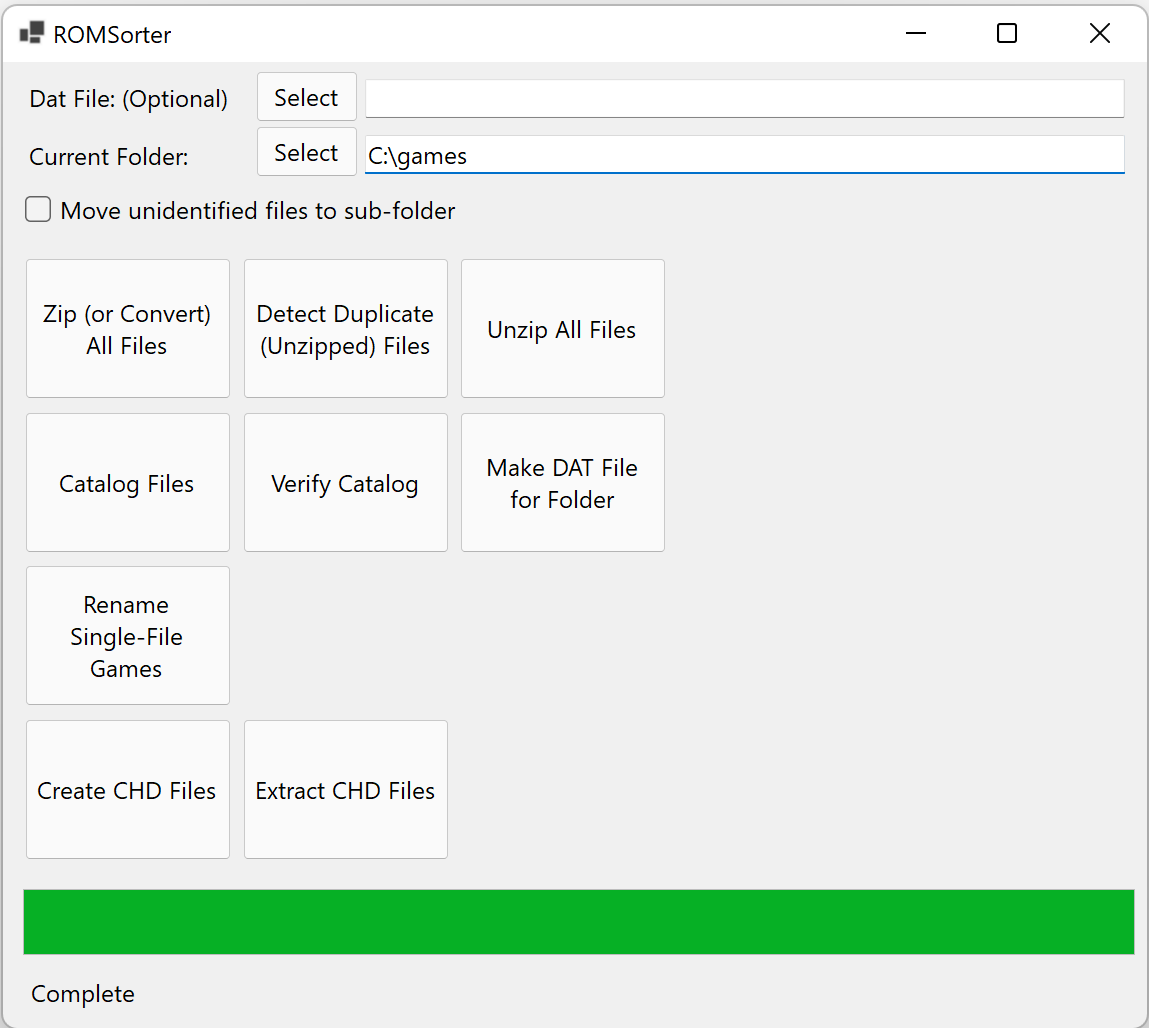
New major feature: 1G1R (1 Game, 1 ROM) sorting! Requires a Parent/Clone DAT file to work as expected (The P/C XML options on Dat-O-Matic are probably what you’re looking for in order to use this feature). Regular DAT files will have an error box pop up telling you it’s not going to work for 1G1R.
New feature: Everdrive Sort. Creates a sub-folder for each letter, and moves games into the appropriate folder based on the first letter in the filename. Designed for devices like the Everdrive where there’s a low limit on the number of files that can be in 1 folder.
ROMSorter:
1 Game 1 ROM (1G1R) sorting available! A dialog box will pop up asking you to set the priority order of regions present in the DAT file. Entries on top will be taken over entries on the bottom.
Everdrive sorting available with the -everdrive command.
Librarian:
1 Game 1 ROM (1G1R) sorting available! Pass in the regions you want in priority order with the -regionOrder: argument. Default is « -regionOrder:USA,EUR,JPN, » if you don’t.
Everdrive sorting available on a new button. Does not require any other command to be run first, but you should unzip and rename your files before this for best results.
Fixes:
Uses universal path separator when creating file paths
Librarian now waits to finish loading the DAT file before processing files.
– Fix: Crash loops around bad/invalid DATs should be resolved.
BASINC est une version dérivée de BASin modifiée par Arda Erdikmen. Elle reprend le code source de la version R14 et de petites parties de la version R15.

Les changements depuis la R16.4 sont:
1.77 (14.10.2021)
– Added: UDG editor character setup option
– Added: UDG editor keyboard shortcuts
– Added: Add/Edit a note to Notes Window by right clicking on a statement in listing
. This is a step to overlay comments over program listing in a future release
– Added: Auto Show Note option in BasinC Options window. Disabling this will prevent project window to popup, even if a BAS file does contain notes.
– Fixed: save as.. Does not modify project name. (A workaround rather than a fix. Needs a bit more time)
– Fixed: Undo/redo buttonts on Image Editor (former Screen Paintbox) wouldn’t work at start.
– Changed-Some Ctrl+Alt+ keyboard shortcuts was clashing with AltGR+A..U graphics mode shortcut. So all of them changed. Sorry.
– Added: Hotkey Toggle Tools. You may open *and* close following tools with single keycombo:
. Crtl-T Tokens, Ctrl+Alt+Z Notes, Ctrl+Alt+X Tapes, Ctrl+I Image Editor, Ctrl+U Udg Editor
– Changed-English tool names Graphics/Sprite Editor become UDG Editor, and Screen Paintbox become Image Editor for simplicity.
1.76 (11.10.2020)
– Added: Project Notes Window
– Fixed: tooltip variables not showing correctly (hopefully fixed)
– Added: More Basinc Test Basic Programs in the release package
1.75 (22.05.2019)
– Fixed: Parser fix (reported by: James Davis)
1.74
– Added: Save Display Window as BMP
– Added: basin now is on github! https://github.com/ref-xx/basinc
1.73
– Fixed: Undocumented fixes
1.72
– Added: -dumptxt commandline parameter. Extracts and saves BASIC portion of a basinc compatible program (eg. BAS/SNA/TAP).
. Usage: basinc
. Example: basinc oregon.tap -dumptxt (will create oregon.tap_BASIC.txt in same folder)
1.71
– Added: 4x,5x,6x font sizes for hi-dpi non-zoomed screens.
– Fixed: variables with 90ish numbers like a91, b95 weren’t properly tokenized.
1.7 20.11.2017
– Added new toolbar buttons
– Added toggle breakpoint navigation buttons (see view menu)
– Added auto backup feature. Basinc saves your work in the background every 3 minutes.
. it keeps 10 copies going back up to 30 minutes in /autoback folder.
. To turn this feature off, use: Options > Filing > Auto Backup
– Changed: Due to large changes in ini and bin files, basinc now requires basinC.bin and basinC.ini, but it still uses basin.chm as help file.
1.7a
– Changed: Broken Undo/Redo behaviour. BETA: Save often to avoid data loss.
– Fixed: Right button popup menu context operators should detect *declared* variables correctly now
– Fixed: Green Ruler Mark at the bottom of the screen should work ok even when cursor in a string.
– Fixed: Drag&Drop files to main window works again.
– Fixed: Esc key no longer breaks the program if Basinc is not in focus
– Fixed: Token table wasn’t printing first keywords correctly (eg. RND/SPECTRUM).
– Fixed: File dialogs won’t stuck at search results anymore
– Fixed: Cosmetic fixes of profiling window
– Fixed: While using double and triple size fonts, find and replace was not showing the result in the editor
– Added: Shift+Clicking token table inserts byte code rather than token itself
– Added: Tape Browser now accept files via drag&drop
– Added: When in full speed emulation, a small arrow is shown at the bottom right corner of display window
– Added: Display window preset sizes: 300%,400%,600%
– Added: German Translation (Uwe Geiken)
– Added: External Utility menu item. This item sends basinc’s memory snapshot to an external utility, such as an emulator.
1.697
– Added: SimpleCon window warns user more if it’s disabled in the options
– Added: REM speed
1.696
– Added: single instance mode
– Added: Command line option: give filename to load
– Added: Profiling window New (clears profiling results and starts new profiling) and Refresh (shows immediate results) button.
– fixed: token table was printing wrong keywords (again).
– fixed: Force Break (Undo) will go back to earlier state than intended (thus overwriting your program).

