Felix (contraction de « Felis lynx ») est un émulateur d’Atari Lynx qui a pour ambition de devenir un émulateur de Lynx nouvelle génération et précis.


Il s’agit d’une version en cours de développement.
 
Les changements:
– EEPROM support reworked.
– Fixed bad write status


Télécharger Felix v0.6.4 (854 Ko)

Site Officiel

En savoir plus…

SSE pour « Steven Seagal Edition » est un émulateur d’Atari ST basé sur le STeem original v3.2 de 2004. Il emprunte également des améliorations en provenance de Hatari.


– Fix VSync running amok on mixed low/medium resolution programs at double frequencies
 

Télécharger Steem SSE (D3D) [32 bits] v4.2.1 R2 (6.1 Mo)

Télécharger Steem SSE (D3D) [64 Bits] v4.2.1 R2 (6.9 Mo)

Télécharger Steem SSE (All builds) v4.2.1 R2 (4.5 Mo)

Site Officiel

En savoir plus…

dgVoodoo est un glide wrapper mais aussi un wrapper DirectDraw/Direct3D (v1 à 7, 8.1 et 9) vers Direct3D11/12. Pour simplifier grandement, ça émule une carte 3DFX qui va pouvoir gérer la bibliothèque propriétaire Glide (Glide 2.11, Glide 2.45, Glide 3.1 et Napalm) mais également les vieilles cartes graphiques compatibles DD/D3D v1 à v9. Quel est l’intérêt ? Jouer aux anciens jeux qui fonctionnent mal sur les nouvelles cartes graphiques (parce qu’ils ont été optimisés pour le Glide ou de vieilles versions de DirectX et non pour d’autres API telles que OpenGL ou DirectX v11 ou v12) ou tout simplement utiliser un émulateur qui lui aussi utilise le Glide. Cette version est destiné à Windows Vista/7/8/10 avec DirectX 11 (ou supérieur) d’installé et vous devez posséder une carte graphique (compatible DirectX Level 10.1) supportant les Shaders Model v4 ou v5.
 
glquake
 
Vous aurez besoin de ces bibliothèques pour activer certaines fonctions graphiques.
 
Les changements:
 
– Fixing bugs causing crash in the FF vs / TruForm shader code generator
– Fixing D3D8/9 texture create-parameter validation (X-Blades)
– Fixing a D3D12 swapchain bug (Balls of Steel through D3D12)
– Fixing an inconsistency bug of the virtual cards other than the default (The Phantom Menace init error)
– Improving the D3D/D3D8 z-biasing implementation (The Phantom Menace)


Télécharger dgVoodoo v2.87.6 (35.2 Mo)

Télécharger 3Dfx splash / D3D Compiler for DgVoodoo2 v4.x (3.2 Mo)

Site Officiel

En savoir plus…

fs-uae est un émulateur multi-plateformes (sur Linux , mac osX et windows) reprenant les travaux de WinUAE/E-UAE/PUAE en mettant l’accent sur l’émulation des jeux sur lecteur de disquette et CD-Rom. A noter que cette version propose un launcher dédié.
 

Une caractéristique unique est le jeu en ligne. Vous pouvez maintenant jouer à des jeux Amiga contre (ou avec) des amis sur Internet.
L’émulateur utilise le dernier code d’émulation Amiga WinUAE du projet et nécessite un ordinateur moyennement rapide avec accélération graphique (OpenGL) pour travailler. Une manette de jeu ou d’un joystick est recommandé, mais pas obligatoire (FS-UAE peut émuler une manette de jeu en utilisant les touches fléchées et Ctrl de droite / touches ALT).


fsuae
Le launcher est relié au site OAGD, immense base de données sur l’Amiga et permet parfois de vous mener directement à la page de téléchargement du jeu. Il simplifie grandement les réglages relatifs à WinUAE. Formidable !

 
Les nouveautés:
 
FS-UAE v3.1.43 / Launcher v3.1.32:
– Fix device helper for xinput devices with recent SDL2 versions.
– Support for multiple mice disabled by default on macOS due to security warning. Use option multiple_mice = 1 to enable.
– Disable expect_version option (no longer synchronized with launcher).
– Added support for more physical keys (when using rawinput).
– Compilation fixes for Apple M1 hardware.
– Netplay desync fixes related to file system (directory hard drives).
– Better virtual memory reservation algorithm.
– Option to automatically pause on menu screen [mrsilver76].
– Use RTLD_DEEPBIND with dlopen on Linux when loading plugins.
– Changes to how plugins are looked up.
– Ide patch.
– SCP floppy image doesn’t wrap to revolution #0 cleanly [keirf].
– Fixed crash in nname_to_aname [PowderedToastMan].


Some additional notes:
– FS-UAE Arcade is included as part of the Launcher. You can run Arcade by passing the –arcade parameter to fs-uae-launcher by (for example) creating a shortcut with this additional parameter. Tested fine on Windows and Linux, but there seems to be an issue with Arcade on macOS. To be continued.
– FS-UAE Arcade on macOS misbehaves (or perhaps it is macOS that misbehaves). When launching FS-UAE, you only get a black screen. Everything works fine if you run Arcade in windowed mode (add –window parameter).
– On Linux, using the browse for file / folder button in FS-UAE Launcher may crash the Launcher. This is probably distro-dependent, and related to the inclusion of the GTK libraries with the Launcher. Will investigate further.
– XInput controllers (Xbox controllers, etc) may need to be configured again in Launcher Settings in order to be recognized and work properly, due to changes in the underlying SDL2 library.


Télécharger FS-UAE (Stable) [32 bits] v2.8.3 (58.8 Mo)

Télécharger FS-UAE (Stable) [64 bits] v3.2.35 / v3.2.35 (75.3 Mo)

Site Officiel

En savoir plus…

Anciennement connu sous le nom de RCPEmu Spoon Edition et développé par Matthew Howkins et Peter Howkins, il s’agit d’un émulateur d’Acorn RiscPC et A7000 pour Windows, Linux et OSX basé sur le célèbre RCPemu de Tom Walker.


Les changements:
 
ARM
– Performance gains on x86 and x64 dynamic recompiler.
– Many of the instructions that were not accelerated on the x64 architecture but were on x86 have now been implemented on x64 BIC/MUL.
– Refactoring of Dynamic Recompiler code.
– Many bugfixes.
– Accessing CP15 should only be permitted in privileged modes.
 

Network Address Translation
– You can now configure ports to be forwarded between your host network and RPCEmu. This allows you to host servers under RPCEmu that can be accessed by other machines on your network. (Note, this still does not enable the use of ShareFS)
 

Floppy Disc
– Support HFE format floppy disc images. HFE disc images are lower-level than ADF discs as they can also store the information required for various copy protection systems. Contributed by Sarah Walker.
 

VIDC
– If you are not using VRAM you can now use up to 4MB of RAM for video modes.
 

Other
– Fix the crash on shutdown or reset of RISC OS 5. Based on a suggestion from Rob Sprowson.
 

GCC
– Compiling with GCC 10 no longer needs a workaround for the common symbols errors.


Télécharger RPCEmu v0.9.5 (10.3 Mo)

Site Officiel

En savoir plus…

Il s’agit du meilleur émulateur de PlayStation One, devant ePSXe et pSX.
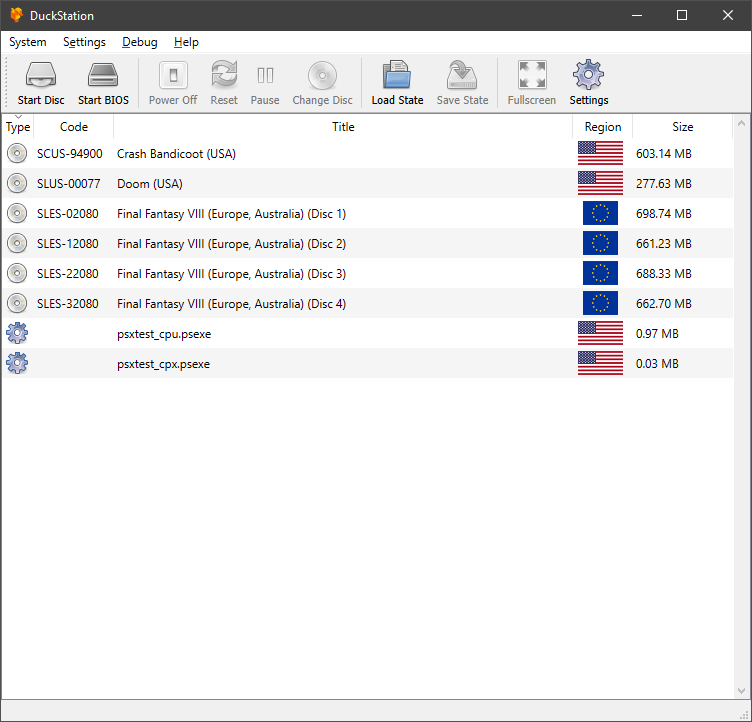


Caractéristiques:
– CPU Recompiler/JIT (x86-64, armv7/AArch32 and AArch64)
– Hardware (D3D11, D3D12, OpenGL, Vulkan) and software rendering
– Upscaling, texture filtering, and true colour (24-bit) in hardware renderers
– PGXP for geometry precision, texture correction, and depth buffer emulation
– Adaptive downsampling filter
– Post processing shader chains
– « Fast boot » for skipping BIOS splash/intro
– Save state support
– Windows, Linux, highly experimental macOS support
– Supports bin/cue images, raw bin/img files, MAME CHD, single-track ECM, MDS/MDF, and unencrypted PBP formats.
– Direct booting of homebrew executables
– Direct loading of Portable Sound Format (psf) files
– Digital and analog controllers for input (rumble is forwarded to host)
– Namco GunCon lightgun support (simulated with mouse)
– NeGcon support
– Qt and NoGUI frontends for desktop
– Automatic updates for Windows builds
– Automatic content scanning – game titles/hashes are provided by redump.org
– Optional automatic switching of memory cards for each game
– Supports loading cheats from libretro or PCSXR format lists
– Memory card editor and save importer
– Emulated CPU overclocking
– Integrated and remote debugging
– Multitap controllers (up to 8 devices)
– RetroAchievements
– Automatic loading/applying of PPF patches

 
Configuration requise:
– A CPU faster than a potato. But it needs to be x86_64, AArch32/armv7, or AArch64/ARMv8, otherwise you won’t get a recompiler and it’ll be slow.
– For the hardware renderers, a GPU capable of OpenGL 3.1/OpenGL ES 3.0/Direct3D 11 Feature Level 10.0 (or Vulkan 1.0) and above. So, basically anything made in the last 10 years or so.
– SDL, XInput or DInput compatible game controller (e.g. XB360/XBOne). DualShock 3 users on Windows will need to install the official DualShock 3 drivers included as part of PlayStation Now.
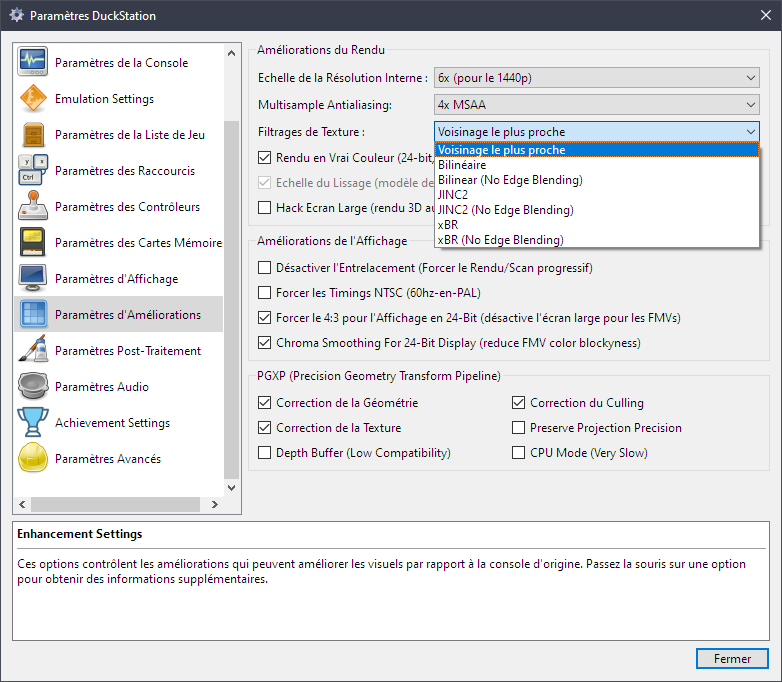


Les améliorations sont:
 
Preview Build:
– Update Turkish (Anderson_Cardoso) #2674
– Update Japanese translation by mikakunin (Connor McLaughlin)
– Update bug_report.md (Connor McLaughlin)
– Fix tracks not getting brought across in CopyTOC() (Connor McLaughlin)
– Fix incorrect delay on setmode while shell opening (Connor McLaughlin)

 
Development Build:
– remove check for xbox one as it doesn’t work on series consoles (tunip3) #2636
– Update Bug Report! (Anderson_Cardoso) #2639
– Add version number to the Windows executable (qurious-pixel) #2658
– Disable AppX signing for PRs (qurious-pixel) #2665
– Fix incorrect operator (Connor McLaughlin)
– Rewrote gamedb with revisional hashes (Silent) #2668
– Fix progress bar not starting from 0 when verifying the data track (Silent) #2668
– Add image verification (Silent) #2668
– Set DSRINPUTLEVEL and CTSINPUTLEVEL to true for Armored Core (gameblabla) #2669
– Revert « Add version number to the Windows executable » (Connor McLaughlin) #2672
– Set version in rc files at build time #2672 (Connor McLaughlin)
– Update compatibility list (Connor McLaughlin)
– Fix gcc warning (Connor McLaughlin)
– Should include common types not core types (Connor McLaughlin)
– Fix warnings in gcc debug build (Connor McLaughlin)
– Fix unused variable warning (Connor McLaughlin)
– Remove unused variable in DrawEnhancementsOverlay (Connor McLaughlin)
– Update README.md (Connor McLaughlin)
– Save/load autofire to input profiles (Connor McLaughlin)
– Reduce log level of IRQ request command (Connor McLaughlin)
– Fix possible crash on startup in SizeChanged (Connor McLaughlin)
– Atualização Português do Brasil (Anderson_Cardoso) #2673
– Update Simple-Chinese Translation to latest. (zkdpower) #2681
– Fixup IsValidPSExeHeader (Silent) #2683
– Common/ProgressCallback: Elide some redundant updates (Connor McLaughlin)
– Special case immediate GetlocP after play/read before int (Connor McLaughlin)
– Fix building (again) (Connor McLaughlin)
– IDXGIDevice is not a parent of ID3D12Device (Connor McLaughlin)
– Fix cuesheets with absolute paths #2688 (Silent)
– Remove Android beta link (Connor McLaughlin)
– Update SDL game controller database (Connor McLaughlin)
– Update game database with NeGcon entries from PiperCalls (Connor McLaughlin)


Stable Build:
WIP


Télécharger DuckStation v0.1 build 12XXX (71.6 Mo)

Site Officiel

En savoir plus…

m64p (ou Mupen64Plus-GUI) est une interface graphique écrite en Qt5. Elle supporte tout ce que vous attendez d’une interface mupen64plus (sélection de plugins, édition de la configuration, gestion des sauvegardes, capture d’écran, pause, etc.).
 
Cette archive inclut Mupen64Plus + ParaLLEl-RDP + une interface utilisateur.
Notez que la dernière archive incluant le plugin GlideN64 est disponible ici.


– Fixed a bug that caused Rumble to stop working on some controllers
 
Code source. Builds ici.

Télécharger Simple64 (x86) (2020/06/02) (20.6 Mo)

Télécharger Simple64 (x64) v2024.12.1 (46.5 Mo)

Site Officiel

En savoir plus…

MxUI est une interface graphique destinée à MAME qui se veut dans le même esprit que M+Gui mais plus moderne et rapide, elle utilise également M1 et les patchs IPS.
 
mxui
 
– Fix and optimize code.
– Misc fixes


Télécharger MxUI (XP) v1.5.2 (6.0 Mo)

Télécharger MxUI v1.5.2 (6.9 Mo)

Site Officiel

En savoir plus…

GroovyMAME est un émulateur multi-systèmes basé sur MAME (Arcade + Consoles + Ordinateurs) et qui se focalise sur le rendu sur écran CRT (Moniteur de PC ou d’arcade avec fréquence particulière) car les auteurs sont convaincus que la technologie CRT est un must quand il s’agit de profiter de l’émulation dans toute sa splendeur. Cependant GroovyMAME peut être utilisé également sur écran LCD (principalement sur les modèles qui permettent un rafraîchissant à des taux personnalisés).


Beaucoup d’améliorations provenant de Groovy avaient été intégrées dans MAME il y a quelques temps rendant Groovy obsolète, mais depuis de nouvelles fonctions ont été développées en parallèles justifiant ces nouveaux builds.
 

A noter que des LiveCD sont également disponibles sur le site officiel.


Les changements:
 

– Sync with mame v0.237
– Properly fix configuration saving from the ui.

 
Note sur la version D3D9EX (les builds ne sont valables que pour windows 7 ou supérieur):
Cette version intègre un patch Direct3D9Ex (également connu sous le nom de Direct3D 9.0L ou 9.L, le L faisant référence à Longhorn, nom de la base de code de Windows Vista) qui permet de bénéficier de certaines fonctionnalités introduites par l’utilisation des drivers WDDM tout en maintenant la compatibilité avec les applications écrites pour Direct3D 9. L’interface Windows Aero s’appuie sur D3D 9Ex et utilise certaines des fonctionnalités non présentes dans Direct3D 9 comme la possibilité de partager des surfaces DirectX entre plusieurs processus.

 
Pas de binaires 32 bits pour le moment.
 
MAJ: J’ai compilé les binaires 32 bits et le 64 bits non Ex.


Télécharger GroovyMAME (x86) v0.227 SwitchRes v0.017t (56.4 Mo)

Télécharger GroovyMAME (x64) v0.227 SwitchRes v0.017t (58.1 Mo)

Télécharger GroovyMAME D3D9Ex (x86) v0.227 SwitchRes v0.017t (56.4 Mo)

Télécharger GroovyMAME D3D9Ex (x64) v0.289 SwitchRes 2.22f (98.5 Mo)

Miroir officiel

Forum officiel

Site officiel

En savoir plus…

Il s’agit d’un émulateur multi-systèmes qui émule les machines suivantes :
 
emma2
– CDP18S020 Evaluation Kit
– Cidelsa
– COMX-35
– COMIX-35
– Cosmac Elf
– Cosmac Elf 2000
– Cosmac VIP
– Cosmac VIP II, prise en charge des versions ‘ED’ et ‘RCA’
– Cosmicos
– ETI 660
– FRED 1
– FRED 1.5
– Infinite UC1800
– MCDS, Microboard Computer Development System
– Membership Card
– Microboard System, prise en charge des CPU CDP18S600 à CDP18S610
– Microtutor
– Microtutor II
– MS 2000, MicroDisk Development System
– Netronics Elf II
– Oscom Nano
– Pecom 32 and 64
– Pico/Elf V2
– Quest Super Elf
– RCA Coin Arcade
– RCA Studio II
– RCA Studio III / Victory MPT-02
– RCA Studio IV
– Telmac TMC-600
– Telmac 1800
– Telmac 2000
– VELF
– VIP2K Membership Card
– Visicom COM-100


Les changements sont visibles ici.


Télécharger Emma 02 (x86) v2.0 (40.8 Mo)

Télécharger Emma 02 (x64) v2.0 (42.6 Mo)

Télécharger Emma 02 (Win2K/XP) v1.23 (8.1 Mo)

Site Officiel

En savoir plus…

A l’instar de MAMEinfo pour MAME(Arcade), le fichier MESSinfo vous permet de suivre les changements entre les versions concernant les différents systèmes émulés par MAME (partie consoles et ordinateurs).


Télécharger MESSinfo.dat v0.289 (7.1 Mo)

Site Officiel

En savoir plus…

Il s’agit d’une nouvelle version de Fightcade qui utilise des émulateurs à jour + GGPO pour le netplay. Celui-ci est basé sur la version originale de GGPO mais avec quelques améliorations.
 
Les émulateurs pris en charges sont:
– Fightcade FBNeo (dernière version, GGPO)
– Fightcade FBA (ancienne version, GGPO)
– Fightcade SNES9X (GGPO)
– NullDC
– Flycast


Les changements depuis la version 2.1.18 sont:
 

Fightcade v2.1.20

Flycast Dojo 0.4.22
- Fix Linux replay savestate retrieval
- Forces consistent replay transmission behavior
- Disable peer verification warning (to avoid emu.cfg issue)
- Per Game Controller Mapping

Fightcade v2.1.19

FcadeFBNeo v0.2.97.44-44
- Add avi scaling options (1x, 2x, 3x) to menu
- New detectors: kof96ae20 kof97ae spf2xpri wh2j whp
- Updated detectors: magdrop3
- New savestates: buckyg gijoeg metamrphjg moomesag nbamhtg viostormg
- Updated savestates: magdrop3

Flycast Dojo 0.4.21.1
- Remove Switch Player Logic to align with GGPO P1 changes
- look for BIOS files in Content Path folders if not found in data folder
- Save replay frames according to internally provided input size
- Upstream Flycast net-rollback branch changes
- Only record savestate checksum & commit when recording replay or sending transmission (Fixes Streaming Replays in Linux)
- New Lobby: flycast_dc_vigilante8_2o


Télécharger Fightcade2 v2.1.45 (223 Mo)

Site Officiel

Compte Twitter

En savoir plus…


https://getourbonus.com/fr/accueil

https://www.romspedia.com/

