Il s’agit d’un émulateur multi-plateformes qui supporte les machines suivantes: ZX80, ZX81, ZX Spectrum, QL, Z88, Timex TS 2068, Sam Coupe, Pentagon 128, Chloe 140 SE, Chloe 280 SE, ZX-Uno, Prism, TBBlue/ZX, Spectrum Next, Jupiter Ace, Amstrad CPC 464, MSX1, Spectravideo 318/328, Colecovision, Sega SG-1000.


Changements:
-Added SamRam Gerton Lunter interface emulation
-Added new ZX-Uno Prism video mode
-Added Dandanator storage button icon
-Added alternate Jupiter ACE rom
-Added another fourth easter egg 😉
-Added read only setting for esxdos handler
-Added setting to redefine joystick fire key
-Added midi output instrument selector
-Added Debug action to set PC register to zero
-Added command line setting –copy-file-to-mmc to be able to copy files to a mmc image before starting ZEsarUX
-Added ZRCP command realtape-open
 

Improved ZX-Uno emulation:
-Updated BIOS, Flash and ESXDOS (ESXDOS now runs 0.8.6 final version)
-Added command line setting –zxuno-initial-64k to allow loading a initial 64kb block in bootm mode, bypassing the normal boot rom
 

Improved TBBlue emulation:
-Added .snx snapshot support
-Added debug window to enable/disable individual sprites
-Added relative sprite type composite/unified on sprite navigator
-Added Sprites Debug memory zone
-Optimize sprite rendering (saving 1% cpu on my computer)
 

Improved CPC emulation:
-Added video scanlines rendering (A.K.A. Real Video)
-Joystick emulation
-Stereo emulation
 

Improved File utilities Browser:
-Added support for browsing inside FAT filesystem disk images (.img, .mmc, .ide, etc)
-Detect when source and target directories are the same when moving or copying
-Show more info in some file viewers (.sna, .p, .o, etc)
-Added .nex file viewer
-Added copy and delete entire folder
-Added SCR to TXT file converter
 

Improved Debug CPU Window:
-Can load a source code
-Tell when a condition is satisfied or not
-Detecting when running a esxdos call, using the esxdos handler, and doing step over
 

Improved ZX Vision menu interface:
-Added Turbo Vision GUI style
-Added ZEsarUX Matte GUI style
-Added GUI Style Selector menu
-Added GUI Test Style
-Added key Shift+Cursor Right to switch to another window
-Added action to minimize all windows
-Added setting to ignore mouse click to open the menu
-Added more utf-8 characters support
-Added setting to show files in hexa+ascii using file viewer
 

Improved all-to-pixel text rendering:
-Allow 1:1 scale
-Allow to set window size and offsets in characters
 

Improved Speccy online browser:
-now uses ZXinfo API V3
-uses SSL SNI when downloading files
 

-Improved Frameskip algorithm
-Improved Core statistics: Add info about frames drawn & dropped
-Improved Hex Editor: can now be backgrounded
-Improved Debug I/O ports window: can now be backgrounded and it’s reloaded continuously
-Improved File spooling: delay can now be any value between 20 and 2000 ms (in increments of +20)
-Improved File Browser: added file size information
-Improved cocoa (Mac) driver: allows distinguish between left and right Ctrl key, and left and right Alt key
-Improved panic screen: added countdown timer, extended to ZX Desktop
 

Fixed ZX-Uno bugs:
-Fixed bugs on mmc and flash storage layer which prevented to update bios, esxdos rom or entire flash from the BIOS
-Fixed chloe mmu mapping: bootm has priority. If bootm=1, can’t map chloe. If bootm=0, can be chloe or +2a
 

Fixed TBBlue bugs:
-Fixed relative sprites: when anchor sprite is not visible, negative coordinates, detecting unified/composite, mirror, rotation
-Fixed 4bpp sprites: pattern calculating, transparency, anchor
-Fixed clipping (affected scrollnutter demo in the right round corners)
-Fixed writing on divmmc memory when layer2 active
 

Fixed CPC bugs:
-Fixed vsync and hsync interrupts
-Fixed border colour
-Fixed AY chip register selection
-Fixed CRTC interrupts. After a CRTC interrupt with Z80 interrupts disabled, they were not fired when enabling Z80 interrupts
-Fixed setting bit 4 of the « Select screen mode and rom configuration » register of the Gate-Array and interrupt request
-Fixed RETURN key
 

Fixed IDE commands which affected almost all IDE firmwares: fatware, mdos, etc:
-Fixed IDE command ECH Identify Drive
-Fixed IDE command 91H Initialize Drive Parameters
-Fixed annoying flickering in menu using XWindows video driver
-Fixed Mac OS retina display window
-Fixed Mac OS full screen
-Fixed loading General Sound rom
-Fixed segfaults on fileselector +3 DSK screen previews using Speedlock protected disks or bad disks
-Fixed segfaults on fileselector TRD screen previews using protected disks or bad disks
-Fixed receiving large snapshots on ZRCP/ZENG
-Fixed pixel color on text all-to-pixel text rendering (color inversion)
-Fixed DivIDE/DivMMC mapram behaviour
-Fixed some GUI style colours
 

– Some other minor bugfixes and improvements


Télécharger ZEsarUX v13 (44.4 Mo)

Télécharger ZEsarUX (Legacy) v13 (44.0 Mo)

Télécharger ZEsarUX Extra v13 (232 Mo)

Site Officiel

En savoir plus…

LaunchBox a été conçu comme une interface attrayante pour DOSBox, mais a depuis été élargi pour supporter à la fois les jeux PC modernes et les consoles émulées. DOSBox continuera d’être une priorité principale pour LaunchBox.
 
Il peut rechercher dans la database TheGamesDB.net (une base de données en ligne communautaire qui permet à quiconque de contribuer) pour les metadatas & box-arts. Il peut exporter les fichiers image, dispose d’une meilleure compatibilité avec dropbox.
 
LaunchBox comprend des processus d’importations automatiques pour Steam, D-Fend Reloaded, et les fichiers ROM pour des gains de vitesse.


LaunchBox-3.6


Télécharger LaunchBox v14.1 (502 Mo)

Site Officiel

En savoir plus…

Il s’agit d’une version de développement de Dolwin (Dolphin Emulator pour Windows, Dolphin était le nom de code de la GameCube), le premier émulateur de Nintendo GameCube créé par Org et Hotquik.  Il est capable de lancer plusieurs jeux commerciaux et lit les .GCM (format ISO des jeux Gamecube). Dolwin est open-source. L’archive comprend les fichiers additionnels du site officiel (ancien site de développement ici).


This project is revived from 2004 in 2020.


Télécharger Dolwin WIP (32 bits) v0.130 GIT (2020/05/21) (456 Ko)

Télécharger Dolwin WIP (64 bits) v0.16 GIT (2022/11/24) (37.6 Mo)

Site Officiel

En savoir plus…

Cette version fait directement suite aux précédentes créées par Ulrich Doewich et est à présent maintenue par Colin Pitrat.


Latest build of Caprice 32, with the newest cool features and the most recent bugs.


Télécharger Caprice32 (x86) v4.6.0 (2026/10/30) (6.6 Mo)

Télécharger Caprice32 (x64) v4.6.0 (2026/10/30) (6.3 Mo)

Site Officiel

En savoir plus…

Binjgb est un émulateur de GameBoy N&B/Color proposant également un débogueur.


Télécharger Binjgb (32 bits) v0.1.10 (719 Ko)

Télécharger Binjgb (64 bits) v0.1.11 (963 Ko)

Site Officiel

En savoir plus…

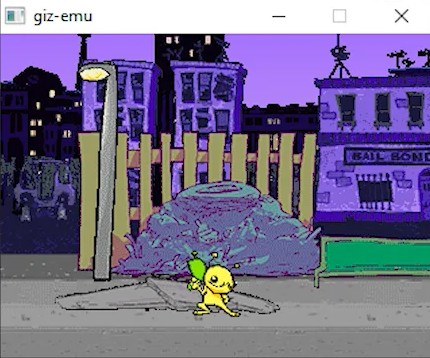
Premier émulateur pour la Gizmondo en version pré alpha émulant 1 jeu.
 
Pour nos lecteurs habituels, eh oui la news Mondolator était un poisson d’avril, mais juste avant (par pure hasard) j’ai vu que le premier émulateur Gizmondo avait été créé, coup de chance 🙂


Un jeu est fourni avec cette pre alpha, vous pouvez tester directement le jeu avec le zip fourni ci-dessous, pas la peine de tester d’autres jeux pour le moment.


Télécharger Giz-Emu Pre-alpha release 1 (4.6 Mo)

Site Officiel

En savoir plus…

Nplayers : Exclusivement pour les frontends comme EmuLoader, MaLa etc.. ce fichier vous servira à classer les jeux par nombre de joueurs possibles : 1p, 2p, 1p+2p, 1p+2p alt, etc…
 
Multiplayer (ex Nplayers32) : Exclusivement pour MAME/MAMEUI ou clone de celui-ci… ce fichier vous servira à classer les jeux par nombre de joueurs possibles : 1p, 2p, 1p+2p, 1p+2p alt, etc…
 

Télécharger Nplayers v0.278 (303 Ko)

Site Officiel

En savoir plus…

Créé par Dietmar Klein, SidTools est un lecteur de sons/musiques dédié au composant SID ou MOS 6581 (commodore C64 et 128) mais également un frontend pour les émulateurs gérants ce même composant tel que VICE ou encore Hoxs64 par exemple.


– Much code cleanup & refactoring – Please report any bugs/errors you encounter
– Bugfix for uncommon folder names
– Bugfix when closing SidTool without having played anything
– Bugfix for folder containing spaces (Thanks Isildur)
– Bugfix always shuffling when clicking next in Playlist
– Bugfix for sidtool protocol
– Bugfix for preferred emu in options not being used
– Bugfix for search
– Sidfiles using 3 Chips (*_3SID) now fallback to VSID as Sidplay does not support these
– More file/folder checks to prevent ugly UHE notifications
– STIL Info moved between Info & Controls to make room for tabs in upcoming major update
– Switched default player to sidplay
– Sids now counted on Start
– GUI Improvement: Shuffle buttons no longer block each other
– Minor improvements to website


Télécharger SidTools v2.3.5 (16.5 Mo)

Site Officiel

En savoir plus…

Il s’agit du premier émulateur GameCube pour Windows créé par org et hotquick.


– Fixed a nasty bug with restarting.


Télécharger Dolwin (64 bits) v0.151 (651 Ko)

Site Officiel

En savoir plus…

Gopher2600 est un émulateur d’Atari 2600. Bien que les performances ne soient pas aussi efficaces que certains autres émulateurs, il convient néanmoins pour jouer à des jeux sur un ordinateur raisonnablement moderne.


Movie Cart support
– Files must end in .mvc
– File will be fingerprinted as it is streamed off disk and any errors sent to the log
– Demo files in the Movie Cart repository
https://github.com/lodefmode/moviecart
 
Gamepad alterations
– Left thumbstick now controls the joystick and not the paddle
– Left/Right Triggers still control the paddle but will no longer auto-centre
– Playmode will now notify (with an icon) when a controller type has been switched
 
Bug Fixes
– Better centering of program counter in Disasm window coord selection
(ie. clicking on the debug screen)
– Superbank switching fixed
 
Windows Bug Fixes
– File paths that include the drive letter will now be recognised.
This will allow Gopher2600 to be used with Amiga Dev Studio on Windows


Télécharger Gopher2600 v0.57.2 (22.0 Mo)

Site Officiel

En savoir plus…

SSE pour « Steven Seagal Edition » est un émulateur d’Atari ST basé sur le STeem original v3.2 de 2004. Il emprunte également des améliorations en provenance de Hatari.


R6
– Option CPU clock in 64bit builds
– Extended monitor monochrome crash (thx Policarpo both)
– Wrong drive track on resuming a snapshot


Télécharger Steem SSE (D3D) [32 bits] v4.2.1 R2 (6.1 Mo)

Télécharger Steem SSE (D3D) [64 Bits] v4.2.1 R2 (6.9 Mo)

Télécharger Steem SSE (All builds) v4.2.1 R2 (4.5 Mo)

Site Officiel

En savoir plus…

Ce fichier est créé par cnterr (voir ici et là) et basé sur celui de Fabricio en 2009, il vous permet de connaitre les mouvements à effectuer dans les jeux de bastons notamment. Il est basé sur le command.dat original de Procyon (créé à l’origine par Emuman et grandement amélioré par Whack). Actuellement maintenu (de nouveau) par Fabricio et Antopisa.
 

Shorthand vs. Longhand

Shorthand vs. Longhand


Ce fichier fait office de fichier WIP entre deux releases d’un command.dat officiel et ne servira que pour la partie arcade de MAME.
 
On le trouve sur le site non officiel d’Antopisa.
 

Voici les informations:
 

– Change some icons and remove some « useless texts ».
– Change Armored Warriors, Art of Fighting, Art of Fighting 2, Art of Fighting 3, Asura Blade, Asura Buster, Daraku Tenshi, Fatal Fury, Fatal Fury 3, Final Fight Revenge, JoJo’s Bizarre Adventure, The King of Fighters ’99, The King of Fighters 2000, The King of Fighters 2001, Kizuna Encounter, Martial Masters, Red Earth, Savage Reign, Street Fighter III: New Generation, Street Fighter III – 2nd Impact: Giant Attack, Street Fighter III – 3rd Strike, Voltage Fighter: Gowcaizer and World Heroes Perfect.
– Re-Added and Corrected Fatal Fury: Wild Ambition, Primal Rage 2, Samurai Shodown 64, Samurai Shodown: Warrior’s Rage, Sonic Championship and Virtua Fighter 2.


Télécharger Command.dat v0.273 (667 Ko)

Site Officiel

En savoir plus…


https://getourbonus.com/fr/accueil

https://www.romspedia.com/