La dernière version béta publique de l’excellent WinUAE, l’émulateur Commodore Amiga.
 

winuae

 
– CD32 FMV ROM image was not loaded correctly from pre-3.4 config files.
– CD32 first CD audio track play attempt from the beginning was confused with TOC subchannel read.
– Z2/Z3 autoconfig data first byte’s upper 5 bits was not editable. Only low 3 size bits should be forced (board size).
– Implemented non-autoconfig RAM board definition support. Added DKB Insider I/II.
– CD emulation didn’t automatically load TOC when accessing the CD for the first time and program didn’t request TOC previously. (Fixes Buddha ATAPI device not reading CD in non-image mode)
– Added manual (non-autoconfig) GUI memory board support. Any Z2 or Z3 board can be configured as manually mapped.
– Pre-KS1.2 boot support works again. Now expansion tree is build before emulation starts but pre-KS1.2 boot support obviously needs to know KS version before emulation starts but KS won’t be loaded until emulation starts..
– Fixed harmless « SCSI command xx, no direction specified! » messages when attempting to play audio CD using hardware SCSI/ATAPI emulation.
– Fixed unstable Portaudio audio in vsync modes.
– Tecmar T-Card RAM works again. First Z2 RAM is emulated as Tecmar autoconfig RAM board.
– Shortcuts with SHIFT work again in optimized builds. It was buffer overflow (reading past end of buffer) very deep in input handling.
– Both SCRAM 500/2000 SCSI board variants emulated (DP8490V = 53C80 and NCR53C94).
– More ESP/NCR5394/FAS216 updates, FIFO in PIO mode only can contain max 1 byte. (SCRAM NCR53C94 fix)
– Otronic Filecard 2000/OSSI 500 emulation. (Official ROM is MIA, Aminet replacement rom works but it needs to be merged first)
– Automatically loaded default.uae with unplugged input device: set it to none, not layout A.
– Include CD/FMV audio caused infinite loop when playing CD audio.
– Disable ROM panel UAE MapROM option if accelerator board emulation is enabled. They are incompatible.
– Accelerator boards that required ROM but nothing was selected: crashed during expansion tree building.
– DD-only drive + turbo floppy mode + standard ADF HD floppy image: valid MFM was returned.
– Ignore all write attempts if standard ADF HD image in DD-only flpppy drive.
 
(some reported GUI related issues are not yet fixed)


Télécharger WinUAE (Public Beta) [32 bits] v6.1.0 Beta 24 (5.3 Mo)

Télécharger WinUAE (Public Beta) [64 bits] v6.1.0 Beta 24 (8.5 Mo)

Télécharger WinUAE (Public Beta) [32 bits] v6.1.0 Beta 23 FR (5.4 Mo)

Télécharger WinUAE (Public Beta) [64 bits] v6.1.0 Beta 23 FR (8.5 Mo)

Site Officiel

En savoir plus…

UKNCBTL (pour UKNC Back to Life!) est un émulateur d’Elektronica МS-0511. (ancien site)


uknbtl


Forum officiel.


Télécharger UKNC Back To Life (GIT) r579 (268,1 Ko)

Site Officiel

En savoir plus…

Ecrit en Java par Shigekazu Hirao (HAL8999), j80 est un émulateur précis, axé sur la série d’ordinateurs japonais NEC PC-8000 (PC-8001+PCG8100). j80 dispose d’excellente fonctions de traçage et de débogage. Il gère aussi le PCG8100.


j80j801


Télécharger j80 Release 6.117 (v6.7.12) (1.0 Mo)

Site Officiel

En savoir plus…

Il s’agit d’un émulateur de COMKIT 8060, 8061 et 8062, que seul les japonais ont pu connaitre.


comkitLS


c80

Plus d’infos ici et là.


Télécharger c80 Release 1b6 (v1.b.10) (328 Ko)

Site Officiel

En savoir plus…

Ecrit en Java par Shigekazu Hirao (HAL8999), u80 est un émulateur du premier ordinateur personnel Japonais : le TK-80, mais aussi son évolution le TK-85.


u80_r1_3u80_r1_4


Télécharger u80TK/u85TK Release 1b96 (v1.b.100) (580 Ko)

Site Officiel

En savoir plus…

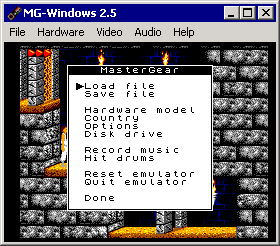
Débuté en 1996 sur diverses plateformes car hautement portable, MasterGear est gratuit depuis le 11/03/2015 dans ses versions Windows.
 
mg
 
MasterGear (MG) est un émulateur des systèmes Sega 8 bits. Il supporte la Sega MasterSystem (Mark3 au Japon) et GameGear, ainsi que leurs prédécesseurs : SG1000, SC3000, SF7000, et Mark2. MasterGear dispose aussi d’un débogueur.


– Added Scale2X scaling algorithm.
– Added Monochrome, Green, Amber, and Sepia CRT emulation.
– Added -scale2x and -raster command line options.
– Added -mono, -sepia, -green, and -amber command line options.
– EMULib-specific command line options now processed inside EMULib.
– Added « Play Sound When Inactive » option on Windows.
– Added « Scale2x Algorithm » option on Windows.
– Added « LCD Raster » option on Windows.
– Added « Debugger » option on Windows.
– Renamed « Color Raster » menu to « Color Filter » on Windows.
– Deprecated -notv and -nolcd command line options.


Télécharger MasterGear (Windows) v3.6 (149,0 Ko)

Site Officiel

En savoir plus…

Version française de Nintendulator, l’émulateur Nintendo NES.


Télécharger Nintendulator (Français) v0.975 (16/09/2016) (461,1 Ko)

Site Officiel

En savoir plus…

Le dernier build beta de Nintendulator, l’émulateur Nintendo NES.


Télécharger Nintendulator (64 bits) v0.985 Beta (2026/08/22) (548 Ko)

Télécharger Nintendulator (32 bits) v0.985 Beta (2026/08/22) (504 Ko)

Site Officiel

En savoir plus…

Il s’agit d’un émulateur de MSX créé par le grand Marat Fayzullin dont cette dernière version est enfin disponible gratuitement (ce qui ne fut pas le cas pendant des années).
 
fmsx

 
– Added Scale2X scaling algorithm.
– Added Monochrome, Green, Amber, and Sepia CRT emulation.
– Added -scale2x and -raster command line options.
– Added -mono, -sepia, -green, and -amber command line options.
– EMULib-specific command line options now processed inside EMULib.
– Added « Scale2x Algorithm » and « LCD Raster » options on Windows.
– Renamed « Color Raster » menu to « Color Filter » on Windows.
– Deprecated -notv and -nolcd command line options.


Télécharger fMSX (Windows) v4.7 (354,2 Ko)

Site Officiel

En savoir plus…

Citra est le premier émulateur (et debugger) de Nintendo 3DS, écrit en C++ par Bunnei et proposé en open-source. Il exécute quelques jeux commerciaux (assez expérimental). Cette version est dédiée aux systèmes 64bits. (Code source).


citra3ds
 
Plus d’infos sur le forum officiel.
 

Télécharger Citra (x64) (2016/09/16) (12,5 Mo)

Site Officiel

En savoir plus…

Foobar2000 est un lecteur de prime abord minimaliste. Son interface est des plus sobre avec la seule présentation d’une liste de lecture alors que la barre de progression et les boutons de contrôle peuvent n’être que des caractères textuels. Il supporte de nombreux formats sonores (notamment les formats audio d’anciennes machines) grâce à l’ajout de plugins.


Cette légèreté permet bien sûr à Foobar2000 d’être l’un des lecteurs MP3 les plus léger en termes de ressources mémoire / processeur, mais il ne faudrait pas croire que cela le contraint au minimum syndical. Le fonctionnement par plugins de ce lecteur lui permet d’être incroyablement modulaire et d’intégrer un nombre impressionnant de fonctions.


De nombreux formats audio en rapport avec l’émulation sont parfaitement supportés.


foobar

Les changements:


– Corrected various 1.3.11 pause regressions.
– Corrected “remove tags” on MP4/M4A files incorrectly showing that the file still has some metadata immediately after the removal.
– Flat equalizer now produces bit identical stream.
– Prevented clobbering of iTunes “Encoding Params” tag on MP4/M4A tag update.
– Now using WavPack5 decoder with support for files larger than 4 gigabytes.
– Updated ZIP archive reader now supports ZIP files larger than 4 gigabytes.
– Added support for Matroska/ALAC files.
– Fixed multichannel ALAC channel order bugs.
– Fixed multichannel WavPack in Matroska.
– Improved handling of various malformed files (Matroska, AAC).
– Made files with extreme sample rates (>200KHz) playable through standard DirectSound output, resampler activated automatically if needed.
– FLAC “Remove tags” no longer erases the “tool” field.
– Reverted 1.3.11 FLAC tag updater tweaks. Removal of padding will be added as a separate feature later.


Télécharger Foobar2000 v1.3.12 (3,7 Mo)

Site Officiel

En savoir plus…

dgVoodoo est un glide wrapper mais aussi un wrapper DirectDraw/Direct3D (v3 à 8) vers Direct3D11. Pour simplifier grandement, ça émule une carte 3DFX qui va pouvoir gérer la bibliothèque propriétaire Glide (Glide 2.11, Glide 2.45, Glide 3.1 et Napalm) mais également les vieilles cartes graphiques compatibles DD/D3D v1 à v8. Quel est l’intérêt ? Jouer aux anciens jeux qui fonctionnent mal sur les nouvelles cartes graphiques (parce qu’ils ont été optimisés pour le Glide ou de vieilles versions de DirectX et non pour d’autres API telles que OpenGL ou DirectX v11) ou tout simplement utiliser un émulateur qui lui aussi utilise le Glide. Cette version est destiné à Windows Vista/7/8/10 avec DirectX 11 (ou supérieur) d’installé et vous devez posséder une carte graphique (compatible DirectX Level 10.1) supportant les Shaders Model v4 ou v5.
 
glquake
 
Vous aurez besoin de ces bibliothèques pour activer certaines fonctions graphiques.

 
Les changements:

  • Support for ‘dynamic resolutions’ (see section ‘Resolution overriding’)
  • Added support for ‘d3dcompiler_47.dll’, so Win10 users don’t have to download and mess with d3dcompiler dll, 47 is part of the Win10 OS.
  • Linear filtering was applied for upscaling the output-image even if the scale ratio was 1.0, fixed
  • Some modifications on the CRT-like shader were done for correct CRT-like appearance on high-res displays like a 4K monitor
  • Glide mode ‘Compare to bias’ is fixed (Esoteria demo)
  • Some other Glide rendering issues are fixed (Hype – The Time Quest)
  • DDraw system memory surface pitch is fixed to match that of DIBs (Snow Wave Avalanche)
  • A DX8 bug is fixed, so Mafia now works, altough I experience z-buffer glitches here and there (to be fixed)
  • Lot of general D3D/D3D8 bugs are fixed, too
  • GeForce4-style shadow buffering is reverse engineered and implemented in the ‘Geforce Ti4800’ preset
  • Floating point arithmetic differences (incompatibilities) between vs1.x and vs4.x are resolved, Splinter Cell 1 now works in shadow buffer mode
  • New dynamic vertex buffering algorhythm for removing rendering performance bottleneck, better usage of GPU
  • The config application is now per-monitor DPI-aware, to have sharp appearance
  • MSAA option name ‘Auto’ is changed to ‘App driven’
  • New option for DirectX emulation is added (No texture filtering)
  • Changes in the default config:
    • Capture mouse is on
    • MSAA is app driven
  • Doc format is changed from txt to html and content is revised


Télécharger dgVoodoo v2.53 (722,3 Ko)

Site Officiel

En savoir plus…


https://getourbonus.com/fr/accueil

https://www.romspedia.com/