Nplayers : Exclusivement pour les frontends comme EmuLoader, MaLa etc.. ce fichier vous servira à classer les jeux par nombre de joueurs possibles : 1p, 2p, 1p+2p, 1p+2p alt, etc…


Multiplayer (ex Nplayers32) : Exclusivement pour MAME/MAMEUI ou clone de celui-ci… ce fichier vous servira à classer les jeux par nombre de joueurs possibles : 1p, 2p, 1p+2p, 1p+2p alt, etc…


Télécharger Nplayers v0.278 (303 Ko)

Site Officiel

En savoir plus…

DS4Windows est un programme portable qui vous permet d’obtenir la meilleure expérience lors de l’utilisation d’un DualShock 4 sur votre PC, en émulant un contrôleur Xbox 360, beaucoup de jeux deviennent alors accessibles.


– Fixed saving of « Repeat While Held » macro setting
– Updated midpoint for gyro to axis calculations
– Change default app text options in main XAML
– Increased stick mouse offset


Télécharger DS4Windows (original) (x86) v3.3.3 (2.6 Mo)

Télécharger DS4Windows (original) (x64) v3.3.3 (2.6 Mo)

Site Officiel

En savoir plus…

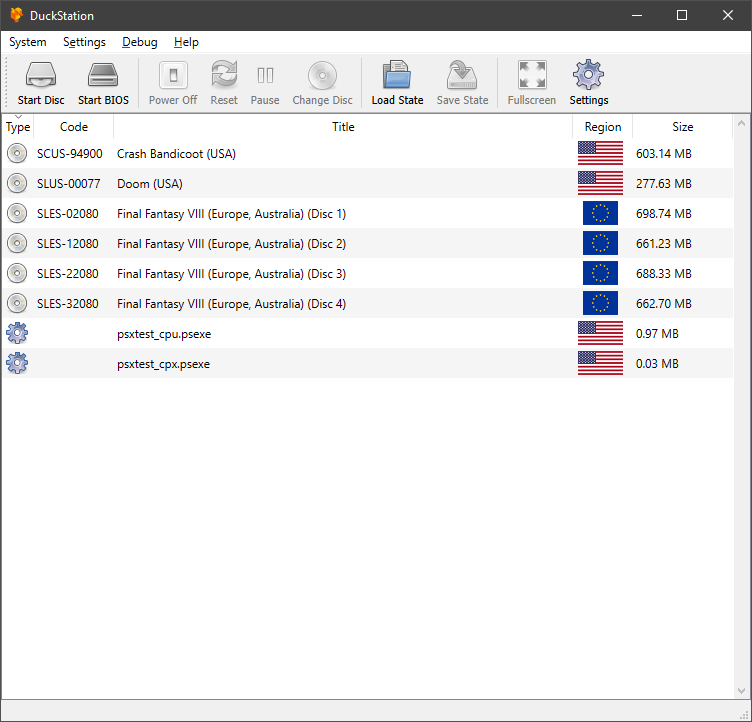
Il s’agit d’un émulateur de PlayStation One.


Caractéristiques:
– CPU Recompiler/JIT (x86-64 and AArch64)
– Hardware (D3D11 and OpenGL) and software rendering
– Upscaling and true colour (24-bit) in hardware renderers
– « Fast boot » for skipping BIOS splash/intro
– Save state support
– Windows and Linux support – macOS may work, but not actively maintained
– Supports bin/cue images, raw bin/img files, and MAME CMD formats.
– Direct booting of homebrew executables
– Digital and analog controllers for input (rumble is forwarded to host)
– Qt and SDL frontends for desktop
– Qt frontend has graphical configuration, and controller binding
– Automatic content scanning – game titles/regions are provided by redump.org

 
Configuration requise:
– A CPU faster than a potato.
– For the hardware renderers, a GPU capable of OpenGL 3.0/OpenGL ES 3.0/Direct3D 11 Feature Level 10.0 and above. So, basically anything made in the last 10 years or so.
– SDL-compatible game controller (e.g. XB360/XBOne)


Télécharger DuckStation v0.1 build 12XXX (71.6 Mo)

Site Officiel

En savoir plus…

Créé par l’auteur de CorgiDS, DobieStation est un émulateur PS2 en cours de développement avec pour objectif de proposer un port Android optimisé ainsi qu’un port PC rapide, précis et facile à utiliser.
 
Une grande partie de la bibliothèque de la PS2 peut démarrer ou accéder aux menus et certains titres peuvent même entrer dans le jeu y compris certains jeux spécifiques comme Final Fantasy X ou Shadow of the Colossus. Reste que pour l’instant l’émulateur est évidemment très préliminaire.


(Builds automatiques)
 

Télécharger DobieStation v0.0.1619 (15.9 Mo)

Site Officiel

En savoir plus…

A l’instar de MAMEinfo pour MAME(Arcade), le fichier MESSinfo vous permet de suivre les changements entre les versions concernant les différents systèmes émulés par MAME (partie consoles et ordinateurs).


Télécharger MESSinfo.dat v0.289 (7.1 Mo)

Site Officiel

En savoir plus…

Créé par Exzap, il s’agit du second émulateur de Wii U à être disponible au public mais le premier à pousser jusqu’à l’émulation de jeux commerciaux. Il peut décrypter les images Wii U qui utilisent le format Wud mais également les fichiers RPS ou RPL. La résolution interne peu aller jusqu’à 1920×1080 selon les jeux. A noter que pour le moment, un seul contrôleur est accepté, il s’agit du DRC (GamePad) de la Nintendo Wii U. Cette version n’est compatible que pour les Windows x64 (à partir de Windows 7) avec une carte graphique gérant OpenGL 4.1 (ou supérieur) ou Vulkan et il faudra posséder 4 à 8 Go de mémoire vive (Ram) pour le faire fonctionner. (Correspondance ID-Titre).
 
Un tuto est disponible ici.
 
cemu
 
Les changements:
 

En résumé:
– Vulkan improvements
– Misc smaller new features and bug fixes

 
En détails:
general: Added stick visualization to input settings
general: Replaced vsync checkbox with a dropdown and added renderer-specific options

vulkan: Overhauled internal Vulkan object/resource management
– Fixes crashes due to erroneously releasing textures that were still in use
– Fixes some RAM/VRAM leaks
– Generally lower VRAM usage since textures are released as soon as possible (previous solution enforced a 3 frame delay)

vulkan: Reloading graphic pack shaders should no longer cause a crash
vulkan: Added debug stats as an additional overlay option

 
Note:
(#xx) refers to bug tracker issues resolved by this change. See http://bugs.cemu.info/projects/cemu/


A noter que des packs graphiques haute définition sont disponibles ici. Ils permettent, entre autre, d’augmenter la résolution native des jeux car contrairement à Dolphin et parce que la machine est techniquement différente il n’est pas possible à Cemu d’augmenter la définition autrement que par cette méthode.
A l’inverse, des packs SD (définitions standards et/ou basses) sont disponibles sur ce lien et permettent à certains PC manquant de performance de lancer des jeux en 60 FPS.

 
Une liste de compatibilité est disponible ici.

 
Site source.

Télécharger Cemu v2.6 (35.6 Mo)

Site Officiel

En savoir plus…

Ootake est un émulateur PC-Engine en provenance du Japon et basé sur PC2E, tournant sous Windows 2000, XP, Vista, 7, 8 et 10. Il nécessite Direct X v9.0c au minimum.


ootake
 
– « Windows Pad Order » has been added to the pad setting screen. When connecting two or more Windows Gamepads, you can set which pad is assigned with the highest priority. Use this when the second and subsequent pads are connected, and the priority of the pad that was originally changed is lowered and the setting is shifted.
– « Overscan TV Mode » has been added to the « Screen » menu. Since v2.92, the aspect ratio is displayed more accurately, but black belts are displayed on the left and right in the 256 dot horizontal mode. When this menu is selected, the black belt display part can be eliminated and the left and right full window display (similar to Ootake before v2.91) can be made. However, 6 dots at the bottom of the screen are hidden to maintain the aspect ratio. Originally, « 6 dots at the bottom of the PC Engine screen » is rarely used for important displays, and most games can be displayed without any problems. I think that many old CRT televisions for home use had a display in this range. Use it when you want to play in that atmosphere or when you want to capture with the left and right filled when capturing the screen. You can also switch this by pressing the [F11] key.
– « Adjust TV Top-Position » has been added to the « Screen » menu. In « Overscan TV Mode », you can adjust the vertical display start position. It can also be adjusted by pressing the [Ctrl]+[F11] keys multiple times.
– The shortcut key of the overscan area display was changed from [F11] key to [F12] key. [Ctrl]+[F12] key can also be used to display the overscan area of top only.
*[F11] key switches overscan TV mode.
*If you want to switch to full screen, press [Alt]+[Enter] key. Also, when displaying the overscan area, only the top and bottom areas are displayed by default.
– When pressing [F12] key while pressing [Ctrl] key, only the top part is displayed in the overscan area.
– « Start Overscan TV Mode » has been added to « Setting->Screen » menu. Use this mode when you want to switch to overscan TV mode (the viewing range is as narrow as an old home TV) from startup.
– Cleaned up the « Capture » menu. Also, screenshot size and drawing method are displayed in the menu.
– « Overscan display state » is not restored during normal state loading. It restores only when loading resume(Turn on the « File->Set Resume » menu).
– When switching overscan area display ([F11] key) in window mode, if the window is below the center of the desktop screen, the window position after switching is adjusted to the bottom side.
– In the audio graph display ([9],[0] keys), in some games, the yellow graph remained even when the DDA sampling sound was muted. This problem has been corrected.
– Fixed the problem that the pad was not reflected when changing the gamepad while Ootake was running when setting the gamepad.
– « 1366×768 » was added to the FullScreen resolution setting menu field.
– « FullScreen 640×480 60Hz » in the « Screen » menu (for switching to full screen mode with any PC environment) has been changed to « FullScreen 800×600 60Hz ». Also, at the time of execution, the drawing method is returned to the default(Direct3D).
– When switching to full screen ([Alt]+[Enter] key), the screen is switched stably even in a PC environment where the available memory is low.
– Fixed a bug (from v2.92) that it display was shifted in a game that can play with 4-split display.
– The speed and timing have been made closer to those of the real machine. In « Chibi Maruko Chan », solved the problem that the display of the raster interrupt part was distorted when clearing the stage.
– Fixed a bug that recording of the play record function (« Capture->Play Record » menu) was not performed correctly at some games.
– Other minor details have been fixed and improved.


Télécharger Ootake (2K/XP/Vista/7/8/10/11) v3.06 (1.4 Mo)

Site Officiel

En savoir plus…

Créé par Force67, PS4Delta est un émulateur très expérimental de PlayStation 4 écrit en c++ et utilisant le HLE. Binaire par Lo v2.


Télécharger PS4 Delta (2020/04/05) (2.1 Mo)

Site Officiel

En savoir plus…

Créé par Inori, GPCS4 est un émulateur très préliminaire de Playstation 4 qui, pour l’auteur, sert principalement de recherche ludique et technique pour l’apprentissage de la gestion de graphisme en 3D. Un premier jeu commence à ce lancer mais n’espérons rien de concret encore avant longtemps.


Télécharger GPCS4 v0.2.0 (src 0.2.1) R230627 (8.6 Mo)

Site Officiel

En savoir plus…

Un très bon émulateur de TI-99/4A tournant sous Windows. Il fut connu sous le nom d’AMI99, mais fut renommé car beaucoup de personnes pensaient qu’il s’agissait d’un émulateur Commodore Amiga.
 

classicti99classicti991

 
Les fonctionnalités :
– Les roms systèmes & plusieurs cartouches sont inclues sous licence Texas Instruments
– Démarre et fait fonctionner correctement toutes les fonctions OS (excepté l’I/O et le TI BASIC,
– La plupart des modules fonctionnent très bien
– Le switch des cartouches XB/Atarisoft/Jon379/SuperSpace cartridge est supporté
– Emulation complète du son sur tous les channels, en incluant le support du son digitalisé
– Speech implémenté à la fois sur les roms et sur le speak externe.
– Le scan CRU du clavier est implémenté
– Support du joystick et du timer 9901
– Le disque supporte les fichiers V9T9, TIFILES/Xmodem, les fichies natifs Windows, les images disque V9T9 DSK & PC99 DSK (les images DSK sont en lecture seule)
– DirectX fenetré et plein écran, comme les modes fenétrés non-DirectX
– Détection des collisions (par pattern)
– Nombreux filtres vidéos en option (HQ4X, 2xSAI, SuperEagle, NTSC, etc)
– Débugger intégré en single step
– Emulation clavier PS/2 keyboard
– Sélection des menus par souris (double-cliquer sur l’écran)
– Support de la carte 1MB Super AMS
– Code source complet inclus
– Etc.
 
Après la v3.99.4, nous voici avec la QI399.008/9, perso je capte pas mais bon comme dirai l’autre: osef quoi!
 

Télécharger Classic99 v399.086 (35.5 Mo)

Site Officiel

En savoir plus…

Voici les derniers builds de Creamymami concernant MAME(Arcade).


– Caname c’est MAME(Arcade) ne supportant que les jeux CPS et Neo Geo.
– NMamex2 est un build de l’émulateur MAME(Arcade) sous Windows qui ne supporte que les jeux NeoGeo.
– Mame32k c’est MAME(Arcade) intégrant le module Kaillera (jeu en réseau).
– Mame32 More! est une version basée sur Mame Plus! mais compilée avec Kaillera.


Télécharger Caname v0.62.289 (2026/11/07) (2.4 Mo)

Télécharger NMamex2 v0.289 (2026/11/07) (1.7 Mo)

Télécharger Mame32K v0.67.289 (2026/11/07) (9.5 Mo)

Télécharger MAME32 More! v0.84.289 (2026/11/07) (12.2 Mo)

Site Officiel

En savoir plus…

Il s’agit de FBA Shuffle faite par Creamymami, contrairement aux versions de KOF2112, cette version est plus proche de la version officielle de FBA.


fba_shuffle_lang


Télécharger FBA Shuffle (x86) [Creamymami] v2.4.0 (2026/11/07) (6.6 Mo)

Télécharger FBA Shuffle (x64) [Creamymami] v2.4.0 (2026/11/07) (7.1 Mo)

Site Officiel

En savoir plus…


https://getourbonus.com/fr/accueil

https://www.romspedia.com/