Ecrit par StapleButter (auteur des émulateurs de SuperNES lolSNES/blargSNES pour DS et 3DS et ayant contribué pour DeSmuME), il s’agit d’un émulateur de Nintendo DS pour Windows et Linux dont l’objectif est de faire les choses bien et rapidement, semblable à blargSNES mais en mieux (dixit l’auteur).
 
Les changements:
 
• fix GL renderer not working at all on certain setups (RSDuck)
• add 32bit writes to certain IO ports (fixes some freezes)
• OpenGL: disable vsync under Windows
• fix bug when mapping a joystick axis but no button
• set kMaxIterationCycles to 64 (old value 16)
• fix potential crash when pressing Escape with menus opened
• OpenGL: remove shitty hack
• OpenGL: better lines
• fix potential crash when closing emu


Site officiel proposant les sources.

Télécharger melonDS v1.1 (18.5 Mo)

Site Officiel

En savoir plus…

Mamesaver est un économiseur d’écran Windows qui exécute MAME avec un jeu aléatoire et dans des intervalles de temps pré-déterminés.


Télécharger MameSaver v3.0 (780 Ko)

Site Officiel

En savoir plus…

DS4Windows est un programme portable qui vous permet d’obtenir la meilleure expérience lors de l’utilisation d’un DualShock 4 sur votre PC, en émulant un contrôleur Xbox 360, beaucoup de jeux deviennent alors accessibles.


– Norwegian Bokmål translation provided by @DandelionSprout
– Loosened enhanced precision curves
– AdvancedColorDialog change improved responsiveness of application for some reason
– Removed color dialog dependency from design for some forms. Allows DS4Form and Options forms to open in Design mode while targetting x64
– Added easeout cubic curve option


Télécharger DS4Windows (original) (x86) v3.3.3 (2.6 Mo)

Télécharger DS4Windows (original) (x64) v3.3.3 (2.6 Mo)

Site Officiel

En savoir plus…

Créé par Avery Lee (l’auteur de VirtualDub), il s’agit d’un émulateur d’Atari 8 bits (800/800XL/130XE) disponible en 32 et 64 bits. Il dispose de beaucoup d’options ainsi que d’une bonne compatibilité. Il prend en charge les jeux protégés conformément à l’émulation. Il s’agit d’une version de développement au stade de béta.


Télécharger Altirra (Beta) v4.50 Test 28 (7.7 Mo)

Site Officiel

En savoir plus…

Créé par Avery Lee (l’auteur de VirtualDub), il s’agit d’un émulateur d’Atari 8 bits (800/800XL/130XE) disponible en 32 et 64 bits. Il dispose de beaucoup d’options ainsi que d’une bonne compatibilité. Il prend en charge les jeux protégés conformément à l’émulation.
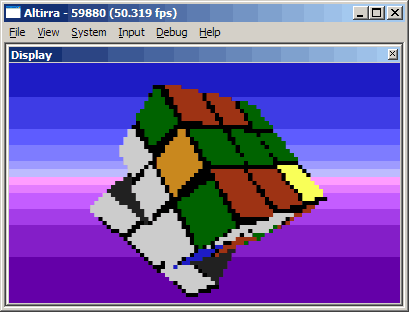


Highlights since 3.10 (https://atariage.com/forums/topic/281825-altirra-310-released ) :
 
– Accuracy: Fixes to several cartridge types, VBXE, Black Box, raw Shift key handling.
– Disk: Fixes to address and data CRC error handling, non-standard sector size encoding support, ATX physical sector size chunk support, rotate disk now works with full disk drives.
– Debugger: Additional disk debugging features, bank-sensitive breakpoints and symbol lookup for AtariMax carts, deferred auto-loading of symbols, more Turbo-Basic XL debugging support, minor fixes to various commands.
– Devices: APE Warp+ OS 32-in-1 is now emulated, Ultimate1MB can soft-control stereo and Covox, fixes to some broken modem and CIO acceleration options.
– Display: Hardware accelerated effects support including distortion and bloom, new color preset for the NTSC 800 model, new overscan preset to match modern widescreen displays.
– Firmware: Updated to Altirra BASIC 1.56 with minor startup fix, AltirraOS 3.17 with fixes to the math pack, SIO, boot screen, and keyboard handler.
– Software: The ColorMap tool on the Additions disk now supports CTIA systems.
– UI: Easier enabling/disabling of portable mode, enhanced drag-and-drop support, system overview/recommendations, escaped text paste, Alt+click to decode BASIC PEEK/POKE addresses, mounted tapes and non-internal BASIC carts now persist, fixes to input state and console controllers in 5200 mode, bogus DOS/Windows executable detection, automatic BASIC/binary switching for tape boot.


Télécharger Altirra v4.40 Stable (8.3 Mo)

Site Officiel

En savoir plus…

Un joli frontend pour Mame (ou autres), très configurable. Emu Loader est une interface graphique qui se greffe principalement sur les émulateurs Arcade comme MAME, SEGA Model 2, SuperModel ou Daphne. Emuloader permet de gérer votre collection de roms, de vérifier vos jeux et de lancer vos émulateurs.
 
el


Télécharger Emuloader v8.9.4 (32.8 Mo)

Site Officiel

En savoir plus…

MicroM8 (ex Octalyzer) est un émulateur d’Apple 2 multi-plateformes.


Télécharger MicroM8 (x86) (2019/12/16) (18.2 Mo)

Télécharger MicroM8 (x64) (2019/12/16) (18.8 Mo)

Télécharger MicroM8 GUI v1.1 (26.3 Mo)

Site Officiel

En savoir plus…

Il s’agit d’une version améliorée de M88, émulateur de Nec PC8801.


Télécharger M88x v2.21a (2025/10/21) (156 Ko)

Site Officiel

En savoir plus…

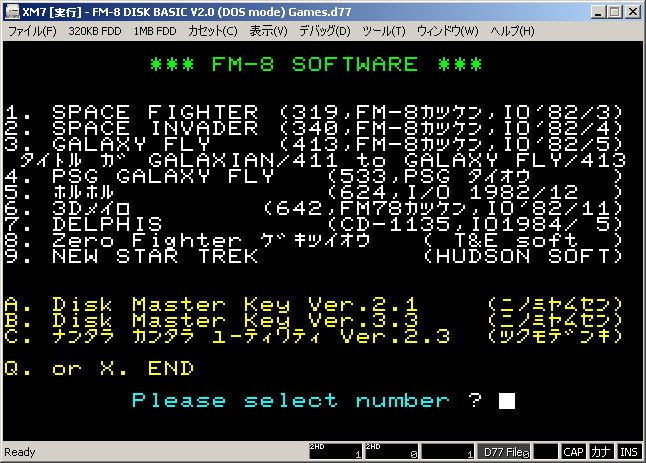
Un émulateur FM7 tout en Japonais par Ryu Takegami. Ces versions font suite à XM7 Emulator Final Release du même auteur. Toutefois la branche « regular » vient de reprendre du service.


Ancien site [pour archive].
 
Notez une chose (trad. de google):
For a few years (or rather since PI. ‘S site was closed) I have not had any impressive impressions, I’m satisfied I intended to report a bug with my page / Twitter account and report it to the developer There are people, and development machines that kept running for the last 6 years are not in good condition and there is no more money to repair, so we decided to terminate the development of XM 7 Type R / XM 7 pure on July 21, 2018.
Since I moved the site to RetroPC.NET side on August 23, 2018, this site will close on January 23, 2019.

 
L’ancien site était à l’origine sur retropc puis a migré pendant des années sur celui-ci, et le voila de nouveau sur son lieu d’origine chez retropc. Sincèrement je comprend rien à la démarche donc si quelqu’un comprend mieux les choses, qu’il nous le dise en commentaire merci ^^


Télécharger XM7 for Win32 + DirectX V1.1L77SX+z10 R4 (Version finale) (338 Ko)

Télécharger XM7 for Win32 + DirectX V2.9L77SX+z10 R4 (Version finale) (312 Ko)

Télécharger XM7 for Win32 + DirectX V2.9L77SX+z10-V2 R4 (Version finale) (318 Ko)

Télécharger XM7 for Win32 + DirectX V3.4L77SX+z10 R4 (Version finale) (321 Ko)

Télécharger XM7 TypeR for Win32 + DirectX V1.1L77SX+z10 R3a (Version finale) (395 Ko)

Télécharger XM7 TypeR for Win32 + DirectX V2.9L77SX+z10 R3a (Version finale) (354 Ko)

Télécharger XM7 TypeR for Win32 + DirectX V2.9L77SX+z10-V2 R3a (Version finale) (360 Ko)

Télécharger XM7 TypeR for Win32 + DirectX V3.4L77SX+z10 R3a (Version finale) (362 Ko)

Télécharger XM7pure for Win32 + DirectX V1.1L77SX+z06r2 (313 Ko)

Télécharger XM7pure for Win32 + DirectX V2.9L77SX+z06r2 (299 Ko)

Télécharger XM7pure for Win32 + DirectX V3.4L77SX+z06r2 (308 Ko)

Site Officiel

En savoir plus…

Il s’agit d’une suite d’émulateurs modifiés pour fonctionner avec le site RetroAchievements et permettant d’ajouter des « succès » (achievements) à la Steam, la possibilité d’enregistrer ses records et de les comparer en direct avec les autres !


Télécharger RAGens v0.58 (1.1 Mo)

Télécharger RANes v1.1 (6.1 Mo)

Télécharger RASnes9x v1.63 (7.7 Mo)

Télécharger RAVisualboyAdvance v1.2.0 (13.7 Mo)

Télécharger RAPCEngine v0.002 (1.7 Mo)

Télécharger RAP64 v1.0 (4.9 Mo)

Télécharger RAMeka v1.0 (1.9 Mo)

Télécharger RAQUASI88 v1.2.0 (1.0 Mo)

Télécharger RAppleWin v1.3.1 (1.9 Mo)

Site Officiel

En savoir plus…

Il s’agit d’un émulateur de Nintendo NES (et aussi FDS, NSF, NSFe, VS System) écrit en C++ (interface en c#) gérant le multi threading et est capable de s’exécuter en mode 32 ou 64 bits automatiquement. Il s’attarde sur la précision, gère un ensemble de mappers et filtres graphiques (mais aussi les packs HD au format HDNes) ainsi que les extensions zip/7z, permet l’enregistrement vidéo, le jeu en ligne ou encore d’utiliser des codes de triches. De plus, il se mettra à jour automatiquement. En outre il dispose également d’un débogueur.
 
Il vous faudra disposer de Windows Vista, 7, 8, 8.1 ou 10 ainsi que DirectX 11 avec .NET Framework 4.5+ d’installé.
 
A noter qu’il est à présent très probable que Mesen soit devenu l’émulateur le plus précis (devant Nestopia UE/puNES/Bizhawk) et en passe de devenir le meilleur émulateur de NES disponible tout simplement.


IMPORTANT: The first release of 0.9.8 contained a bug that prevented FDS games from loading properly, this has been corrected. An updated version of 0.9.8 has been uploaded, if you’ve downloaded the original release, please manually download 0.9.8 again.
 
WARNING: Save states created with version 0.9.7 (or older) will no longer work in 0.9.8.
 
New Features
– Debugger: General improvements as well as new features/tools (and bug fixes.)
– NSF: Allow rewinding during NSF file playback and fixed an initilization problem with VRC6 audio.
– History Viewer: Added a few new features and options, including allowing it to be used with NSF files.
– Video: Added support for 512-color palette files (for color bit emphasis.)
– Input: Added options to configure the deadzone size for analog sticks and to hide the mouse cursor when using a zapper.
– Dip switches: Dip switches can now be configured for all cartridges that use them (instead of being limited to VS System games.)
 
Bug Fixes
– APU: Fixed frame counter bug that caused audio to sometimes be paced slightly incorrectly.
– APU: Fixed DMC power on state to match hardware test results.
– PPU: Prevent palette updates during horizontal blank when rendering is enabled (to match expected hardware behavior.)
– Namco 163: Fixed problems with battery save data.
– Bandai FCG: Added support for EEPROM save data.
– MMC5: Fixed incorrect attribute data when using fill mode.
– VRC7: Updated audio instrument values to match the values recently dumped from hardware.
– AOROM: Fixed power on mirroring state.
– Misc: Fixed minor bugs in a variety of mappers (including mappers 112, 176, 320 and UNROM512.)


Télécharger Mesen v2.1.1 (33.5 Mo)

Site Officiel

RomCenter est une très bonne alternative à ClrMAMEPro et plus accessible.


At last, after seven years of development, romcenter 4.0.0 is ready.
Romcenter 4 is a complete rewrite of romcenter 3.7 in c# language using microsoft visual studio.
Compared to previous 3.7 version, it provides same features with a new interface and an updated engine.
Requirement : .net framework 4, windows xp to windows 10

 
Les changements depuis la RC4:
– Add 27 systems datafiles generated from mame 208
– Add more precise log messages
– Extend text filter search to more games and files columns
– Faster operations when a lot of items are selected
– Add backup strategy selection on startup
– Improve container remove method to reliably handle on-success db operation.
– Rewrite version comparison
– Update some components
– Faster dat import
– Clean and fix games selection
– Clean files/fileroms view selection
– Handle operations exceptions. Display only one dialog and cancel.
– Disable ‘remove zip comment’ by default
– Fix deleted items not sent to recycle bin
– Fix refresh database deadlock
– Fix settings when backup path not selected
– Fix filters not working with grey disks
– Fix some views not translated
– Fix crash when opening a db from a non existent folder
– Fix error when temp folder deleted
– Fix a bug causing an index error
– Fix crash when ‘backspace’ typed in view
– Fix detail view not updated when master is empty
– Fix loading error with some utf-8 dat
– Fix invalid cast when updating view data
– Fix loading libretro mame2003 dat (double )
– Fix no detail item selected after operations
– Fix wrong files identification when fixing from a rom selection
– Fix plugin not always detected when dat is filtered
– Fix ribbon staying active after trying to open a missing db
– Fix unzipped files not renamed
– Fix wrong file status for single files
– Fix db name not changed when updating dat.
– Fix detail view not cleared when filtering the selection.
– Fix empty backup folder settings blocking save in options.
– Fix items selection identification when rom selected
– Disable for now usage of extension calculated by plugin (use datafile rom extension instead).
– Bug #10: Issues When Archive Folder Runs Out of Space
– Bug #111: RC3 trying to rename files that have correct name
– Bug #124: Writing gamename in FILTER box is not working for many games.
– Bug #128: MAME 2003 PLUS libretro core xml error
– Bug #129: Crash opening « settings » dialog when a non-existent database is selected.
– Bug #136: Cancel running operation, buttons (yes/not) are inverted
– Bug #137: Selected file when playing with filters
– Bug #140: NES plugin not working/triggering when selecting only USA region
– Bug #142: Exception has been thrown by the target of an invocation.
– Bug #143: Splash screen « BACKUPED » should be « BACKED UP »
– Bug #144: Fix process extremely slow on large collections
– Bug #145: Romcenter doesn’t recognize Roms it should
– Bug #148: InvalidOperationException: Added item does not appear at given index ‘0’.
– Bug #151: Directory not found – RomCenter will now close
– Bug #153: Problems with paths longer than 260 characters
– Bug #154: Cannot create database from latest TOSEC dat
– Bug #156: Adding the same folder twice leads to a buggy state


Télécharger RomCenter v4.1.1 (18.2 Mo)

Site Officiel

En savoir plus…


https://getourbonus.com/fr/accueil

https://www.romspedia.com/