DSP est un émulateur Sinclair ZX Spectrum mais aussi Amstrad CPC, Arcade, NES, SMS, GameBoy, Coleco Vision, Chip8/Super Chip8… développé par Leniad Soft 2003. Il supporte les Spectrum 48K, Spectrum 128K et des jeux d’arcades comme Phoenix, BombJack ou encore Ghost’n’Goblins. Il s’agit d’un projet Open Source développé en Delphi+Lazarus+Free Pascal.
 
DSP
 
DSP Emulator 0.18b3 WIP:
 
-Renewed preview images (Thanks to Francisco José Martí Terrón)
 
-General
+CPU
-MCS51: Added halt line
+ROMS export: Fixed many ROMs sets (Thanks to Francisco José Martí Terrón)
 
-Commodore 64
+Added PRG and T64 file support (added by chuso gar)
 
-Sega System 16B HW
+Fixed dipswitches
+Fixed video cache
+Fixed sprite colors
+Added memory overlap
+Added 315-5248 and 315-5250
+Added more operations to 315-5195
-Dynamite Dux: Added driver with sound
-Golden Axe: Driver working, due problems with i8751/M68000 using predecoded version
-ESwat – Cyber Police: Added driver with sound, due the lack of FD1094 emulation using predecoded version

 
—-
 
-General
+CPU
-MCS51: Added opcodes $45,$e2,$e3,$f2 and $f3
+uPD7759: Added slave chip type
 

-Sega System 16B HW
+Added MCU, sound, sprites and controls
+Fixed chars and tiles
-Altered Beast: Driver with sound
-Golden Axe: Initial driver
 

more here…


Télécharger DSP (x86) v0.23 (6.0 Mo)

Télécharger DSP (x64) v0.20 (16/07/2022) (3.5 Mo)

Site Officiel

En savoir plus…

Il s’agit d’une version béta de bsnes ajoutant un mode haute résolution au mode 7 et qui gère à présent l’affichage en mode écrans larges, le résultat est absolument magnifique !! Espérons que Near pourra l’intégrer dans le projet officiel prochainement !
 

Avant


Après!


WideScreen en action !

Avant

Après!

 
New in this version:
 
general:
– Fixed memory leak affecting every rendered frame (#70)
– Widescreen sizes are now rounded to increments of 8 to avoid misalignments (#60)
– Background color gradient smoothing now has a threshold to avoid blurring intended edges
– Some release build system tweaks (partially from #57 by Margen67)
– tweaked widescreen marker positions
 

standalone:
– Fixed loading of settings (#45, #53)
– Default latency of WaveOut (the default audio on Windows) has been reduced to 128 (#58)
– Linux and Mac releases are now .tar.bz2 compressed to preserve the execute permissions (#37, #41)
– Mac releases now target macOS 10.14 (Mojave) (#40)
– Included settings file is no longer empty, but contains default input and hotkey settings
– The Windows and Linux packages now include the Super Metroid widescreen patch by ocesse as – – well as some sample setting overrides (partially by @wojpawlik)
 

libretro:
– The core is back on the auto updater (by libretro team and community) (#56)
– The core is now also available for some systems as part of releases
– The « HD Windowing (experimental) » setting is now applied properly (#55)
– Support for GB/GBC roms in archives, Satellaview and MSU-1 SGB (by KickMeElmo in #69 (#46))
 

setting overrides:
– The 4 « widescreen background » settings now allow specifying a line from which on up/downwards the background is widescreen as well as specifying cropping modes
– « WideScreen Marker » setting can now be set via ‘m’
– « Mode 7 Perspective Correction » setting can now be set via ‘P’
– « Overclock CPU » setting can now be set via ‘O’
– Overrides are now properly removed when switching games and not accidentially saves in settings
– The ‘%’-character can now be used in override files to switch to and from comments
 

All provided as-is!
 

« bsnes-hd beta » core for RetroArch available in the internal updater on Windows, Linux, Mac, Android and Switch


A télécharger ici: beta 1, beta 2, beta 3, beta 4, beta 5, beta 6, beta 7, beta 8, beta 9, beta 8, beta 10, beta 10.2, beta 10.3, beta 10.4.


Forum Officiel

Site Officiel

Un très bon émulateur de TI-99/4A tournant sous Windows. Il fut connu sous le nom d’AMI99, mais fut renommé car beaucoup de personnes pensaient qu’il s’agissait d’un émulateur Commodore Amiga.
 

classicti99classicti991

 
Les fonctionnalités :
– Les roms systèmes & plusieurs cartouches sont inclues sous licence Texas Instruments
– Démarre et fait fonctionner correctement toutes les fonctions OS (excepté l’I/O et le TI BASIC,
– La plupart des modules fonctionnent très bien
– Le switch des cartouches XB/Atarisoft/Jon379/SuperSpace cartridge est supporté
– Emulation complète du son sur tous les channels, en incluant le support du son digitalisé
– Speech implémenté à la fois sur les roms et sur le speak externe.
– Le scan CRU du clavier est implémenté
– Support du joystick et du timer 9901
– Le disque supporte les fichiers V9T9, TIFILES/Xmodem, les fichies natifs Windows, les images disque V9T9 DSK & PC99 DSK (les images DSK sont en lecture seule)
– DirectX fenetré et plein écran, comme les modes fenétrés non-DirectX
– Détection des collisions (par pattern)
– Nombreux filtres vidéos en option (HQ4X, 2xSAI, SuperEagle, NTSC, etc)
– Débugger intégré en single step
– Emulation clavier PS/2 keyboard
– Sélection des menus par souris (double-cliquer sur l’écran)
– Support de la carte 1MB Super AMS
– Code source complet inclus
– Etc.
 
Après la v3.99.4, le système d’incrémentation des versions à changé, on en ignore la justification.
 

Télécharger Classic99 v399.086 (35.5 Mo)

Site Officiel

En savoir plus…

Développé par Mike Wynne, il s’agit d’un émulateur Sinclair ZX81, Sinclair ZX80, Sinclair ZX Spectrum 16k/48k, Sinclair ZX Spectrum 128k, Amstrad/Sinclair Spectrum +2, Amstrad/Sinclair Spectrum +2a, Amstrad/Sinclair Spectrum +3, Timex TS1000, Timex TS1500, Timex TS2068, Timex TC2048, Lambda 8300, Ringo R470, MicroDigital TK85 et Jupiter ACE.


Bug fixes:
– The status bar of the BASIC Listing window was not showing the correct program address range
for the ZX80 and Spectrum.
– The status bar of the BASIC Listing window was not being cleared when switching to a
different computer model.
– The memory shadowing of QS Character mode when Chroma 81 was selected was incorrect.
– Removal of the close ‘X’ from the hardware dialog title bar, which was leaving the dialog
in an incorrect state.
– Removal of the close ‘X’ from the Sound Settings dialog title bar, which was leaving the
dialog in an incorrect state.
– Removal of the close ‘X’ from the BASIC Listing Settings dialog title bar, which was leaving
the dialog in an incorrect state.
– Cancelling the Load BASIC Listing Options dialog no longer results in a reset.
– A line highlighted in the BASIC Listing window was not being de-highlighted when clicking
empty space beyond the end of the program.
– The continuation marker in a BASIC Listing file is now supported for comment lines.
– The Discard Redundant Spaces option of the BASIC Listing loader was not removing all surplus
spaces.
 

Enhancements:
– Updated program icon to have white keys (provided by equin0x80).
– Selecting a machine specific BASIC Listing file causes an automatic switch to the appropriate
computer model.
– The BASIC Listing window now provides a 2x scaling option.
– Support for loading BASIC Listing files with a .txt extension.
– Support for loading BASIC Listing files with a .bas extension.
– Support for loading BASIC Listing files that use ZxToken format extensions.
 

Télécharger EightyOne v1.41 (4.9 Mo)

Site Officiel

En savoir plus…

Il s’agit d’un très bon émulateur de NES, ce fut le second à être releasé au public (en 1996 !) après Pasofami mais le premier à être le plus facilement utilisable. L’idée originale de iNES appartient à Alex Krasivsky, qui a trouvé les premières informations sur le matériel et NDA a écrit le code initial, il ne reste rien de ce code aujourd’hui.
 
iNES lance une immense quantité de jeux NES, supporte le Gamegenie, le Family BASIC Keyboard, le FDS et le système arcade VS-System. iNES propose plusieurs filtres graphiques et supporte le jeu en ligne.
 
Il a été porté sur Unix, MacOS, MSDos, Windows, Symbian, PocketPC, etc…
 
inesines2
 
– Nintendo Entertainment System (NES), Famicom, Famicom Disk System and Dendy are all registered trademarks of Nintendo.
– GameGenie is a registered trademark of Galoob.
– The author is in no way affiliated with Nintendo.
– The author is in no way affiliated with any pirate group out there.
– The author cannot and will not provide you with any NES or Famicom games.
– The author cannot be held responsible for anything this program will do to your computer, brains, free time, housemates, pets, or family members.


Télécharger iNES v6.1 (218 Ko)

Site Officiel

En savoir plus…

Débuté en 1996 sur diverses plateformes car hautement portable, MasterGear est gratuit depuis le 11/03/2015 dans ses versions Windows.


MasterGear (MG) est un émulateur des systèmes Sega 8 bits. Il supporte la Sega MasterSystem (Mark3 au Japon) et GameGear, ainsi que leurs prédécesseurs : SG1000, SC3000, SF7000, et Mark2. MasterGear dispose aussi d’un débogueur.
 

-Mark3, MasterSystem, GameGear, SG1000, SC3000, and SF7000 are all registered trademarks of SEGA.
– GameGenie is a registered trademark of Galoob.
– The author is in no way affiliated with SEGA.
– The author is in no way affiliated with any pirate group out there.
– The author cannot and will not provide you with any MasterSystem, GameGear, or other games.
– The author cannot be held responsible for anything this program will do to your computer, brains, free time, housemates, pets, or family members.


Télécharger MasterGear (Windows) v4.9 (161 Ko)

Site Officiel

En savoir plus…

DS4Windows (site original) est un programme portable qui vous permet d’obtenir la meilleure expérience lors de l’utilisation d’un DualShock 4 sur votre PC, en émulant un contrôleur Xbox 360, beaucoup de jeux deviennent alors accessibles.
 
– Added delay time to Gyro Directional Swipe action
– Fixed populate of Gyro Directional Swipe and Gyro Controls triggers buttons
– Lowered touchpad slide distance for Controls mode
– Fixed Steering Wheel calibration Special Action saving
– Allow resetting of extras for Trigger soft pull and full pull
– Allow resetting Extras bound to Gyro Swipe actions
– Now officially only support Windows 10 and later. THANKS MICROSOFT
– Added BatteryPercentage mode for DualSense Player LED Bar
– Fixed Switch Pro and JoyCon AccelY coordinate used by UDP Server
– Fixed profile cancelling for the test index
– Tweaked disable device time for Exclusive mode routine
– Removed DynamicResource lookups for Special Action Editor
– .NET 5 port in progress
– Added App instance check to work around Design mode in .NET 5.0
– Changed Browse Programs fallback value in Profile Editor for .NET 5.0
– Changed method to strip null terminated strings
– Added Gyro Calibration button to Gyro Mouse StackPanel
– Updated ViGEmClient library to use notification queue
– Fixed critical notification callback bug in ViGEm.NET library
– Bundled DS4Updater 1.4.6
– Added updated ScpVBus build


Télécharger DS4Windows (original) (x86) v3.3.3 (2.6 Mo)

Télécharger DS4Windows (original) (x64) v3.3.3 (2.6 Mo)

Site Officiel

En savoir plus…

Ceci est un fork de l’émulateur Playstation, PCSX. L’objectif est à peu près le suivant:
 

– Apportez une base de code conforme aux normes d’aujourd’hui.
– En finir avec le système de plug-in et permettre une base de code monolithique unique qui gère tous les aspects de l’émulation Playstation.
– Utiliser SDL / OpenGL3 + / ImGui pour la portabilité et la lisibilité.
– Améliorez l’expérience du déboggage.
– Améliorez l’expérience de rendu.
 

Il s’agit de binaires préliminaires.


NB: Je précise que ce sont des builds basés sur le GIT à un instant T, l’auteur n’a rien proposé de stable ni de finalisé. Ces versions sont toujours à considérer comme des versions alpha préliminaires tant que l’auteur ne propose officiellement rien d’autres, cela permet en outre de faire connaitre le projet au plus grand nombre et si certain(e)s d’entre vous veulent y contribuer, tant mieux pour tous. Donc il se peut que ce genre de build fonctionne ou pas du tout, c’est en soit « normal » car c’est tout sauf finalisé. Cela s’applique à tous builds dit « GIT » que nous proposons.
 

Télécharger PCSX Redux (32 bits) (2023/03/27) (41.0 Mo)

Télécharger PCSX Redux (64 bits) (2026/11/09) (47.9 Mo)

Site Officiel

En savoir plus…

Play! est une tentative de créer un émulateur PlayStation 2 sous Windows / MacOS / iOS / Android. Il est actuellement écrit en C / C + + et utilise un système de mise en cache / de recompilation d’instruction pour obtenir de meilleures performances tout en émulant le CPU.
 
L’émulateur peut faire fonctionner quelques jeux, mais très moyennement dans la plupart des cas. L’objectif de l’auteur est d’atteindre un niveau de qualité qui permettra à quiconque de jouer son jeu favori PlayStation 2 sur son PC.
 
play
 
– Merge pull request #1015 from bigianb/fast_psm8_texupdater
– added defines for 32 bit platforms
– added NEON version
– update SSE detection to work better on ios compilation
– SSE version of column unswizzle for PSM8
– Fixes / Cleanup


Télécharger Play! (x86) GIT v0.77 (2026/10/25) (8.9 Mo)

Télécharger Play! (x64) GIT v0.77 (2026/10/25) (10.3 Mo)

Site Officiel

En savoir plus…

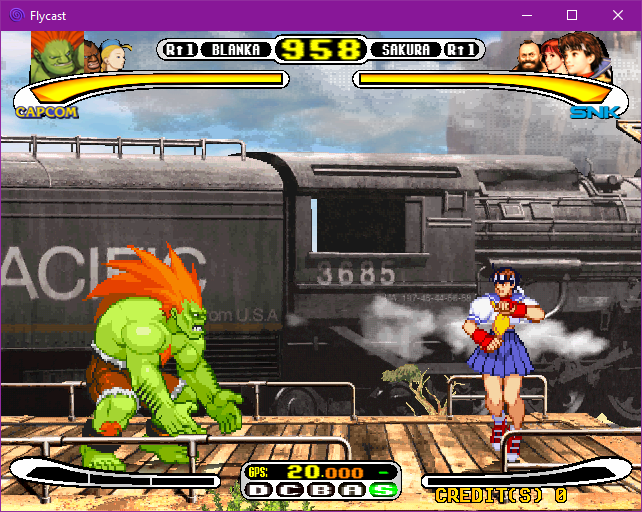
Flycast est un émulateur multiplateforme de Sega Dreamcast, Naomi et Atomiswave qui est basé sur Reicast. Informations ici.


Il prend en charge les jeux aux formats suivants:
– SEGA Dreamcast (CHD, CDI, GDI, CUE)
– SEGA Dreamcast utilisant WinCE
– SEGA NAOMI (.zip, .7z, .dat/.lst)
– SEGA NAOMI GD-ROM (.zip, .7z, .dat/.lst et .chd)
– Sammy Atomiswave (.zip, .7z)
 

Il ne prend pas encore en charge les jeux SEGA NAOMI 2, Hikaru et SEGA System SP.
 

Des packs de textures sont disponibles ici.


Builds automatiques (debug).
 

Télécharger Flycast v2.7 (9.4 Mo)

Site Officiel

En savoir plus…

Xemu est une application multiplateforme et open source qui émule le matériel de la console de jeu Xbox d’origine, permettant aux utilisateurs de jouer à leurs jeux Xbox sur les systèmes Windows, macOS et Linux.


Ce projet est une branche active du projet XQEMU, qui est lui même basé sur le projet QEMU qui est populaire et très activement maintenu.


A noter que la version 32 bits n’est pas officielle (réalisée par Lo v2).
 

Télécharger Xemu (x86) (2020/06/12) (6.2 Mo)

Télécharger Xemu v0.8.139 (10.9 Mo)

Télécharger Xemu (Debug) v0.8.139 (11.3 Mo)

Site Officiel

En savoir plus…

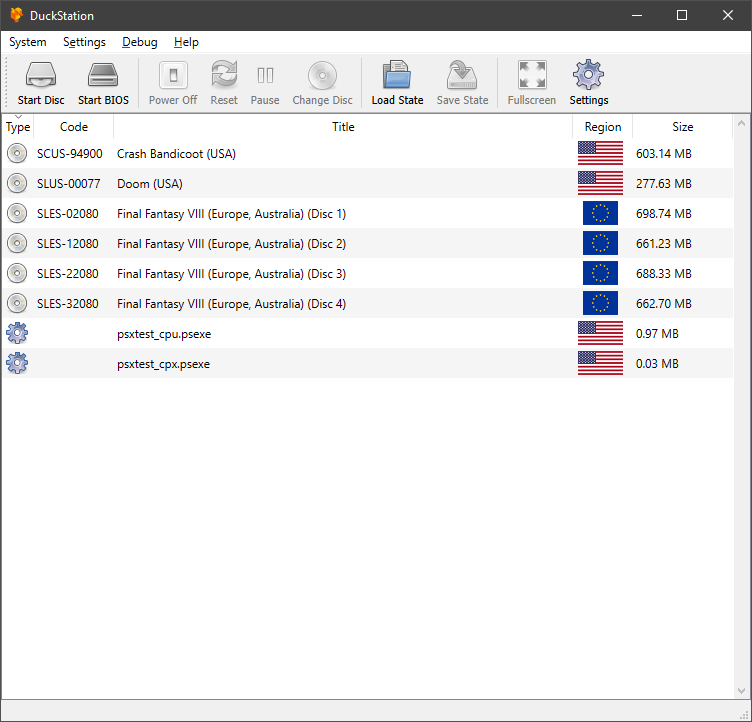
Il s’agit d’un émulateur de PlayStation One.


Caractéristiques:
– CPU Recompiler/JIT (x86-64 and AArch64)
– Hardware (D3D11 and OpenGL) and software rendering
– Upscaling and true colour (24-bit) in hardware renderers
– « Fast boot » for skipping BIOS splash/intro
– Save state support
– Windows and Linux support – macOS may work, but not actively maintained
– Supports bin/cue images, raw bin/img files, and MAME CMD formats.
– Direct booting of homebrew executables
– Digital and analog controllers for input (rumble is forwarded to host)
– Qt and SDL frontends for desktop
– Qt frontend has graphical configuration, and controller binding
– Automatic content scanning – game titles/regions are provided by redump.org

 
Configuration requise:
– A CPU faster than a potato.
– For the hardware renderers, a GPU capable of OpenGL 3.0/OpenGL ES 3.0/Direct3D 11 Feature Level 10.0 and above. So, basically anything made in the last 10 years or so.
– SDL-compatible game controller (e.g. XB360/XBOne)


Télécharger DuckStation v0.1 build 12XXX (71.5 Mo)

Site Officiel

En savoir plus…


https://getourbonus.com/fr/accueil

https://www.romspedia.com/