L’émission Double Back revient comme promis avec tout un tas de news fraîches. Et c’est toujours avec le même plaisir que nous retrouvons Doc Return qui vous narrera l’actualité retrogaming de sa voix câline !


  • 00:15 OutRun se lance sur Switch !
  • 02:03 Katana Zero – l’art divinatoire de la tuerie
  • 03:29 Retro-Bit expose le prototype d’une nouvelle Sega Nomad !
  • 04:47 Demon’s Tilt – le cousin démoniaque de Devil Crush
  • 06:03 So 19ème ! la SEGA Master Systeampunk !
  • 07:34 Mettez vite le grappin sur ce prototype Darkwing Duck !
  • 08:59 Dragon’s Lair Trilogy sur Switch – Die and retry and retry encore !
  • 10:15 Rikki et Vikki ou la belle vie sur Atari 7800 !
  • 11:39 Le Manoir de Mortevielle – le trophée du Tilt d’or 1987 mis aux enchères !
  • 14:05 Lunark – mi Flashback, mi lui-même


Double Back, c’est 10 news tous les 10 jours les 7, 17 et 27 de chaque mois ! sortez vos calculettes, c’est donc 30 faits par mois marquant l’actualité rétrogaming !. Si vous avez manqué les épisodes précédents de Double Back, l’émission qui démonte l’actualité retrogaming en vidéo, votre situation est grave mais pas désespérée. Heureusement pour vous, la technologie humaine permet aux étourdis dans votre genre de voir et revoir les anciens numéros en vous rendant sur cette page et de suivre votre instinct.


Site Officiel

IV/Play (prononcé «Four Play») est une interface graphique pour MAME. Il a été conçu par un codeur rémunéré par John IV comme une alternative à MAMEUI (que Robbbert maintient). IV/Play mise sur une séparation réelle entre frontend et code MAME afin que les changements sur MAME n’affectent plus le frontend. Disponible pour windows 32 et 64 bits, il vous faudra .NET 4.0 pour le lancer.


IV/Play sees a minor update for an issue I found with some relative paths being reset after a bkground image change. Matan fixed it and additionally updated the internal support libraries, etc.
 

Télécharger IV/Play v2.17 (11.9 Mo)

Site Officiel

En savoir plus…

Un émulateur de GB/GBC/GameBoy Advance écrit en langage C par Jeffrey Pfau (endrift) et basé (sensiblement) sur GBA.js et qui a comme objectif d’être un émulateur de haute qualité. Disponible pour Windows (Vista et +), Linux, Mac OSX et bien d’autres systèmes.
 
mgba


Features:
– ELF support
– Game Boy Camera support
– Qt: Set default Game Boy colors
– Game Boy Printer support
– Super Game Boy support
– Customizable autofire speed
– Ability to set default Game Boy model
– Map viewer
– Automatic cheat loading and saving
– GameShark and Action Replay button support
– AGBPrint support
– Debugger: Conditional breakpoints and watchpoints
– Ability to select GB/GBC/SGB BIOS on console ports
– Optional automatic state saving/loading
– Access to ur0 and uma0 partitions on the Vita
– Partial support for MBC6, MMM01, TAMA and HuC-1 GB mappers
– GBA: ARMIPS/A22i-style and ELF symbol table support
– Initial Switch port
 
Bugfixes:
– ARM: Fix MSR when T bit is set
– Core: Fix audio sync breaking when interrupted
– Core: Fix ordering events when scheduling during events
– FFmpeg: Fix encoding audio/video queue issues
– GB: Revamp IRQ handling based on new information
– GB: Fix IRQ disabling on the same T-cycle as an assert
– GB Audio: Make audio unsigned with bias (fixes mgba.io/i/749)
– GB Audio: Clock frame events on DIV
– GB Audio: Fix channel 3 reset value
– GB Audio: Fix channel 4 initial LFSR
– GB Audio: Fix channel 1, 2 and 4 reset timing
– GB I/O: DMA register is R/W
– GB MBC: Improve multicart detection heuristic (fixes mgba.io/i/1177)
– GB, GBA Savedata: Fix savestate loading overwriting saves on reset
– GB, GBA Savedata: Fix unmasking savedata crash
– GB Serialize: Fix audio state loading
– GB Serialize: Fix game title check
– GB Serialize: Fix IRQ pending/EI pending confusion
– GB Timer: Minor accuracy improvements
– GB Video: Fix dot clock timing being slightly wrong
– GB Video: Fix loading states while in mode 3
– GB Video: Fix enabling window when LY > WY (fixes mgba.io/i/409)
– GB Video: Fix SCX timing
– GB, GBA Video: Don’t call finishFrame twice in thread proxy
– GBA: Reset WAITCNT properly
– GBA BIOS: Fix BitUnPack final byte
– GBA BIOS: Fix BitUnPack narrowing
– GBA DMA: Fix invalid DMA reads (fixes mgba.io/i/142)
– GBA DMA: Fix temporal sorting of DMAs of different priorities
– GBA Hardware: Fix RTC overriding light sensor (fixes mgba.io/i/1069)
– GBA Hardware: Fix RTC handshake transition (fixes mgba.io/i/1134)
– GBA Memory: Fix Vast Fame support (taizou) (fixes mgba.io/i/1170)
– GBA Savedata: Fix savedata modified time updating when read-only
– GBA Serialize: Fix loading channel 3 volume (fixes mgba.io/i/1107)
– GBA Serialize: Fix loading states in Hblank
– GBA SIO: Fix unconnected SIOCNT for multi mode (fixes mgba.io/i/1105)
– GBA Timer: Fix timers sometimes being late (fixes mgba.io/i/1012)
– GBA Video: Don’t mask out high bits of BLDY (fixes mgba.io/i/899)
– GBA Video: Add delay when enabling BGs (fixes mgba.io/i/744, mgba.io/i/752)
– GBA Video: Start timing mid-scanline when skipping BIOS
– GBA Video: Improve sprite cycle counting (fixes mgba.io/i/1126)
– GBA Video: Make layer disabling work consistently
– PSP2: Fix more issues causing poor audio
– Qt: Fix GL display when loading a game from CLI (fixes mgba.io/i/843)
– Qt: Improve FPS timer stability
– Util: Fix wrapping edge cases in RingFIFO
 
Misc:
– 3DS: Remove deprecated CSND interface
– All: Make FIXED_ROM_BUFFER an option instead of 3DS-only
– Core: Remove broken option for whether rewinding restores save games
– Feature: Added loading savestates from command line
– FFmpeg: Support libswresample (fixes mgba.io/i/1120, mgba.io/b/123)
– FFmpeg: Support lossless h.264 encoding
– FFmpeg: Support lossless VP9 encoding
– GBA Cheats: Allow multiple ROM patches in the same slot
– GB: Skip BIOS option now works
– GB: Fix VRAM/palette locking (fixes mgba.io/i/1109)
– GB Audio: Improved audio quality
– GB, GBA Audio: Increase max audio volume
– GB MBC: Remove erroneous bank 0 wrapping
– GB Video: Darken colors in GBA mode
– GBA: Extend oddly-sized ROMs to full address space (fixes mgba.io/i/722)
– GBA: Implement display start DMAs
– GBA: Improve multiboot image detection
– GBA Memory: 64 MiB GBA Video cartridge support
– GBA Savedata: Remove ability to disable realistic timing
– GBA Timer: Use global cycles for timers
– Libretro: Add frameskip option
– mGUI: Add fast forward toggle
– PSP2: Use system enter key by default
– Python: Integrate tests from cinema test suite
– Qt: Redo GameController into multiple classes
– Qt: Prevent window from being created off-screen
– Qt: Add option to disable FPS display
– Qt: Options to mess around with layer placement
– Qt: Add load alternate save option
– Qt: Allow pausing game at load (fixes mgba.io/i/1129)
– Qt: Clean up FPS target UI (fixes mgba.io/i/436)
– Test: Restructure test suite into multiple executables
– Util: Don’t build crc32 if the function already exists
– Wii: Move audio handling to callbacks (fixes mgba.io/i/803)
 
Changes from beta 1:
Features:
– Libretro: Add Game Boy cheat support
– Qt: Separate fast forward volume control (fixes mgba.io/i/846, mgba.io/i/1143)
– Switch: Rumble support
– Switch: Rotation support
– Switch: Screen stretching options
– Qt: State file load/save menu options
– Windows installer
– Tile viewer now has adjustable width
– Python: Experimental audio API
 
Bugfixes:
– 3DS: Fix unused screens not clearing (fixes mgba.io/i/1184)
– Core: Remember to deinit proxy ring FIFO
– Core: Reroot timing list when (de)scheduling
– GB, GBA: Fix broken opposing button filter (fixes mgba.io/i/1191)
– GB MBC: Fix MBC30 SRAM
– GB, GBA Savedata: Fix leaks when loading masked save (fixes mgba.io/i/1197)
– GB Video: Fix SGB border hole size
– GB Video: Changing LYC while LCDC off doesn’t affect STAT (fixes mgba.io/i/1224)
– GBA: Fix GB Player features
– GBA I/O: SOUNDCNT_HI is readable when sound is off
– GBA Savedata: Fix EEPROM writing codepath when savetype is not EEPROM
– GBA Video: Fix caching with background toggling (fixes mgba.io/i/1118)
– Libretro: Fix adding codes with hooks
– PSP2: Fix audio crackling after fast forward
– PSP2: Fix audio crackling when buffer is full
– Qt: Fix jumbled background when paused
– Qt: Fix FPS counter on Windows
– Qt: Fix focus issues with load/save state overlay
– Switch: Fix incorrect mapping for fast forward cap
– Wii: Fix drawing caching regression (fixes mgba.io/i/1185)
– PSP2: Fix tearing issues (fixes mgba.io/i/1211)
– Qt: Fix mapping analog triggers (fixes mgba.io/i/495)
– Qt: Grab focus when game starts (fixes mgba.io/i/804)
– Qt: Ensure FATAL logs reach log view
– SDL: Fix handling of invalid gamepads (fixes mgba.io/i/1239)
 
Misc:
– CMake: Fix libswresample version dependencies (fixes mgba.io/i/1229)
– Debugger: Minor text fixes
– Debugger: Readability improvements (fixes mgba.io/i/1238)
– GB: Improved SGB2 support
– GB Audio: Skip frame if enabled when clock is high
– Libretro: Reduce rumble callbacks
– mGUI: Add SGB border configuration option
– mGUI: Add support for different settings types
– Python: Minor API improvements
– Qt: Ensure camera image is valid
– Qt: Debugger console history
– Qt: Detect presence of GL_ARB_framebuffer_object
– Qt: Minor memory view tweaks
– Res: Improve modeling of AGB/AGS screen in shaders
– Wii: Define _GNU_SOURCE (fixes mgba.io/i/1106)
– Wii: Expose stretch configuration in settings
– Wii: Stretch now sets pixel-accurate mode size cap
 
0.7 beta 1:
– Initial beta for 0.7


Télécharger mGBA (32 bits) v0.10.5 (13.8 Mo)

Site Officiel

En savoir plus…

MedGui Reborn est une interface (Frontend) pour Mednafen sur OS Windows. Cette archive inclut MetroMed.


– Added pause/unpause and enable/disable cheats as configurable key
– Added direct search of a cheat code on « gamehacking.org », by serial for saturn and psx games, and by crc32 for all others based cartidge rom (Thx to rimsky82 for all support on this part of web query)
– Added a « Experimental » cheat manager to import/modify, delete cheat in RAW mode only
– Fixed bad calc of md5 on nes,lynx games
– Fixed a crash on save import manager
– Fixed a crash on UCI when a user want to exit without connect on irc channells
– Updated VgmPlay to v3.42
– Fixed a bug when missing MedGuiR resources are downloaded and extracted
– Fixed missing detection of mai package file in any circumstance
– Setted TGDB NewApi as default (due to legacy server shutdown)
– Fixed ss.cart parameter to auto, for mednafen >= 1.22.0
– Added Apple II+ on TGDB Scraper Platform
– Added additional control on compressed file to skip that with annidate folder inside (should be fix any crash)
– Added a control to skip file without extension, this will reduce the scan time
– Updated 7z library to the last release
– Added a control at MedGuiR startup and when a user change Mednafen path, to detect emu4crt Mednafen fork


Télécharger MedGui Reborn v0.127 (24.5 Mo)

Site Officiel

En savoir plus…

Créé par espes et basé sur QEMU, il s’agit d’un émulateur open source multi-plateformes expérimentale de console Microsoft X-Box et de sa déclinaison arcade Sega Chihiro.


xqemu-chihiro xqemu-xbox


Vous trouverez sur ce site un ensemble de fichiers utiles.
 
Site de développement.

Télécharger XQEMU (2018/07/17) (8,3 Mo)

Site Officiel

En savoir plus…

jGamebase est un port Java de Gamebase, une interface orientée rétro-gaming riche en fonctionnalités (boxarts, screenshots, liens vidéos…) pour lancer vos jeux.


Il supporte tout émulateur pour tout système and dispose de filtres de recherche.Il existe des bases de données pour Apple II, Atari ST, Coleco ColecoVision, Commodore Amiga, Commodore C64, Commodore VIC20, Nintendo NES, Nintendo SNES, et Sinclair ZXSpectrum. jGamebase vous permet de télécharger les bases de données en quelques clics.


jGamebase
 
Bugs Fixed
– Fixed import of Access databases with inconsistencies
– Fixed step-by-step import via jToolBox (start the jToolBox with « jgamebase toolbox »)


Télécharger jGamebase v0.64.3 (46.6 Mo)

Site Officiel

En savoir plus…

DS4Windows est un programme portable qui vous permet d’obtenir la meilleure expérience lors de l’utilisation d’un DualShock 4 sur votre PC, en émulant un contrôleur Xbox 360, beaucoup de jeux deviennent alors accessibles.


– Implemented FILE_ATTRIBUTE_TEMPORARY use when opening DS4 device
– Changed some missed routines to use 128 as stick axis midpoint
– HidGuardian v.1 support added back in. A new executable is bundled with DS4Windows to manage whitelist entry


Télécharger DS4Windows (original) (x86) v3.3.3 (2.6 Mo)

Télécharger DS4Windows (original) (x64) v3.3.3 (2.6 Mo)

Site Officiel

En savoir plus…

Voici les derniers émulateurs (et aussi les plus fréquemment mis à jour) en cours de développements.


VDosplus: Emulateur de DOS.

Citra: Emulateur de 3DS.

Decaf: Emulateur de WiiU.

RPCS3: Emulateur de Playstation 3.

Redream: Emulateur de Sega Dreamcast.

Reicast: Emulateur de Sega Dreamcast préliminaire.

CXBX: Emulateur de Microsoft X-Box.

Xenia: Emulateur de Microsoft X-Box 360.

Cen64: Emulateur de Nintendo 64 Préliminaire.

Yuzu: Emulateur de Nintendo Switch Préliminaire.

Ryujinx: Emulateur de Nintendo Switch Préliminaire.

Vita3K: Emulateur de Sony PS Vita Préliminaire.


Télécharger vDosPlus (2018/03/01) (1.8 Mo)

Télécharger Citra (Final build) (2024/03/07) (140 Mo)

Télécharger Decaf-Emu Build 231109 (40.8 Mo)

Télécharger RPCS3 (WIP) v0.0.43 Alpha (2026/11/14) (35.5 Mo)

Télécharger Redream v1.5.0.1239 (3.1 Mo)

Télécharger Reicast (x86) (2020/05/31) (1.3 Mo)

Télécharger Reicast (x64) (2020/05/31) (1.5 Mo)

Télécharger Xenia v1.0.2844 (2026/11/13) (3.9 Mo)

Télécharger CXBX Reloaded (WIP) v0.1.0 (2026/04/21) (4.4 Mo)

Télécharger Cen64 (WIP) (2022/10/02) (2.6 Mo)

Télécharger Cen64 (Debugger) r2015.01.18 + (DEV) r2017.04.23 (3.4 Mo)

Télécharger Yuzu (Final WIP build) (2024/03/xx) (112 Mo)

Télécharger Ryujinx Build 1.1.1403 (190 Mo)

Télécharger Vita3K v0.2.1 (2026/11/13) (36.4 Mo)

AmiArcadia est le port amélioré de Tunix2001 ex ‘Win Arcadia 2001’ (par Gavin Turner) pour Amiga. Ecrit par James Jacobs et Gavin Turner, cette version est en fait le port Windows du port Amiga (un backport) !


Il émule les consoles basé sur la famille des Arcadia2001 : Bandai, Emerson, Grandstand, Hanimex, Intervision, Leisure-Vision, Leonardo, MPT-03, Ormatu, Palladium, Poppy, Robdajet, Rowtron, Tele-Fever, Tempest, Tryom, Tunix, etc.
 
Il supporte aussi l’Interton VC 4000 et l’Elektor TV Games Computer. Il nécessite Windows 9x/ME/NT/2000/XP et tourne aussi sous Vista/8/10.
 

Télécharger Win Arcadia (Ami Arcadia) v36.8 (9.9 Mo)

Site Officiel

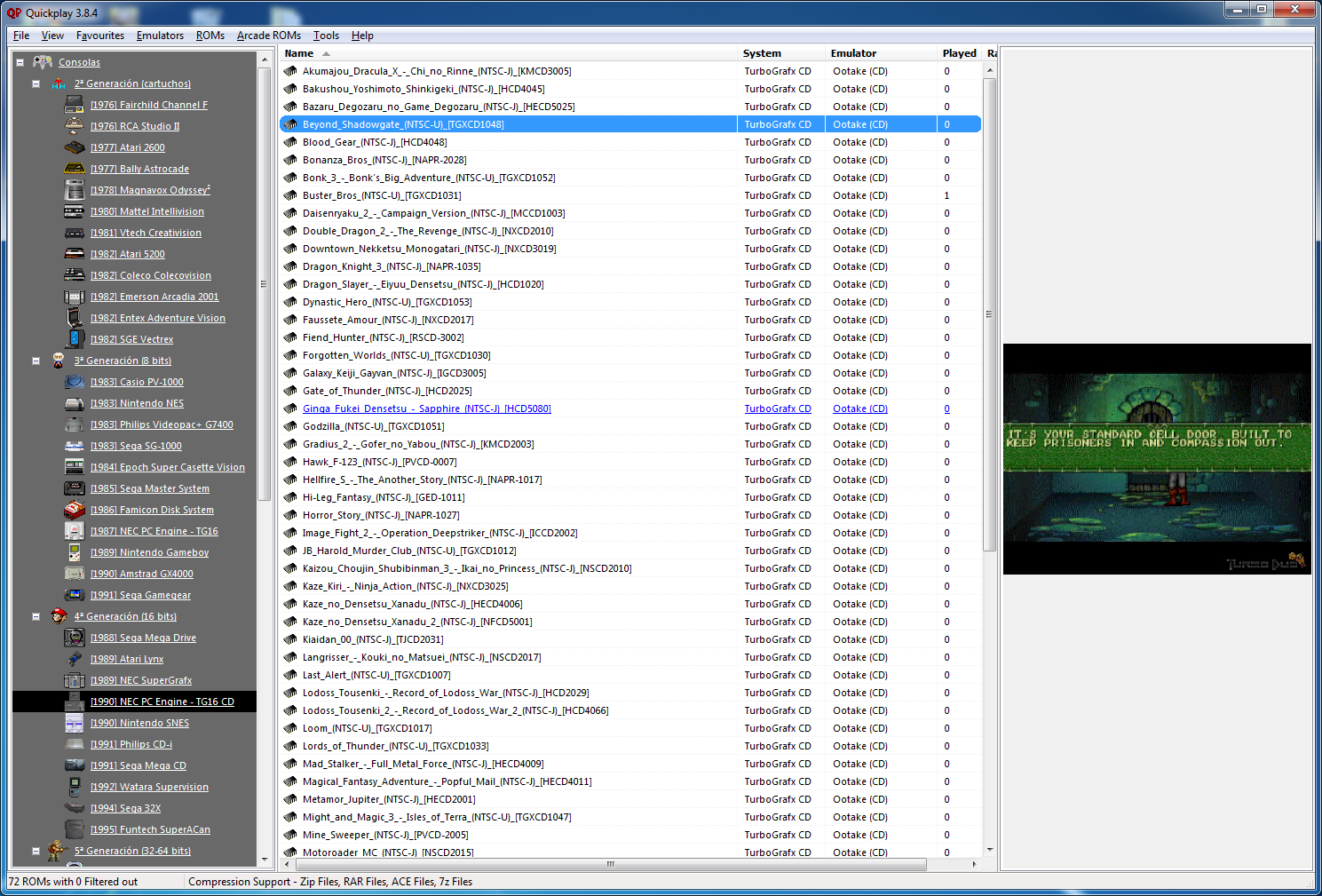
Quickplay est un grand frontend multi-système incluant des fonctions avancées pour Mame, Virtual Tree, Emu-Finder, un système IPS, Mirroring de répertoire, support Zip pour les émulateurs ne le supportant pas et beaucoup d’autres choses.


– Ensure multiloader compatibility with Daemon Tools Lite 10.10
– Bugfix: fix mametool bug with ini kv files
– Bugfix: fix bug where mame version would revert on success
– Bugfix: get the logic right for users rescanning a new mame version
– Bugfix: recheck mame extras dir when mame scan triggered
– Bugfix: mametool uses its own mame.json as a gatekeeper check, not the users mame xml
– Add pcsx-pgxp to efinds


Télécharger QuickPlay v4.7.6 (112 Mo)

Site Officiel

En savoir plus…

emuControlCenter est un excellent gestionnaire multi-émulateurs de jeu, qui supporte plus de 190 plates-formes. ECC supporte les images et aperçus dans le «Resultview» ou en plein écran.


EmuControlCenter 1
En outre il gère la prise en charge de ZIP, RAR, 7z ainsi que les Import & Export des images directement à partir de No-Intro / EmuMovies ; il permet de jouer des fichiers vidéo MP4/FLV avec VLC media player et supporte Daemon Tools Lite (en utilisation avec un script). Il est également possible d’importer les dats de CMPRO et RomCenter. Enfin plusieurs thèmes sont sélectionnables pour l’aspect visuel.


Les améliorations, toujours très nombreuses, sont les suivantes:
ECC Core
Added support for joystick emulator commandline parameters!
Updated Interton logo to the correct one!
Added CISO extension to all CD-based platforms.
 
ECC Startup
v3.0.0.5
Thirdparty tool World of Joystick filename changed.
v3.0.0.4
Added support for joystick emulator commandline parameters!
 
emuDownloadCenter
v1.0.0.3
Added GLOBAL install location wich is recommended, this saves a lot of diskspace using multi-emulators!
Now using multi-emulator configurations on platform level used in the EDC ini’s.
Changed location of emulator logo’s to the wiki resource, this is reducing bandwidth.
Fixed crash when clicking on website link.
Fixed waiting for up/down keypresses using cpu resources.
v1.0.0.2
Added Language label on emulator select
v1.0.0.1
Config bugfixes, now the ECC configs should be written properly!
 
ECC DAT file updater
v1.3.0.2
Updated « NeoGeo » datfile extract naming to match MAME v2.00+
 
Added platforms
Benesse Pocket Challenge V2
Chip-8
Konami Picno
Nintendo Satellaview
Nintendo Sufami Turbo
Nintendo Switch
Videoton TV-Computer
VTech V.Smile
 
Thirdparty updates
AutoIt 3.3.14.2 (2015-09-18) to v3.3.14.5 (2018-03-16)
HxD HEXeditor v1.7.7.0 to v2.1.0.0 (2018-09-27)
MPlayer Redxii-SVN-r37871-4.9.3 (i686) to Redxii-SVN-r38119-6.2.0 (i686) (2018-12-25)
Notepad++ v6.9.2 (2016-05-18) to v7.6.1
7zip v16.04 (2016-10-04) to v18.05 (2018-04-30)
World of Joystick (WOJ) v1.57 to v1.59 (2018-09-30)
 
Updated DAT files for:
CPS-1 : v0.180 to v0.205 (mame)
CPS-2 : v0.180 to v0.205 (mame)
CPS-3 : v0.180 to v0.205 (mame)
MAME : v0.180 to v0.205 (mame)
MODEL1 : v0.180 to v0.205 (mame)
MODEL2 : v0.180 to v0.205 (mame)
NAOMI : v0.180 to v0.205 (mame)
NEOGEO : v0.180 to v0.205 (mame)
PGM : v0.180 to v0.205 (mame)
S11 : v0.180 to v0.205 (mame)
S16 : v0.180 to v0.205 (mame)
S18 : v0.180 to v0.205 (mame)
S22 : v0.180 to v0.205 (mame)
ZINC : v0.180 to v0.205 (mame)


Télécharger emuControlCenter v1.23 (122 Mo)

Site Officiel d’EmuControlCenter

Site Officiel d’EmuDownloadCenter

En savoir plus…

Un émulateur d’Orion/Z (Orion128, Z80-CARD-II et ORION-Pro) créé par Sergey A.


Changements:
– Added: ROM2 emulation for Orion-PRO, IDE-RTC card emulation (512VI1, IDE) and AY-8910 on the ports of Orion-PRO
 
Merci Breaker pour l’info et le build.
 

Télécharger Orion/Z v1.09 (7.0 Mo)

Site Officiel

En savoir plus…


https://getourbonus.com/fr/accueil

https://www.romspedia.com/